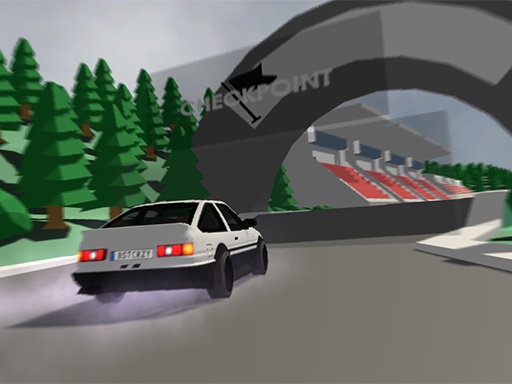
About Low poly car racing
Low poly car racing is a 3D blocky driving game where you can compete solo or challenge a friend on the same computer using split-screen action. Personalize your ride with custom colors, test your handling across three distinct game modes, and design custom circuits with three dedicated save slots while earning points to unlock new cars.
Built with a distinct block and pixel aesthetic, Low poly car racing brings arcade motorsport straight to your browser via WebGL. The title gives drivers the flexibility to enjoy solo time trials or jump right into competitive head-to-head races on a single screen with two-player local controls.
Beyond standard competition across three built-in game modes, the game features an integrated track builder. Players can construct their own racing layouts, save up to three custom creations, earn points through successful runs, and invest those rewards into expanding their vehicle collection.
Your goal
Your primary objective is to outmaneuver rivals or your local split-screen opponent across various tracks to reach the finish line first. By finishing races and demonstrating sharp driving skills across the available game modes, you accumulate reward points to buy faster and better vehicles from the garage.
How to play Low poly car racing
1. Select your preferred vehicle and adjust its paint color before starting your session.
2. Choose between single-player or two-player split-screen mode, then pick from the three available game modes.
3. Player 1 steers using the WASD keys, while Player 2 controls their car using the keyboard Arrow keys.
4. Navigate corners smoothly and race along straightaways to beat your competitor or set strong lap times.
5. Earn points from completed runs to purchase new cars, or visit the editor to create and save custom tracks.
Controls and device support
WASD: Drive Player 1 car
Arrow Keys: Drive Player 2 car
- Controls: WASD + arrow keys
- Device support: Browser
- Game frame: 800 x 600
Rules to keep in mind
- Two-player split-screen competition requires both racers to share the same keyboard using their designated key mappings.
- Custom track layouts can be designed and stored directly into one of the three available save slots.
- Earned points serve as the currency required to unlock additional cars within the garage.
What makes the challenge interesting
Precision cornering and steady speed management are key to mastering the blocky circuits in Low poly car racing. Because local two-player matches share one keyboard, maintaining focus without bumping hands is part of the fun. In the track builder, designing balanced straightaways and tight bends lets you test vehicle handling to its limits. Balancing speed with controlled turns ensures you stay on track, earn consistent points, and unlock higher-tier vehicles more efficiently.
Tips for Low poly car racing
- Pick distinct car colors before each split-screen match to easily track your vehicle during fast-paced turns.
- Ease off full acceleration when entering sharp bends to prevent sliding off course on tighter track layouts.
- Use the three track save slots to create diverse circuits, ranging from high-speed speedways to technical obstacle courses.
- Consistently finish races across all three game modes to accumulate the points needed for vehicle upgrades.
Stages and progression
Progression centers around earning points by participating in races across the three game modes. As your point balance increases, you can browse the garage to purchase and unlock brand-new vehicles, while using the three track builder slots to expand your custom circuit library.
The skills behind the game
As part of the racing genre, Low poly car racing delivers immediate arcade thrills focused on responsive steering, track navigation, and head-to-head competition. It combines classic split-screen multiplayer traditions with creative sandbox track creation for lasting replayability in modern web browsers.
Who will enjoy this game
Players searching for an engaging low poly car racing game will appreciate this lightweight 3D title. It functions smoothly as an online browser game offering instant split-screen racing, vehicle customization, and creative track-building features without demanding complex downloads or setups.
Games with a similar feel
Asphalt: Like Asphalt, this title focuses on high-energy arcade car racing, but Low poly car racing features stylized blocky visuals, local split-screen multiplayer on one keyboard, and a custom track creation mode.
Need for Speed: Sharing the core driving and vehicle acquisition themes of Need for Speed, this game sets itself apart with lightweight browser accessibility, minimalist 3D aesthetics, and a three-slot custom course builder.
Frequently asked questions
Can two people play Low poly car racing on the same computer? Yes, the game features local split-screen multiplayer where Player 1 drives using WASD and Player 2 steers using the Arrow keys on the same keyboard.
How many custom tracks can you build and save? The built-in track editor allows players to construct custom courses and save them across three dedicated save slots for solo or two-player play.
How do you unlock new cars in the game? You earn points by competing in the game modes, which can then be spent in the garage to purchase and unlock new vehicles.
Something not right?
Tell us if the game does not load, the information is wrong or the content needs review.
Report a problem ›