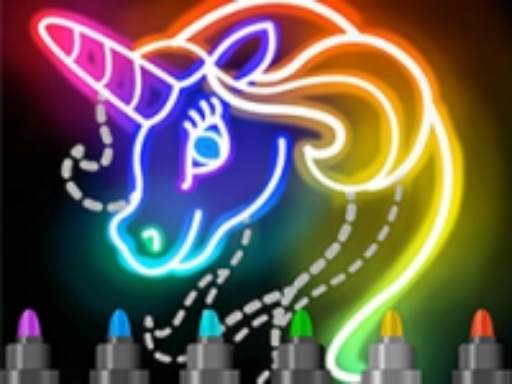
About Learn To Draw Glow Cartoon
Learn To Draw Glow Cartoon is a casual creative browser game that combines drawing outlines and coloring varied animated templates. Featuring Character, Hero, and Animal modes, players trace shapes and apply bright tones to complete lively stylized figures. Powered by simple tap and click controls, it provides an inviting art space tailored for kids and casual doodle enthusiasts seeking a relaxed digital canvas.
Built with three-dimensional game art animation, Learn To Draw Glow Cartoon welcomes players into a cheerful digital studio centered on glowing cartoon illustrations. The activity invites you to work through distinct subject categories, including Character, Hero, and Animal modes. Rather than dealing with high-stress timers or failure penalties, the session encourages you to focus on the immediate tactile pleasure of outlining figures and filling in their colors.
The primary loop revolves around choosing an available pattern, following guided lines to form recognisable cartoon shapes, and coloring the resulting art with vibrant glowing tones. The experience is designed to be approachable and straightforward, making it accessible on both desktop browsers and touchscreen mobile devices via straightforward tap or click interactions.
Your goal
Your main objective is to complete each chosen illustration by tracing pattern outlines and coloring the artwork across Character, Hero, and Animal themes. Players strive to achieve smooth, steady strokes, neatly filling in the cartoon templates while exploring different visual subjects to build an entertaining portfolio of bright, finished figures.
How to play Learn To Draw Glow Cartoon
1. Select a starting theme from the available Character, Hero, or Animal categories on the main selection screen.
2. Examine the visible pattern outline displayed on the drawing canvas.
3. Click with your mouse or tap with your finger to begin drawing along the designated line paths.
4. Trace through each segment of the pattern carefully until the entire character structure is fully sketched.
5. Switch to coloring to apply bright hues across the completed cartoon outline.
6. Review your finished glowing cartoon piece before picking another illustration to sketch.
Controls and device support
The game uses simple tap or click inputs to guide tracing tools and apply color across the canvas.
- Controls: Mouse or touch
- Device support: Desktop + mobile
- Game frame: 504 x 800
What makes the challenge interesting
The appeal of Learn To Draw Glow Cartoon lies in steady line tracking and visual gratification rather than rapid reflexes. When tracing animated character curves, rushing across the canvas often results in wobbly or mismatched contours. Taking a measured approach lets you follow each pattern line cleanly, ensuring the character's facial features and clothing look balanced.
Coloring brings a calming visual contrast, letting players transform faint sketches into vivid, glowing cartoon figures. Because the game emphasizes creative entertainment over strict performance criteria, the primary satisfaction comes from practicing fine motor coordination, observing three-dimensional visual animations, and turning simple line prompts into finished hero and animal portraits.
Tips for Learn To Draw Glow Cartoon
- Maintain a steady stroke speed while tracing outlines. Moving too quickly can cause missed turns on tight curves, leading to uneven lines on your cartoon subject.
- Complete all line tracing before shifting focus to colors. Laying down clean foundational contours ensures the final coloring stage looks cohesive and well structured.
- Try switching between the Character, Hero, and Animal modes to practice different shapes, ranging from organic animal limbs to dramatic superhero poses.
- On touch devices, use a light, continuous touch rather than abrupt taps to keep tracing motions smooth and connected throughout complex segments.
Stages and progression
Progression in the game is centered around exploring its three core categories: Character mode, Hero mode, and Animal mode. Rather than locking players behind strict grade thresholds or time trials, the experience allows artists to explore varied templates at their own pace.
A practical practice plan involves beginning with simpler animal outlines to build confidence with digital tracing. Once comfortable with basic contours, players can advance to more complex character figures and stylized heroes, refining stroke precision and color application across every session.
Playing on different devices
Learn To Draw Glow Cartoon is configured with a vertical canvas resolution of 504 by 800 pixels. This portrait orientation makes it naturally suited for handheld smartphones and tablets, where finger taps and direct dragging provide an intuitive drawing feel.
Desktop players can use standard mouse clicks to trace lines and select palettes. While mouse control offers reliable pointing stability, touchscreens often deliver a more natural drawing posture for young artists practicing hand-eye coordination.
The skills behind the game
Although cataloged under the Girls category, Learn To Draw Glow Cartoon functions primarily as an all-ages creative drawing and coloring game. Creative titles in this space focus on relaxing, self-paced interaction where players engage with appealing cartoons and vibrant palettes without competitive friction.
By emphasizing popular motifs like heroes, animals, and friendly characters, the game shares common ground with digital coloring books and art sandbox titles. It serves as an accessible entry point for kids and beginners seeking casual art practice in a lightweight, web-based format.
Who will enjoy this game
Players searching for Learn To Draw Glow Cartoon or a casual coloring game online are typically looking for an easy, no-pressure creative outlet. These games are popular among parents seeking kid-friendly activities, as well as casual players who enjoy doodling during short breaks.
Rather than demanding mastery of complex art software, a browser coloring activity provides instant access to structured line templates. Users can practice following visual paths, test color combinations, and enjoy relaxing creative sessions directly within their browser without downloading large apps.
Games with a similar feel
Happy Color: Both Learn To Draw Glow Cartoon and Happy Color provide relaxing digital art experiences centered on filling imagery with vivid colors. However, Happy Color relies on a structured color-by-number format where users tap pre-partitioned numeric zones. Learn To Draw Glow Cartoon pairs coloring with active pattern tracing across Character, Hero, and Animal modes, offering a hands-on sketching element suited for players who prefer drawing their own outlines.
Frequently asked questions
What modes are available in Learn To Draw Glow Cartoon? The game features three main thematic categories: Character mode, Hero mode, and Animal mode, allowing players to sketch and color a variety of stylized subjects.
How do you control the drawing tools? You interact with the canvas using simple tap or click inputs. On a desktop computer, hold and drag the mouse button; on a mobile device, touch and slide your finger along the lines.
Is this coloring game suitable for young children? Yes, the guided tracing mechanics, bright cartoon animation, and absence of timers or penalties make it an accessible, relaxing activity for kids practicing motor coordination.
Something not right?
Tell us if the game does not load, the information is wrong or the content needs review.
Report a problem ›