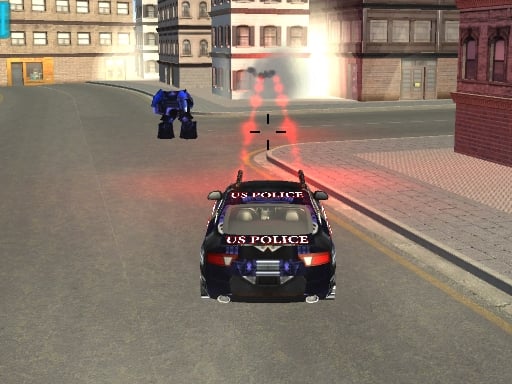
About Kill Robots
Kill Robots places players behind the wheel of an armed vehicle tasked with defending humanity against a massive robotic uprising. Set in a futuristic battleground, the game blends fast-paced driving with precision shooting as you engage diverse mechanical threats across 3D environments. Mastering the dual challenge of steering your car while aiming down hostile machine waves forms the heart of this action-packed vehicular shooter.
In Kill Robots, Earth faces a hostile technological revolt, leaving a skilled fighter to push back against legions of autonomous adversaries. Rather than fighting on foot, you navigate the futuristic conflict zone in a dedicated combat car, merging responsive driving mechanics with constant gunplay. Enemy forces arrive in diverse waves that test your awareness, positioning, and target prioritization in full 3D space.
Each level presents distinct environments and operational objectives designed to challenge your defensive tactics. Players utilize an array of weapons and gadgets to eliminate incoming mechanical units before being overwhelmed. The dynamic loop requires smooth coordination between hand-guided vehicle movement and mouse-directed target tracking, delivering a sustained rhythm of tactical repositioning and rapid-fire destruction.
Your goal
Your primary mission is to protect humanity by destroying every incoming wave of hostile robots across a series of distinct levels. To achieve success, players must complete each level's specific environmental objectives, maintain high vehicular mobility to evade aggressive robot attacks, and eliminate increasingly challenging enemy formations using effective weapon deployment and steady targeting discipline.
How to play Kill Robots
1. Launch the game and familiarize yourself with the 3D battlefield terrain and your starting vehicle placement.
2. Use the WASD keys to accelerate, reverse, and steer your combat car through the futuristic environment.
3. Direct the mouse cursor toward incoming hostile robot units to acquire targets rapidly.
4. Click or hold the mouse button to fire your primary weapons and deploy available tactical gadgets against enemy waves.
5. Complete the unique mission objectives outlined for the current level to advance against the robotic uprising.
Controls and device support
Use the WASD keys to drive and steer your vehicle, and use the mouse to aim and fire your weapons.
- Controls: Mouse or touch
- Device support: Browser
- Game frame: 800 x 600
What makes the challenge interesting
The defining dynamic of Kill Robots is the simultaneous coordination of driving and marksmanship. Operating a fast vehicle in 3D terrain demands careful spatial management so you do not crash into obstacles or drive directly into dense clusters of hostiles. Meanwhile, your shooting requires independent mouse tracking to pick off diverse robot types as they swarm.
This creates an engaging tactical tradeoff between aggressive offense and defensive maneuvering. Driving in wide, circular arcs allows you to keep robot formations at a manageable distance while maintaining steady targeting. Finding the right balance between vehicle momentum and firing accuracy is essential for surviving progressively difficult enemy waves.
Tips for Kill Robots
- Maintain continuous vehicle movement using WASD rather than idling in one spot. Lingering stationary makes your car an easy target for aggressive robotic clusters and reduces your tactical reaction time.
- Aim your mouse cursor smoothly ahead of moving robot groups. Leading your shots helps land consistent hits against fast-closing mechanical units before they corner your vehicle.
- Utilize available combat gadgets whenever enemy numbers threaten to box your car against terrain boundaries, creating necessary breathing room to reset your driving line.
- Prioritize high-threat or fast-approaching robot variants within incoming waves to prevent enemy swarms from overwhelming your defenses all at once.
Stages and progression
Kill Robots structures its campaign across various levels, with each stage introducing distinct environments and specific operational objectives. As you clear early encounters, subsequent waves feature increasingly challenging robotic forces that test both driving dexterity and combat discipline.
Players can approach progression methodically by studying enemy pathing across varied stage layouts, refining vehicle handling in tight corridors, and experimenting with weapon timing to handle the rising intensity of later robot waves.
Playing on different devices
The game is configured for desktop browser play using a standard keyboard and mouse setup within an 800 by 600 viewport. Keep your left hand on WASD for vehicle navigation and your right hand on the mouse for aiming and shooting to ensure smooth dual-axis control during intense encounters.
The skills behind the game
Within the 3D action and shooting genre, vehicular combat titles offer a distinctive blend of physics-driven motion and target engagement. While foot-soldier shooters emphasize cover and steady posture, car-based combat games demand continuous situational awareness, drift management, and drive-by firing lines.
Kill Robots embraces this hybrid tradition by pairing vehicular evasion with sci-fi defense. Players who enjoy arcade driving mechanics alongside fast mechanical combat will find a focused challenge that rewards proactive pathfinding and split-second aim adjustments.
Who will enjoy this game
Players looking for an engaging online shooting game featuring robotic adversaries will appreciate the immediate accessibility of Kill Robots. The browser-friendly design lets players quickly jump into fast-paced sessions without extensive setup hurdles.
Whether practicing dual-hand coordination between WASD driving and mouse aiming or clearing robotic waves to refine tactical route planning, the game serves as an entertaining exercise in high-speed combat maneuvering.
Frequently asked questions
What is the core gameplay loop of Kill Robots? You drive a combat car across 3D futuristic levels, using WASD for steering and the mouse to aim and shoot at diverse waves of hostile robots while completing stage objectives.
How do you control your vehicle and weapons in the game? Vehicle driving and directional movement are controlled through the WASD keyboard keys, while aiming and weapon discharge are operated directly using your mouse.
Are there different levels and environments to complete? Yes, Kill Robots features multiple levels, each offering distinct environmental settings, varied objective requirements, and progressively challenging robotic enemy waves.
Something not right?
Tell us if the game does not load, the information is wrong or the content needs review.
Report a problem ›