Official listing
Game description
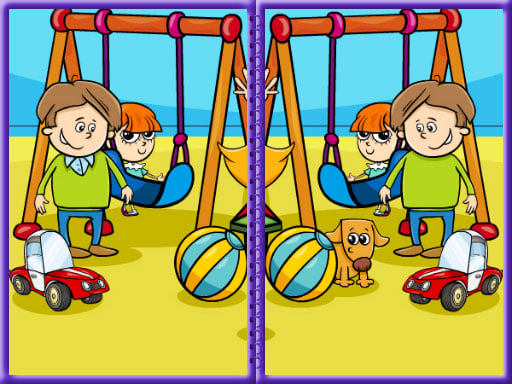
Look the both pictures and spot any 5 difference between both. There are 6 exciting levels. Useful for entertaining you or educating your lovely kids.
Puzzles game
Kids Photo Differences is an engaging visual puzzle game designed to entertain and educate players of all ages. By carefully comparing two side-by-side pictures, your task is to spot five subtle distinctions in each scene. With six exciting levels to explore, this title offers an accessible, family-friendly observation challenge using simple mouse or touchpad controls.
Choose Play now to load the game.
Official listing
Look the both pictures and spot any 5 difference between both. There are 6 exciting levels. Useful for entertaining you or educating your lovely kids.
From the game listing
Use mouse or touch pad to play this game
Open this card to load the gameplay video.
Kids Photo Differences is an engaging visual puzzle game designed to entertain and educate players of all ages. By carefully comparing two side-by-side pictures, your task is to spot five subtle distinctions in each scene. With six exciting levels to explore, this title offers an accessible, family-friendly observation challenge using simple mouse or touchpad controls.
Kids Photo Differences brings classic picture comparison gameplay directly to your browser. Each level presents two nearly identical images placed next to one another, challenging you to scan every section and locate five hidden discrepancies. Whether played by children practicing observation skills or adults seeking a calm brain teaser, the game delivers focused educational entertainment.
The game spans six distinct levels, each offering a fresh set of images to examine. Because interaction relies entirely on straightforward mouse or touchpad input, players can effortlessly click on identified variations as soon as they are spotted. This lightweight HTML5 puzzle provides a clean arcade-style format suitable for casual learning sessions or quick visual warm-ups.
The primary objective in Kids Photo Differences is to locate and select all five differences between the paired pictures on screen. Players must successfully identify every discrepancy to clear the active stage and progress through all six available levels. Completing each picture set proves your sharp visual attention and completes the full educational puzzle run.
1. Look at the two side-by-side pictures displayed on the screen.
2. Scan the images systematically to identify any details that do not match.
3. Use your mouse or touchpad to click directly on each detected difference.
4. Locate all 5 differences to complete the current picture challenge.
5. Advance through all 6 exciting levels to finish the entire puzzle set.
Mouse / Touchpad: Click or tap to select differences between the images
Kids Photo Differences centers on visual scanning, patience, and meticulous detail comparison. Because discrepancies can appear anywhere within the frame—such as slight color shifts, altered shapes, or missing objects—players benefit from dividing the image into manageable quadrants. The title emphasizes relaxing mental focus rather than rapid reflexes, making it an excellent educational tool for younger audiences developing spatial awareness and pattern recognition. Taking time to inspect background elements alongside prominent foreground subjects ensures no hidden variation is overlooked.
The game is structured across 6 exciting levels, each presenting a new pair of pictures to analyze. Clearing all five differences in a scene allows players to advance sequentially through the full series of challenges.
As part of the browser puzzle genre, spot-the-difference games provide accessible visual challenges that encourage careful observation. These titles test cognitive focus and detail recognition in a relaxed format suitable for all age groups. Kids Photo Differences represents this traditional puzzle style, offering straightforward picture comparisons that blend casual arcade accessibility with educational value.
Players looking for a fun kids photo differences game or an approachable puzzle game online can enjoy this straightforward visual exercise. Kids photo differences puzzles offer a structured way to practice visual perception, making them an appealing option for family-friendly casual gaming directly in a web browser without complex setup.
How many differences are in each level of Kids Photo Differences? Each stage requires you to find exactly 5 differences between the two displayed pictures before you can complete the challenge.
How many levels does Kids Photo Differences feature? The game includes 6 exciting levels in total, providing distinct picture sets designed to entertain and educate players.
What controls are used to play Kids Photo Differences? Players can interact with the game using a standard mouse or touchpad to click on differences between the images.
Tell us if the game does not load, the information is wrong or the content needs review.
Report a problemExplore popular games by category, shared tags and site-wide activity.