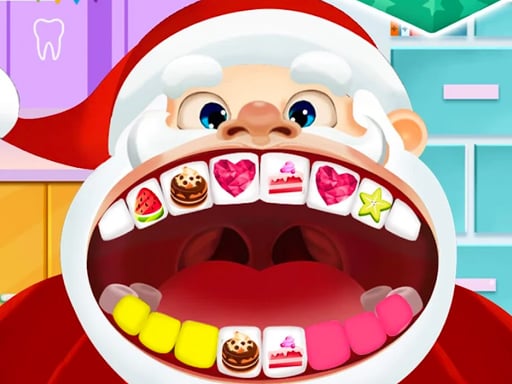
About Kids Dentist Games
Kids Dentist Games places you in the role of a capable dentist treating an eclectic lineup of patients who need urgent dental attention. From playful cats and noble princesses to hardworking police officers and friendly grandmothers, each patient arrives at your office seeking relief from oral issues. By applying direct mouse clicks or touchscreen taps, you work through varied dental procedures to restore smiles and keep your clinic running smoothly.
The game presents a colorful clinic environment where players step directly into professional dental care. Instead of a single recurring character, the waiting room features four distinct individuals: an adorable cat, an elegant princess, a dedicated police officer, and a kind old grandmother. Each patient brings a unique visual theme and dental condition into the exam chair, making every visit a fresh task for the player.
Gameplay centers on choosing a visitor who needs urgent attention and systematically working on their teeth. Interactions are built around intuitive single-point controls, letting players handle dental implements, clear away buildup, and resolve oral discomfort through direct clicking on desktop or tapping on mobile devices. The visual feedback keeps the routine friendly and accessible, focusing on restorative actions rather than stressful timers.
Your goal
Your primary goal in Kids Dentist Games is to examine your chosen patient, identify their oral distress, and complete every required cleaning or treatment step to fix their teeth. Success involves selecting the right tool for each visible issue, methodically cleaning or repairing affected areas, and ensuring each visitor leaves your clinic with a healthy, painless smile. You can cycle through all available patients to provide complete clinic care.
How to play Kids Dentist Games
1. Survey the patient waiting room to review who requires dental assistance, including the cat, princess, policeman, or granny.
2. Select the character you want to treat first to bring them directly into the dental exam chair.
3. Inspect the mouth to spot noticeable problems such as cavities, stains, food particles, or damaged teeth.
4. Click or tap your active dental tools to perform the necessary cleaning, drilling, or polishing actions on affected teeth.
5. Complete all visual treatment steps until the patient's teeth are fully cleaned and restored before selecting your next visitor.
Controls and device support
On PC, use mouse clicks to select patients and apply dental tools. On mobile devices, use finger taps to interact with instruments and perform dental treatments.
- Controls: Mouse or touch
- Device support: Desktop + mobile
- Game frame: 504 x 800
What makes the challenge interesting
Kids Dentist Games emphasizes casual sequencing, observation, and gentle roleplay over high-pressure twitch reflexes. Players must inspect the patient's mouth closely to determine which treatment tool matches each visible oral flaw. The satisfaction comes from transforming neglected, discolored teeth into a polished, radiant set across an assortment of varied character models.
Because the experience offers diverse patients—spanning human professions, royalty, and animal companions—it maintains engagement through narrative variety. Players can take their time testing each utensil's effect, making it an inviting option for younger audiences or casual players interested in low-stress medical simulation loops.
Tips for Kids Dentist Games
- Scan the entire mouth before applying tools so you understand which teeth require deep cleaning versus surface polishing, avoiding missed problem spots.
- Treat one tooth at a time rather than skipping randomly across the jaw, which ensures you resolve every cavity thoroughly without accidental omissions.
- Cycle through all four distinct characters during your session to experience the full range of dental problems and visual designs available in the clinic.
- Maintain steady mouse clicks or deliberate screen taps, avoiding rapid spam clicking that might cause you to misalign an instrument against delicate areas.
Playing on different devices
Kids Dentist Games runs at a vertical resolution of 504 by 800 pixels, making it well-suited for portrait orientations on mobile smartphones and tablets. On handheld devices, simple finger taps provide direct, tactile control over instruments, feeling natural for younger players handling small on-screen objects.
On desktop browsers, the portrait frame displays centered on widescreen monitors. Players control the clinic using precise mouse clicks, which offers pinpoint accuracy when targeting tiny tooth surfaces or specific dental equipment on the examination tray.
The skills behind the game
Within family-friendly casual simulations and doctor-themed web titles, dental care experiences offer an approachable look at health routines. By turning medical appointments into playful, interactive puzzles, these titles demystify dental visits for young audiences while highlighting the importance of regular hygiene.
Featuring both animal and human patients, Kids Dentist Games incorporates gentle humor and lighthearted character art into a familiar clinical format. The simplified point-and-click actions allow players of all ages to practice problem-solving in a warm, welcoming setting without intimidating medical terminology.
Who will enjoy this game
Players looking for kids dentist games frequently seek intuitive browser titles that let them explore medical tools in a calm, pressure-free environment. These titles provide accessible virtual sandboxes where children can wash, polish, and mend teeth while discovering basic dental tools through direct cause-and-effect interaction.
Whether enjoyed for roleplaying fun or casual daytime relaxation, a kids dentist games game delivers short, satisfying sessions. Because each patient presents a self-contained appointment, players can easily complete one quick visit during a study break or spend time treating the entire waiting room in one sitting.
Frequently asked questions
Which patients can you treat in Kids Dentist Games? You can provide dental care to four distinct characters: a cute cat, a princess, a police officer, and an elderly grandmother. You can choose whoever you think needs treatment first.
How do you control instruments in the game? Interactions rely entirely on simple clicks or taps. On a PC desktop, use your mouse to click on patients and tools. On a smartphone or tablet, tap the screen with your finger.
Is there a strict time limit to finish patient treatments? The game does not impose strict countdown timers, allowing you to examine teeth and complete each dental procedure comfortably at your own preferred speed.
Something not right?
Tell us if the game does not load, the information is wrong or the content needs review.
Report a problem ›