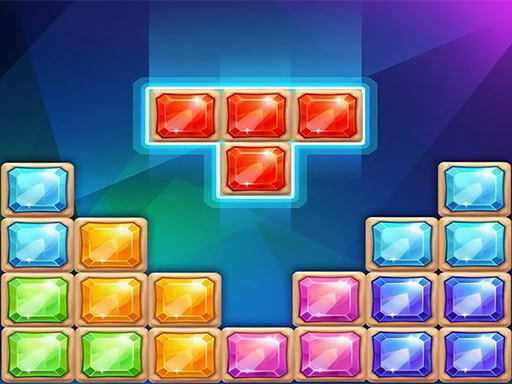
About Jewel Classic Block Puzzle Tetrix
Jewel Classic Block Puzzle Tetrix is a spatial grid game where players place gem-style pieces onto the board to build and clear full lines. With no active countdown clock, your main objective is to arrange incoming block shapes methodically, clear complete rows both horizontally and vertically, and maximize your score by eliminating multiple lines in simultaneous clears.
Jewel Classic Block Puzzle Tetrix delivers an accessible, turn-by-turn spatial challenge centered around deliberate board management. Players interact with jewel-themed blocks, positioning each available shape onto the playfield to fill empty spaces. Whenever a complete row or column across the screen is filled without gaps, that entire line is cleared from the board, opening up crucial space for subsequent placements.
Because the game features no time limit, the overall experience emphasizes patient tactical thinking over rapid reflexes. You can take as much time as needed on every turn to analyze the open spaces, evaluate where each piece fits best, and work toward clearing multiple rows at once to secure higher scoring rewards.
Your goal
The primary goal is to achieve the highest possible score by continuously placing blocks onto the screen and clearing complete horizontal and vertical rows. To push your score higher, aim to align pieces so that a single placement triggers multiple row deletions at the same time, clearing large areas of the board in one move.
How to play Jewel Classic Block Puzzle Tetrix
1. Survey the current board layout to identify empty spaces and assess which rows or columns already have blocks positioned in them.
2. Select an available jewel block shape using your mouse cursor or touchscreen tap.
3. Position the piece into an open section of the board where it fits cleanly without overlapping existing blocks.
4. Fill entire horizontal or vertical lines completely across the play area to trigger line clears and remove those blocks.
5. Plan your piece placements ahead of time to complete multiple rows simultaneously, unlocking higher score bonuses.
Controls and device support
Interact with the game by using your mouse cursor on desktop or tapping directly on the screen on mobile devices to select and place blocks.
- Controls: Mouse or touch
- Device support: Desktop + mobile
- Game frame: 800 x 600
Rules to keep in mind
- Placing blocks to complete entire horizontal rows or vertical columns clears those lines from the screen.
- Deleting more rows at once with a single placement yields higher point values.
- There is no running countdown timer or time limit forcing rapid moves.
What makes the challenge interesting
The core gameplay loop of Jewel Classic Block Puzzle Tetrix revolves around spatial organization, risk management, and pattern foresight. Unlike falling-block games that demand instant reaction speeds under gravity, this title gives players full control over when each move occurs. The central strategic tradeoff lies between playing conservatively by clearing single lines immediately versus building up complex structures to execute multi-line clears for greater point gains.
Maintaining an open, flexible grid layout is critical. If you fill too many isolated pockets across the board without completing lines, finding room for awkward or larger block shapes becomes increasingly difficult. Developing a calm placement rhythm and keeping open channels across both axes allows you to adapt smoothly to any incoming pieces.
Tips for Jewel Classic Block Puzzle Tetrix
- Keep the center of the board relatively clear. Spreading pieces too thinly along the middle restricts your placement options for wider block shapes.
- Build toward simultaneous horizontal and vertical clears. Triggering multiple line deletions in one turn awards significantly higher scores than clearing single rows.
- Avoid creating single-tile gaps buried under larger blocks. Isolated empty pockets are difficult to fill later and disrupt clean line completions.
- Take full advantage of the absence of a time limit. Pausing to examine how every available piece fits the grid prevents careless placement mistakes.
Playing on different devices
Jewel Classic Block Puzzle Tetrix is designed to run in standard browser windows at an 800 x 600 display resolution. On desktop computers, mouse control provides precise cursor targeting when picking and dropping blocks into specific grid cells. On touch-enabled devices and mobile screens, direct finger taps allow for quick, intuitive piece placement without requiring external hardware.
The skills behind the game
Although classified in some directories under broader arcade and sports listings, Jewel Classic Block Puzzle Tetrix functions primarily as a logic-based grid puzzle game. The genre emphasizes pattern recognition, geometry, and spatial optimization. Players who enjoy brain teasers, tactile block fitting, and meditative tile-matching challenges will appreciate its clean presentation and thoughtful placement mechanics.
Who will enjoy this game
Players looking for an engaging jewel classic block puzzle tetrix game will find a focused experience centered entirely around deliberate grid clearing. Because the game eliminates splash screens and countdown timers, it serves as a practical, lightweight browser game for casual puzzle practice. You can boot it up for a short mental break or spend longer sessions refining your multi-line clearing strategies.
Frequently asked questions
Is there a time limit during gameplay? No, Jewel Classic Block Puzzle Tetrix has no countdown timer or time limit. You can deliberate over each block placement at your own pace.
How do you score points in the game? You earn points by placing jewel blocks to completely fill horizontal and vertical rows. Deleting multiple complete rows at the same time awards higher point bonuses.
Can you clear lines both vertically and horizontally? Yes, completing an entire row across the screen horizontally or a full column vertically will clear those blocks and free up space on the grid.
What controls are used to place blocks? The game supports mouse clicks and dragging on desktop browsers as well as direct screen taps on mobile and tablet devices.
Something not right?
Tell us if the game does not load, the information is wrong or the content needs review.
Report a problem ›