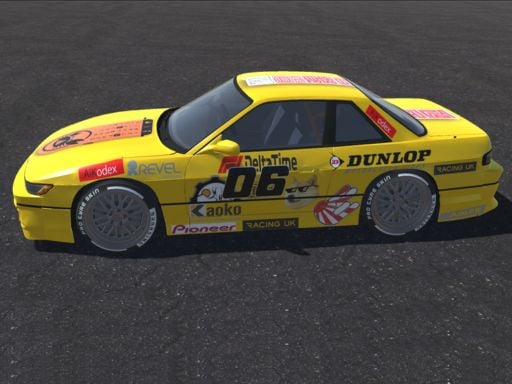
About Japan Drift Racing Car Simulator
Japan Drift Racing Car Simulator drops players behind the wheel in an expansive open world city designed for high-speed exploration and drift maneuvers. Featuring six distinct Japanese drift cars, the game invites drivers to navigate busy streets, evade moving traffic, and engage specialized drifting modes while utilizing boost and custom lighting controls across detailed 3D urban environments.
Set against the backdrop of a sprawling metropolis, Japan Drift Racing Car Simulator blends street exploration with responsive vehicle handling. Drivers can freely tour urban thoroughfares, test vehicle cornering across tight intersections, and maneuver around civilian traffic scattered across the road network.
The experience centers on selecting from a lineup of six Japanese drift machines to tackle wide boulevards and technical turns. High-fidelity 3D vehicle models and dedicated audio effects accompany the drive, while onboard vehicle functions such as headlights, turn indicators, boost acceleration, and dynamic camera angles give drivers extensive control over their urban cruising runs.
Your goal
The primary objective is to master vehicle handling across city streets by initiating controlled drifts and weaving smoothly through traffic without unwanted collisions. Players aim to refine their cornering angles, test the distinct characteristics of all six Japanese drift cars, and build consistent lines across long road stretches while balancing sudden bursts of speed with deliberate handbrake slides.
How to play Japan Drift Racing Car Simulator
1. Select one of the six available Japanese drift cars to enter the open world city map.
2. Accelerate and steer through the streets using WASD or the Arrow keys to gain forward momentum.
3. Switch camera perspectives with C to find the optimal viewpoint for urban navigation and sliding.
4. Initiate lateral slides into corners by tapping Space to engage the handbrake while turning.
5. Trigger the F key to activate boost on straight sections to regain speed after tight turns.
6. Use L for main lights and Q, E, or Z for direction lights to navigate varying traffic situations safely.
Controls and device support
Drive with WASD or Arrow keys, engage the handbrake with Space, activate boost using F, cycle camera angles with C, toggle headlamps with L, and trigger direction lights using Q, E, and Z.
- Controls: WASD + arrow keys
- Device support: Browser
- Game frame: 960 x 600
What makes the challenge interesting
The core gameplay rhythm relies on the tension between forward velocity and sudden directional weight transfer. Drifting in city streets requires drivers to anticipate intersections early, initiating lateral momentum with the handbrake before steadying the line with counter-steering inputs.
Traffic avoidance adds an active layer of spatial awareness to every run. Because urban lanes contain moving obstacles, players must constantly assess exit corridors during high-speed drifts. Using boost at the wrong time risks sliding directly into traffic, so smart throttle modulation and perspective management are key to clean driving.
Tips for Japan Drift Racing Car Simulator
- Tap the handbrake briefly rather than holding it down; a quick tap breaks rear traction smoothly without killing all your forward speed before corner entry.
- Save your boost for straightaways after straightening out from a drift; activating nitro mid-slide can cause sudden oversteer into surrounding traffic.
- Cycle through camera views using C to find an angle that reveals approaching cross-traffic well before you enter wide city intersections.
- Test all six vehicles to identify which car balance best matches your handling style, as different models offer varied responsiveness during drift initiation.
- Scan distant traffic patterns constantly while cruising, steering toward open outer lanes before initiating long, sustained power slides.
The skills behind the game
As a 3D driving entry in the racing genre, this title emphasizes open-ended vehicular control over scripted linear tracks. Rather than confining drivers to fenced circuits, the sandbox format encourages free navigation and practical car handling across urban asphalt.
Drifting games specifically prioritize lateral vehicle control, weight balance, and braking timing. By incorporating dedicated controls for boost, handbrake initiation, and signaling, the game offers an accessible simulation playground for players interested in Japanese car culture and urban driving practice.
Who will enjoy this game
Players looking for a dedicated drifting game often want open asphalt where they can practice vehicle balance without rigid time constraints. Japan Drift Racing Car Simulator caters to this interest by providing six Japanese cars ready for street sliding in an open city setting.
For casual drivers seeking a browser-accessible racing game online, the straightforward control layout allows immediate jump-in action. Drivers can practice smooth line transitions, experiment with boost timings, and enjoy casual city cruising without complex setup barriers.
Games with a similar feel
Asphalt: Like the Asphalt series, this game emphasizes fast-paced car driving and boost-fueled speed. However, while Asphalt focuses heavily on arcade circuit racing and competitive events, Japan Drift Racing Car Simulator centers on open-city exploration and continuous drift maneuvering around civilian traffic.
Need for Speed: Sharing the urban street driving and drift-focused handling themes seen in Need for Speed, this browser simulator lets players pilot Japanese performance cars through city lanes. It provides a relaxed, sandbox-style driving space rather than a structured narrative campaign.
Frequently asked questions
How many vehicles can I drive in Japan Drift Racing Car Simulator? The game includes six distinct Japanese drift cars that players can pilot across the city environment.
What keyboard key activates the speed boost? Press the F key on your keyboard to engage the boost function for an immediate surge in acceleration.
Can I change my driving view in the game? Yes, pressing the C key allows you to cycle through different camera perspectives while driving.
How do I trigger direction lights and headlights? You can toggle the main headlights with L, and operate the direction indicator lights using the Q, E, and Z keys.
Something not right?
Tell us if the game does not load, the information is wrong or the content needs review.
Report a problem ›