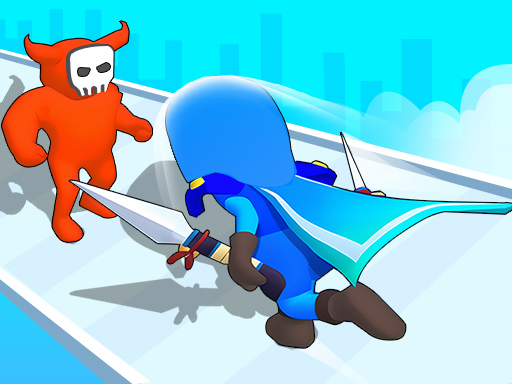
About Hit And Run: Solo Leveling
Hit And Run: Solo Leveling puts you in control of an adventurer maneuvering along active courses packed with hazards. Blending parkour movement with an arcade running format, each run challenges you to guide your character through courses filled with traps and obstacles while leveling up along the path.
Hit And Run: Solo Leveling is an arcade running game where you navigate an adventurer through structured levels filled with hazards. The title emphasizes forward momentum and reactive movement, asking you to guide your hero past an assortment of traps and obstacles scattered across the track.
Designed around parkour and adventure themes, the core loop centers on clean navigation and steady progression. As you travel through each course, your character works to level up while handling sudden route shifts, giving each attempt a lighthearted yet fast-paced feel suitable for short casual sessions in your browser.
Your goal
Your primary goal is to guide your adventurer through each obstacle course, evading hazards and traps to advance through the levels. Rather than pausing to plan complex routes, you aim to maintain steady progress, avoid route collisions, and complete the track so your character can level up continuously.
How to play Hit And Run: Solo Leveling
1. Start the game by clicking your mouse on desktop or tapping the display on a touchscreen device.
2. Observe the forward layout of the course to spot oncoming traps and standing obstacles early.
3. Use mouse clicks or touch taps to guide your adventurer along open lanes and away from danger.
4. Navigate smoothly around route hazards to keep your parkour run moving without unnecessary interruptions.
5. Reach the end of the course to continue leveling your character through subsequent level challenges.
Controls and device support
The game uses a direct interface: mouse click or tap to play. Click with your primary mouse button on desktop or tap your screen on mobile devices to direct your adventurer through the course.
- Controls: Mouse or touch
- Device support: Desktop + mobile
- Game frame: 750 x 1334
What makes the challenge interesting
The central appeal of Hit And Run: Solo Leveling lies in balancing rapid spatial awareness with simple, immediate inputs. Because obstacles appear along a continuous running track, success depends on reading the layout several steps ahead rather than reacting only when a hazard is right in front of your character.
A common tradeoff involves choosing between making early, cautious adjustments and holding a direct line. Reacting too late leaves little margin to dodge moving traps, while swerving erratically can steer you straight into adjacent obstacles. Developing a steady cadence of deliberate taps or clicks helps keep your movement predictable and clean.
Tips for Hit And Run: Solo Leveling
- Scan the far end of the lane rather than watching your hero's feet. Spotting incoming traps early gives you time to plan lateral shifts smoothly without panic dodging.
- Use gentle, measured inputs rather than rapid double-clicks. Frantic clicking often overcorrects your adventurer's position and pushes you into peripheral hazards.
- Commit to clear lanes promptly when approaching clusters of obstacles. Hesitating in the center of the track splits your focus and narrows your reaction window.
- Treat every run as timing practice. Recognizing the rhythm of static barriers versus active traps helps you time your clicks with greater consistency.
Stages and progression
The game structures its journey around navigating an adventurer through distinct levels loaded with traps and obstacles, allowing you to level up as you push forward. Rather than relying on complicated upgrade trees, the sense of growth comes from clearing sequential courses with greater confidence.
To build consistency across sessions, focus on maintaining clean runs on each stage. Reviewing where you made sudden directional mistakes allows you to approach subsequent courses with calmer positioning and sharper lane discipline.
Playing on different devices
Hit And Run: Solo Leveling is configured with a portrait resolution of 750 by 1334 pixels, making it naturally suited for vertical mobile displays and narrow browser windows. The simple click-or-tap input scheme ensures responsive play on both touchscreen phones and desktop setups using a standard computer mouse.
The skills behind the game
Arcade runners emphasize prompt reflexes, clean visual tracking, and continuous forward movement. In traditional arcade designs, obstacles are positioned to test hand-eye coordination over long strategic pauses, delivering quick rounds that encourage repeated attempts.
By incorporating parkour movement and obstacle navigation, this game leans into the running subgenre where route management is the core discipline. Players who enjoy obstacle courses will appreciate how straightforward controls allow immediate access to fast, dynamic track navigation.
Who will enjoy this game
Players looking for a casual running experience can explore Hit And Run: Solo Leveling for fast-paced obstacle navigation. Because it launches directly in modern web browsers, it serves as an accessible option for short gaming breaks that focus on reflexes and lane discipline.
Whether you are interested in lighthearted parkour courses or casual arcade running games online, the pick-up-and-play format provides instant action. The straightforward click-and-tap mechanics mean players of any experience level can start steering through traps without studying complex key configurations.
Frequently asked questions
What is the main objective in Hit And Run: Solo Leveling? Your goal is to steer an adventurer along obstacle-filled tracks, evading traps and barriers to complete levels and level up your character throughout the run.
What controls do I use to play the game? The game accepts simple inputs: click your mouse on desktop or tap the screen on mobile devices to control your adventurer's movement through the course.
Can I play Hit And Run: Solo Leveling on a smartphone? Yes. The vertical 750 x 1334 resolution is well suited for mobile screens, and the tap-to-play control scheme works directly in mobile web browsers without extra setup.
Something not right?
Tell us if the game does not load, the information is wrong or the content needs review.
Report a problem ›