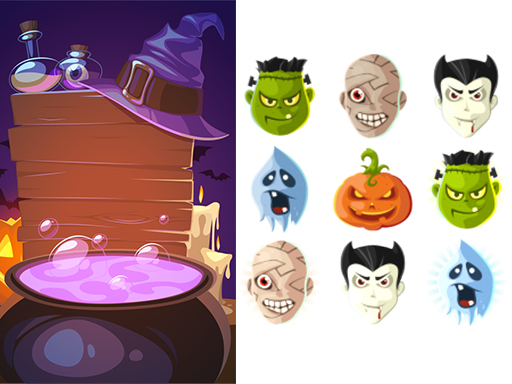
About Halloween Match3
Halloween Match3 brings casual 2D matching entertainment directly to your browser with festive holiday themes. Players use simple clicker and mouse drag inputs on desktop or touch controls on mobile devices to engage with the puzzle layout. Designed with kid-friendly ghost and holiday imagery, it provides straightforward matching gameplay that is accessible across supported platforms.
Halloween Match3 is a 2D holiday-themed puzzle and matching title presented in a standard 800 x 600 display resolution. The game combines classic match-3 mechanics with clicker accessibility, allowing players to interact by clicking, dragging with a mouse, or tapping screen buttons on mobile devices. Featuring festive holiday elements such as ghosts, it delivers lightweight casual sessions designed for kids and casual puzzle enthusiasts alike. Its responsive layout ensures smooth performance across different web browsers, focusing purely on direct piece manipulation and matching actions without requiring complex configuration or advanced control setups.
Your goal
The primary objective in Halloween Match3 is to locate matching holiday and ghost icons across the 2D game board and connect them using mouse dragging or screen tapping. Players focus on identifying adjacent identical pieces, clicking or touching the elements, and executing matches to continuously clear items and maintain an active board state during each casual play session.
How to play Halloween Match3
1. Launch the game in your browser to view the 2D holiday puzzle screen at 800 x 600 resolution.
2. Identify identical ghost or holiday items positioned across the matching board.
3. Use mouse drag or clicker input on desktop to select and connect matching icons.
4. Tap on-screen buttons directly if you are playing on a mobile touchscreen device.
5. Continue clearing matches steadily across the board to sustain your casual play session.
Controls and device support
Mouse drag and click: Interact with board pieces and UI buttons
Touch screen buttons: Tap on-screen controls to play
- Controls: Mouse or touch
- Device support: Desktop + mobile
- Game frame: 800 x 600
What makes the challenge interesting
Gameplay in Halloween Match3 centers around swift visual recognition and intuitive point-and-click or drag controls. Because the game utilizes a lightweight 2D presentation, players can easily scan the board for matching ghost and holiday icons. The loop emphasizes continuous clicking and dragging to trigger successful matches without cumbersome control schemes. On mobile devices, straightforward touch interactions make selecting buttons seamless. The overall pacing remains approachable for kids and casual players who enjoy accessible holiday puzzle mechanics without requiring complicated combat or high-pressure maneuvers.
Tips for Halloween Match3
- Scan the entire 2D board systematically before dragging your mouse to spot clusters of matching ghost or holiday icons quickly and efficiently.
- Maintain smooth and steady mouse dragging motions on desktop so that every selection registers cleanly without slipping off adjacent puzzle pieces.
- Apply precise, deliberate taps when interacting with on-screen buttons on mobile devices to avoid accidental inputs during fast-paced matching moments.
The skills behind the game
As a clicker and matching title, Halloween Match3 represents casual browser puzzle gaming where simplicity is paramount. Clicker and match-3 games typically focus on direct, repetitive player interactions like mouse dragging and screen tapping to yield satisfying visual responses. By incorporating holiday motifs and ghost themes, this entry offers an accessible entry point within the broader puzzle and matching catalog, tailored for rapid web-based play without complex setups.
Who will enjoy this game
Players searching for a casual match 3 puzzle game or clicker game online will find Halloween Match3 fitting those descriptions. The game merges straightforward clicker interactions with classic holiday-themed matching dynamics. Whether seeking seasonal entertainment involving ghosts or standard 2D drag-and-drop mechanics on web and mobile screens, this title aligns with essential browser puzzle gameplay expectations.
Games with a similar feel
Candy Crush Saga: Halloween Match3 shares the core tile-matching concept found in Candy Crush Saga, focusing on aligning themed pieces on a puzzle board. However, while Candy Crush features expansive progression maps and varied boosters, Halloween Match3 offers a lightweight, browser-based clicker and drag experience suited for quick casual sessions.
DOOM: While Halloween Match3 carries shooter tags in its listing, it contrasts sharply with the fast-paced first-person combat and hostile encounters of DOOM. Instead of navigating 3D arenas with firearms, Halloween Match3 is purely a 2D puzzle clicker centered on dragging and tapping seasonal items.
Frequently asked questions
How do you control Halloween Match3 on desktop and mobile? On a desktop computer, you interact with the game using clicker inputs and mouse dragging. On mobile phones and touchscreens, you simply touch the on-screen buttons to control gameplay.
What is the primary theme and visual style of Halloween Match3? Halloween Match3 features a 2D presentation centered around festive holiday and ghost themes designed for casual play, presented in a standard 800 by 600 window resolution.
Something not right?
Tell us if the game does not load, the information is wrong or the content needs review.
Report a problem ›