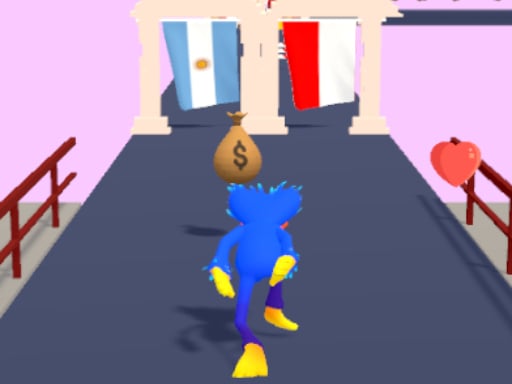
About Haggo Jaggo Runner
Haggo Jaggo Runner is a browser-based running challenge set across an open field divided into sequential stages. Players must steer their character through a series of checkpoints, each presenting two distinct doorways labeled A and B. Finding the open passage allows you to advance smoothly toward the final finish flag, while picking the wrong route forces you through detours and obstacle delays that slow down your run.
In Haggo Jaggo Runner, the arena is structured as an open field broken into multiple checkpoints. At every transition point along the course, you are faced with a straightforward binary decision: choose Door A or Door B. One entrance opens the way forward directly into the subsequent stage, while the alternate entrance sends your runner into a minor detour or temporary obstacle setup that stalls your forward momentum.
The entire layout leads toward a distinct final flag marking the end of the course. Because each stage demands a new doorway choice, the player experience balances steady movement with split-second pathfinding. Whether you guess the clear route on your first attempt or have to recover from a delaying detour, the core gameplay loop tests your ability to navigate checkpoints cleanly from start to finish.
Your goal
The primary goal is to complete the entire running course and reach the final flag at the end of the arena. To achieve this cleanly, you must pick the correct door at each checkpoint stage. Successfully identifying the advancing passage keeps your runner moving continuously, while avoiding incorrect doors prevents time-wasting detours and obstacle disruptions.
How to play Haggo Jaggo Runner
1. Start the run in the open arena and move forward toward the first set of checkpoint doors.
2. Approach the checkpoint and observe the two available routes labeled Door A and Door B.
3. Steer your character toward one of the two doors using mouse or touch input to enter the threshold.
4. If the selected door opens the direct route, continue running smoothly into the next stage.
5. If the chosen door leads to a detour or obstacle, navigate through the delay to return to the main track.
6. Repeat your door choices across all subsequent stages until you cross the finish line marked by the flag.
Controls and device support
Haggo Jaggo Runner supports mouse and touch inputs for steering and interaction across browser sessions.
- Controls: Mouse or touch
- Device support: Desktop + mobile
- Game frame: 400 x 800
Rules to keep in mind
- Each checkpoint on the course features exactly two entryways, labeled Door A and Door B.
- Only one door per checkpoint grants direct advancement to the following stage.
- Choosing the incorrect door leads to a detour or a minor obstacle that delays player progress.
- The course concludes when the player successfully reaches the final destination marked by a flag.
What makes the challenge interesting
The core dynamic of Haggo Jaggo Runner revolves around route commitment and quick recovery. As your character travels across the arena, every checkpoint demands an immediate directional call between Door A and Door B. Because only one entrance provides unhindered progress, players must manage the tension between aggressive forward running and reacting to unexpected obstacles when a detour occurs.
A key skill involves regaining control quickly after hitting an incorrect door. Rather than hesitating before each barrier, maintaining a steady navigation rhythm allows you to handle minor obstacle delays efficiently and refocus on aligning with the next checkpoint ahead.
Tips for Haggo Jaggo Runner
- Line up your runner early when approaching each checkpoint. Centering your movement toward your chosen door prevents accidental steering drift right at the threshold.
- Stay composed if you enter a detour. Overcorrecting your steering when encountering a minor obstacle often creates additional delays instead of clearing the path quickly.
- Scan ahead for the next stage immediately upon clearing a doorway. Anticipating the upcoming A and B selection gives you more time to choose your angle of approach.
- Maintain smooth, decisive input strokes on mouse or touchscreen to avoid erratic path adjustments when changing directions between checkpoint gates.
Stages and progression
The course layout is split into multiple stages spanning an open arena, culminating at the end flag. As you progress from one checkpoint to the next, consecutive door decisions test your consistency over the full length of the track.
For ongoing practice, focus on developing a steady routine between checkpoints. Attempting to clear each detour with minimal hesitation helps turn disjointed attempts into a fluid, confident run toward the final destination.
Playing on different devices
Designed with a vertical 400 by 800 display format, the game is well suited for both mobile touch displays and desktop browser windows. Mouse controls offer precise cursor steering on PC, while direct touch gestures provide responsive course corrections on mobile devices.
The skills behind the game
Within the casual adventure runner landscape, course navigation games emphasize route choice and obstacle avoidance across partitioned stages. Instead of intricate inventory systems or vast open worlds, these titles focus on direct movement challenges across structured arenas.
Haggo Jaggo Runner embodies this genre style by stripping checkpoint navigation down to quick binary choices, making it easy to pick up for quick casual sessions while challenging players to maintain their running speed.
Who will enjoy this game
Players searching for Haggo Jaggo Runner or an adventure game online often seek accessible, fast-paced obstacle courses that test reflexes without complicated control schemes. The game provides a clean checkpoint-based loop suitable for casual warm-ups or quick reaction practice.
Whether you are practicing path selection or aiming for a smooth run to the finish flag, the simple structure of Haggo Jaggo Runner game makes it an enjoyable pick for brief browser-based gaming breaks.
Frequently asked questions
What happens if I choose the wrong door in Haggo Jaggo Runner? Selecting the incorrect door routes your runner into a minor detour or obstacle, causing a short delay before you can continue toward the next stage.
How do I know when the course is finished? The end of the course is marked by a clear flag, signaling that you have successfully traversed all checkpoints in the arena.
Can I play Haggo Jaggo Runner on both mobile and desktop browsers? Yes, the game is configured with mouse and touch support, allowing responsive navigation on desktop monitors as well as mobile screens.
Something not right?
Tell us if the game does not load, the information is wrong or the content needs review.
Report a problem ›