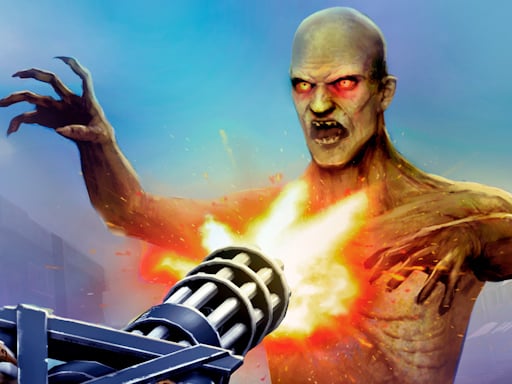
About Gun War Z 2
Gun War Z 2 is a browser-based defense shooter that places players on the front line of an apocalyptic outbreak where a deadly virus transforms populations into aggressive zombies. Taking control of heavy weaponry, your mission is to hold back the advancing undead and save human lives. With direct mouse targeting and rapid rocket support via the keyboard, each encounter demands alert focus to clear hostile crowds.
The world of Gun War Z 2 faces an existential crisis as an aggressive viral contagion sweeps through expanding territories, turning people into relentless zombies. Stationed at critical defensive points to save humanity, players must confront oncoming swarms before human survivors are overwhelmed. The primary gameplay loop consists of surveying the field, directing rapid fire at encroaching targets using the mouse, and deploying devastating auxiliary ordnance when enemies gather in overwhelming numbers.
To counter the growing threat, the game provides an expansive arsenal spanning standard rapid-fire miniguns, high-tech plasma cannons, and auxiliary armaments such as RPG7 rockets and grenades. Players can also utilize a slot machine feature between or during combat phases to test their luck. The overall experience blends fast hypercasual accessibility with intense defensive combat, asking players to balance steady direct fire against explosive ordnance to keep the infected at bay.
Your goal
Your objective in Gun War Z 2 is to eliminate all attacking zombies and safeguard vulnerable human populations from the virus. Succeeding in each defensive engagement requires prioritizing the closest hostile targets, activating auxiliary rocket strikes before lines are breached, and effectively employing your weapon options. Completing each defense depends on keeping people alive while preventing the horde from overrunning your position.
How to play Gun War Z 2
1. Load Gun War Z 2 in your web browser and orient yourself to the defensive combat arena.
2. Track incoming zombie groups across the screen using your mouse to align your crosshairs onto active threats.
3. Engage primary weapons such as miniguns or plasma cannons to eliminate approaching infected targets before they reach survivors.
4. Press the A key on your keyboard to launch RPG7 rocket strikes into dense zombie formations or against durable foes.
5. Deploy auxiliary grenades and test your luck with the in-game slot machine to sustain your defensive effort to save humanity.
Controls and device support
Gun War Z 2 features mouse control for general maneuvering and aiming, along with pressing the A key to fire auxiliary rockets.
- Controls: Mouse or touch
- Device support: Browser
- Game frame: 800 x 600
What makes the challenge interesting
The core appeal of Gun War Z 2 centers on target prioritization, trigger discipline, and rapid situational assessment under pressure. Because the virus drives persistent waves of infected foes toward human survivors, players must constantly evaluate which zombies pose the most immediate danger. A key tactical tradeoff involves managing standard sustained fire against high-impact auxiliary munitions. Firing directly into crowds with weapons like a minigun or plasma cannon works well for dispersed targets, but tightly packed hordes require decisive rocket strikes using the A key or auxiliary grenades. Deciding whether to save powerful ordnance for sudden surges or expend it early to maintain breathing room defines the game's defensive rhythm. The accessible mouse-driven aiming makes immediate action intuitive, yet maintaining spatial awareness under constant pressure provides satisfying arcade tension.
Tips for Gun War Z 2
- Prioritize the closest zombie threats to survivor positions rather than targeting distant enemies. Chasing faraway targets often allows fast-moving zombies to slip through your perimeter undetected.
- Reserve your auxiliary rocket on the A key for dense swarms rather than single targets. Wasting heavy explosive ordnance on isolated stragglers leaves you vulnerable when clustered waves suddenly appear.
- Sweep your mouse smoothly across the screen to acquire targets early. Jerky, erratic cursor movements frequently cause missed shots and slow down your response time against sudden flanks.
- Integrate grenades and auxiliary explosives when primary minigun fire cannot halt an advancing line. Relying solely on sustained direct fire can allow dense hordes to close the distance.
- Take advantage of the slot machine feature when available to test your luck for helpful combat resources. Neglecting auxiliary features might mean missing opportunities to bolster your defensive arsenal.
Playing on different devices
Gun War Z 2 runs in a standard 800x600 resolution canvas designed for desktop web browsers. Because aiming relies on continuous mouse input and launching rockets requires pressing the A key on a physical keyboard, playing on a desktop or laptop setup offers the most reliable control scheme. Using a mouse with steady tracking on a flat surface ensures prompt targeting across the fixed display area, reducing missed inputs during fast-paced zombie encounters.
The skills behind the game
Classified as a hypercasual shooter with strong zombie and gun combat themes, Gun War Z 2 distills defensive combat into immediate, accessible gameplay. Hypercasual shooters focus on swift onboarding, letting players jump straight into action without navigating convoluted setup menus or steep learning curves. Combining wave-based zombie defense tropes with an expansive weapon lineup—from miniguns to plasma cannons—the title provides quick, bite-sized shooting sessions. The straightforward mouse controls and auxiliary hotkeys let players immediately concentrate on reaction time, defensive positioning, and target selection.
Who will enjoy this game
Players searching for Gun War Z 2 or looking for an engaging gun war z 2 game online are typically seeking responsive, browser-friendly action that blends undead defense with heavy weaponry. The game caters to fans of quick-fire shooting sessions who want casual target practice without heavy system requirements. Whether spending a few minutes practicing rapid mouse tracking or experimenting with auxiliary rocket timing against incoming waves, it offers an approachable arcade shooting experience suitable for quick desktop breaks.
Games with a similar feel
DOOM: While DOOM is a renowned first-person shooter celebrated for rapid combat movement, intricate arena navigation, and fast demon extermination, Gun War Z 2 offers a more stationary, casual defensive shooting experience. Both titles reward rapid target acquisition and weapon variety against monstrous hordes. However, Gun War Z 2 emphasizes hypercasual desktop convenience and mouse aiming over full-fledged 3D spatial navigation, making it ideal for players seeking quick, lightweight zombie defense sessions.
Frequently asked questions
How do you control your weapons in Gun War Z 2? Aiming and firing primary weapons are handled using intuitive mouse controls, allowing you to track approaching zombie hordes across the battlefield. To launch heavy auxiliary rocket attacks, simply press the A key on your keyboard to hit compact enemy groups.
What types of weapons are available in the game? Gun War Z 2 features a broad arsenal to battle the zombie outbreak, ranging from standard miniguns to high-tech plasma cannons. In addition, players have access to auxiliary RPG7 rockets and grenades to clear out heavy enemy concentrations.
What is the primary mission in Gun War Z 2? Your core objective is to save humanity from a deadly viral outbreak that is transforming populations into zombies across expanding territories. You achieve this by shooting down incoming zombie swarms and preventing them from reaching the survivors you are tasked with protecting.
What is the purpose of the slot machine feature? The slot machine provides an in-game mechanic to test your luck during your campaign to stop the zombie epidemic. It offers an auxiliary break from direct shooting, potentially assisting your defensive efforts as you battle across infected zones.
Something not right?
Tell us if the game does not load, the information is wrong or the content needs review.
Report a problem ›