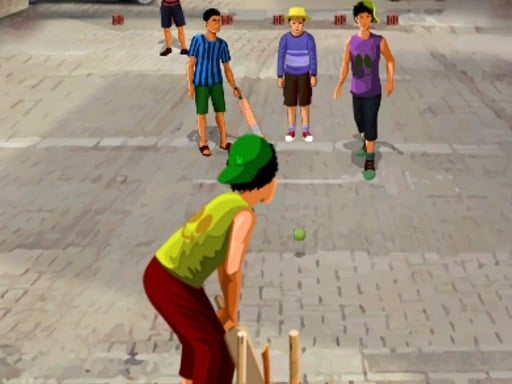
About Gully Cricket
Gully Cricket translates neighborhood street cricket into an accessible browser sports game built around quick reflexes and sharp timing. Players step into matches set in crowded urban alleys and narrow residential lanes, taking control of both batting and bowling roles. With straightforward tap and click mechanics, the game challenges you to read incoming deliveries, choose clever scoring angles, and outmaneuver the opposition in localized street-cricket showdowns.
Unlike stadium-based sports simulations with vast manicured outfields and complex fielding management, Gully Cricket focuses on the spontaneous energy of informal street matches. Matches take place within tight neighborhood lanes where spatial awareness and fast reactions are essential. Players choose a team and take the pitch to compete across both batting and bowling phases, experiencing the compressed physical constraints typical of alleyway play.
The core loop alternates between facing deliveries with the bat and sending balls down the pitch to restrict the opponent. Success depends on reading the ball early, discovering effective angles in confined surroundings, and adapting to different batting and bowling styles. Because input is streamlined into direct mouse clicks or screen taps, the challenge centers entirely on hand-eye coordination, anticipation, and shot selection.
Your goal
Your objective in Gully Cricket is to prevail in competitive street matches by outscoring your opponents while batting and shutting down their scoring opportunities while bowling. To secure bragging rights, players must consistently time their strikes to send shots past tight street obstacles and execute controlled deliveries that disrupt the opposing batter's rhythm across each encounter.
How to play Gully Cricket
1. Launch the game in your browser and select your preferred team from the initial lineup menu.
2. Take your position at the crease during the batting innings and observe the bowler's run-up and trajectory.
3. Click your mouse or tap your display when the delivery approaches to swing the bat and execute your shot.
4. Switch to bowling duties, utilizing click or tap inputs to deliver balls toward the opposing wickets.
5. Experiment with distinct batting and bowling styles across match exchanges to maintain an advantage over the opponent.
Controls and device support
The official instructions specify mouse click or tap to play. On desktop browsers, click your primary mouse button to trigger swings, pitch deliveries, and navigate team selection menus. No secondary keys or complex keyboard combinations are required.
- Controls: Keyboard
- Device support: Desktop + mobile
- Game frame: 800 x 600
What makes the challenge interesting
The core appeal of Gully Cricket lies in its fast-paced reaction testing within confined spatial boundaries. Traditional cricket games emphasize fielding fielders across an expansive oval, but street cricket naturally compresses play into narrow urban corridors. This environment places supreme value on quick reflexes and inventive shot-making.
A key player tradeoff involves balancing aggressive boundary hunting against reliable contact. Swinging too early or misjudging a bouncing delivery in narrow lanes risks wasted chances, while overly cautious defensive play can leave you trailing on runs. Mastering both batting timing and varied bowling styles requires players to continuously anticipate trajectories rather than simply reacting at the last split second.
Tips for Gully Cricket
- Watch the bowler's release point closely to anticipate speed before swinging. A common mistake is clicking on impulse before the ball bounces, which often leads to mistimed, weak contact.
- Aim for clever shot placement through open gaps in the street rather than swinging indiscriminately. Trying to force identical strokes on every ball often results in blocked or intercepted shots.
- Vary your bowling approach when taking your turn on the mound. Delivering predictable pitches at the exact same rhythm makes it easy for opposing batters to anticipate contact and rack up runs.
- Keep your input finger or cursor poised near the center of action. Hesitating or repositioning your mouse mid-delivery causes critical delays that can spoil otherwise excellent timing windows.
Playing on different devices
Gully Cricket runs within standard web browsers using WebGL technology and accommodates both desktop and touchscreen play. On desktop computers, a wired mouse provides reliable physical feedback and consistent click timing for batting swings. On touchscreens, tapping directly on glass offers immediate input, though players should ensure their fingers do not obstruct sightlines to the incoming ball path.
The skills behind the game
Gully Cricket sits at the intersection of casual sports simulations and accessible arcade games. Traditional sports titles often emphasize exhaustive rulebooks, full rosters, and complex multi-button control schemes. In contrast, games in this hypercasual sports category distill the athletic experience down to immediate reflex checks and situational timing.
By adopting colorful cartoon styling and WebGL 3D rendering, the title delivers quick athletic fun suitable for younger players and sports fans looking for a fast session. Players can jump in without memorizing deep tactical playbooks, focusing purely on the satisfaction of cleanly striking a ball or bowling an unhittable delivery in a friendly, stylized environment.
Who will enjoy this game
Players looking for a gully cricket game typically want an experience that captures the distinct feel of informal street matches rather than sterile stadium simulations. Informal cricket in neighborhood alleys involves close-range pressure, unexpected angles, and rapid decision-making, which translate naturally into short, replayable browser challenges.
Whether practicing timing during a brief work break or looking for accessible sports gameplay, casual players can use Gully Cricket to hone hand-eye coordination and reaction speed. Exploring different delivery styles and batting placements provides satisfying micro-challenges that fit seamlessly into spontaneous everyday play sessions.
Frequently asked questions
Can I both bat and bowl in Gully Cricket? Yes. The game features both batting and bowling roles, allowing players to practice timing clever offensive shots at the crease and executing varied pitching styles to restrict opposing batters during matches.
What inputs are needed to control the game? Gully Cricket requires only a single mouse click or screen tap. You do not need directional arrow keys or complex gamepad buttons to participate in matches or navigate menus.
Can I choose different teams? Yes. Team selection is an official feature, enabling you to pick your preferred side before heading out onto the street pitch to compete for match bragging rights.
How can I improve my batting timing? Track the delivery closely as it leaves the bowler's hand rather than tapping immediately. Establishing a steady rhythm based on the ball's approach speed helps you connect cleanly and place shots effectively.
Something not right?
Tell us if the game does not load, the information is wrong or the content needs review.
Report a problem ›