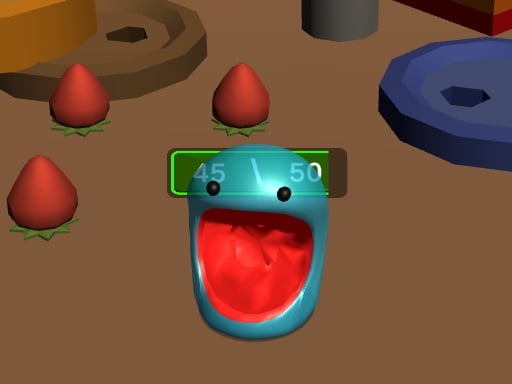
About GrowBall Feed to Grow
GrowBall Feed to Grow puts players in control of an expanding slime whose mouth functions like a miniature black hole. Your primary goal is to navigate across the playfield, tracking down and swallowing items smaller than your current size. Each successful meal increases your overall volume, gradually opening up larger objects across the map while demanding sharper navigational awareness as your physical footprint expands.
In GrowBall Feed to Grow, the gameplay revolves around continuous consumption and size progression. Taking on the role of a greedy slime entity, you glide around the environment seeking out items that fit within your current threshold. Swallowing smaller targets fuels steady growth, transforming your slime from a modest orb into a massive consuming force.
As your slime expands, the dynamic of movement shifts. Gaining mass allows you to target items that previously stood out of reach, but maneuvering a larger body requires greater anticipation of spacing and pathways. The core loop challenges players to prioritize targets efficiently, balancing quick early-game foraging with steady, deliberate sweeping across cluttered areas.
Your goal
The primary objective in GrowBall Feed to Grow is to grow as large as possible by steadily absorbing smaller items throughout the arena. Players strive to maintain an unbroken rhythm of feeding, sizing up from minor pickups to substantial structures or clusters. Achieving optimal scale requires careful path selection, recognizing which items you can safely consume at your current stage, and clearing zones systematically.
How to play GrowBall Feed to Grow
1. Start each round by surveying the immediate area for the smallest available items your slime can absorb.
2. Use mouse clicks or touchscreen taps to steer your slime across the arena floor toward your selected targets.
3. Pass directly over items smaller than your current circumference to pull them into your mouth and swallow them.
4. Monitor your slime's expanding size to gauge when medium and large objects become small enough to safely consume.
5. Navigate into denser clusters across the environment to absorb high-value targets as your overall scale expands.
Controls and device support
GrowBall Feed to Grow uses simple click or tap inputs to guide the slime across the playing field on desktop browsers and mobile devices.
- Controls: Mouse or touch
- Device support: Desktop + mobile
- Game frame: 800 x 600
Rules to keep in mind
- The slime can only swallow and absorb objects that are smaller than its current physical size.
- Every successful swallow contributes to increasing the slime's overall volume and swallowing capacity.
What makes the challenge interesting
The central appeal of GrowBall Feed to Grow lies in visual scaling and spatial assessment. At the start of a session, movement is nimble, but your consumption options are restricted to tiny objects scattered along the ground. Players must quickly distinguish edible items from impassable terrain, stringing together clean pickup lines.
As mass accumulates, the operational trade-off changes. A larger body covers more surface area and scoops up groups effortlessly, but tight corridors become harder to navigate cleanly. Success depends on shifting your scanning perspective outward, transitioning smoothly from micro-level foraging to wide-area sweeping.
Tips for GrowBall Feed to Grow
- Target dense clusters of small debris early on. Scooping up multiple small items in one pass accelerates your initial growth faster than chasing distant lone objects.
- Avoid getting wedged against large stationary objects when small. Trying to push against unyielding obstacles wastes valuable movement time.
- Plan broad looping routes across the playfield. Sweeping the map in organized circles prevents you from backtracking over already cleared, empty patches.
- Revisit previously blocked zones once you expand. Areas packed with medium-sized items become prime feeding grounds as soon as your scale threshold increases.
Stages and progression
Progression in GrowBall Feed to Grow centers on the continuous scaling of your slime. With each swallow, your character expands in volume, which progressively unlocks the ability to digest larger elements of the world. This dynamic escalation creates natural pacing shifts throughout a run, as clearing small starter objects opens the door to swallowing substantial obstacles across the map.
Playing on different devices
Built on standard HTML5 web technology, GrowBall Feed to Grow runs smoothly inside modern browsers across desktop systems, iPads, iPhones, and Android devices. Desktop players can steer with simple mouse clicks, while mobile users can guide their slime directly using responsive touchscreen taps within an 800 by 600 display canvas.
The skills behind the game
Classified under the action and puzzle umbrellas, GrowBall Feed to Grow offers a relaxing yet fast-paced physics-inspired consumption loop. Rather than relying on intricate combat or reflexes, action in this genre stems from rapid environmental navigation, opportunistic routing, and steady visual expansion.
Who will enjoy this game
Players looking for an accessible action game online will appreciate the pick-up-and-play simplicity of GrowBall Feed to Grow. The satisfying loop of feeding a growing orb makes it ideal for quick casual sessions, allowing players to practice efficient routing and enjoy watching small beginnings turn into massive arena takeovers.
Games with a similar feel
Hole.io: Like Hole.io, GrowBall Feed to Grow revolves around steering a growing entity that swallows smaller objects to increase in volume. While Hole.io features city-wide multiplayer competitions, GrowBall Feed to Grow provides an accessible single-player slime-themed growth experience suitable for casual browser play.
Frequently asked questions
How do you grow larger in GrowBall Feed to Grow? Your slime expands automatically whenever you move over and swallow objects smaller than your current dimensions. Continuously clearing smaller items builds the mass needed to consume bigger targets.
Can the slime consume any item on the screen immediately? No. The slime can only absorb objects that are smaller than its current size. Attempting to swallow larger items will not work until you have fed on enough small objects to grow past their scale.
What devices support playing GrowBall Feed to Grow online? The game operates directly in web browsers on desktop PCs, Android smartphones, iPhones, and iPads using either mouse clicks or direct touchscreen inputs.
Something not right?
Tell us if the game does not load, the information is wrong or the content needs review.
Report a problem ›