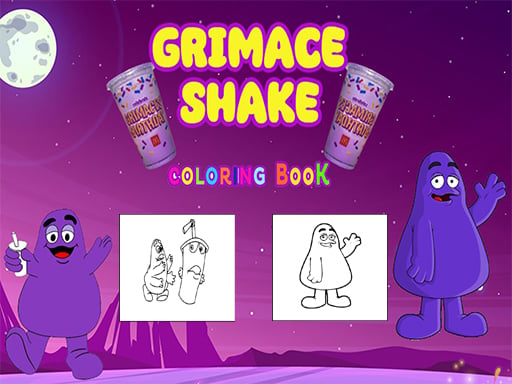
About Grimace Shake Coloring
Grimace Shake Coloring is an interactive browser art activity centered on themed illustrations of the viral Grimace Shake character. Players can experiment freely across a palette of distinct shades by dragging paint directly onto each scene, or pick up the magic pen tool to reset drawings back to their starting outline format whenever they want a clean canvas.
The core experience of Grimace Shake Coloring revolves around selecting hues and applying them across character line art to capture different moods and expressive poses. The game provides a relaxed digital coloring book workspace where you can test different color combinations, tint specific areas of the drawing, and explore visual ideas at your own pace without time pressure or penalty systems.
Alongside standard pigment application, the game incorporates a dedicated magic pen feature. If a color layout does not turn out as intended or you wish to start a piece anew, the magic pen lets you restore the illustration to its original, uncolored appearance. This balance of direct painting and effortless resetting makes the activity accessible for casual art sessions across desktop and mobile browsers.
Your goal
Your main objective is to complete expressive artwork featuring Grimace Shake by dragging selected paint tones onto the provided illustrations. Players aim to create vibrant, harmonious compositions while using the magic pen to clean up or reset sections until the finished image matches their creative vision.
How to play Grimace Shake Coloring
1. Select an uncolored Grimace Shake illustration to load the drawing workspace on your screen.
2. Examine the available palette options and choose the color you want to use on a specific section.
3. Click or press and drag the paint into the target image area to apply the chosen pigment.
4. Continue dragging additional shades onto other segments of the artwork to fill out the full character design.
5. Equip the magic pen tool whenever you want to wipe away applied colors and restore the illustration to its original state.
Controls and device support
Drag the paint into the image using your mouse cursor or touch gesture to color Grimace and interact with the magic pen.
- Controls: See in-game controls
- Device support: Browser
- Game frame: 800 x 600
What makes the challenge interesting
Grimace Shake Coloring focuses on casual visual creativity rather than fast-paced reflexes or precision timing. The central dynamic is the freedom to experiment with tone and contrast without worrying about making a permanent mistake. Because the magic pen allows players to quickly revert drawings to their baseline outlines, you are encouraged to try unconventional palettes and bold fill patterns across Grimace's character artwork.
The primary artistic tradeoff comes from balancing complementary background tones against Grimace's recognizable purple silhouette. Taking time to plan distinct shades for character highlights, accessories, and backgrounds ensures the finished illustration stands out clearly rather than blending into a single flat tone.
Tips for Grimace Shake Coloring
- Establish the main character silhouette first before working on smaller accents to maintain a clear visual hierarchy across the drawing.
- Test bold color combinations freely; if a shade disrupts the balance of the piece, switch to the magic pen to reset the drawing without frustration.
- Use contrasting colors between Grimace and the surrounding environment so character details remain easily readable in the final image.
- Drag paint deliberately into the intended outline boundaries to ensure complete coverage across all designated illustration segments.
The skills behind the game
While cataloged broadly under puzzle games, digital coloring activities emphasize visual design, color matching, and open-ended experimentation rather than logic-based deductions or strict win conditions. They provide a calming, tactile canvas where players can engage with character art at their own pace.
Titles in the coloring and cartoon space appeal to players seeking a low-stress creative break. Combining recognized pop-culture figures like Grimace with accessible drag-and-fill tools creates an approachable digital workbook suitable for casual sessions on both desktop and mobile platforms.
Who will enjoy this game
Players looking for a grimace shake coloring game online typically want an easy-to-learn browser title featuring the viral character. The appeal lies in instant access without downloads, allowing fans of cartoon coloring books to jump directly into filling character sketches.
Whether searching for a casual coloring game online or exploring light puzzle games, users appreciate straightforward mechanics like paint dragging and image restoration tools. These features offer relaxing artistic practice for children, casual gamers, and character enthusiasts alike.
Games with a similar feel
Happy Color: Happy Color provides a structured color-by-number format where users fill predefined numbered segments according to an exact template. In contrast, Grimace Shake Coloring offers open-ended creative freedom, allowing players to drag any available paint shade onto Grimace illustrations and restore drawings freely using the magic pen without following numerical guidelines.
Frequently asked questions
What is the primary goal in Grimace Shake Coloring? The main goal is to color various Grimace Shake character illustrations by dragging paint into different sections of each drawing to create customized artwork.
How do you apply colors to the drawings? You apply colors by dragging the paint directly from the palette into the target areas of the Grimace illustration using your mouse or touchscreen.
What does the magic pen do in the game? The magic pen tool lets you restore an image back to its original uncolored state, giving you a fresh canvas if you want to try a new color scheme.
Are there timers or penalties for making mistakes? No timers or penalty mechanics are reported. The game is designed as a relaxed coloring activity where you can paint at your own pace and reset whenever desired.
Something not right?
Tell us if the game does not load, the information is wrong or the content needs review.
Report a problem ›