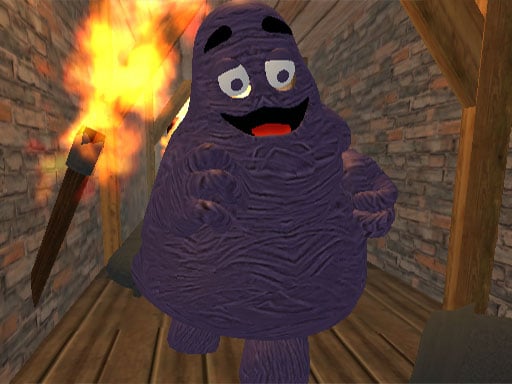
About Grimace Shake Burn or Die
Grimace Shake Burn or Die places players inside a tense, eerie abandoned cave to investigate bizarre disturbances and confront a lurking adversary. Facing the menacing Grimace character, you must navigate hazardous spaces, pick up nearby items, and launch them to neutralize the threat before you are defeated. This survival-themed browser adventure combines fast-paced evasive movement with direct projectile combat in a struggle to make it out alive.
In Grimace Shake Burn or Die, your mission begins with an investigation into strange and dangerous rumors surrounding an isolated, abandoned cavern. Upon entering the depths, you discover that the rumors are real and that Grimace poses a lethal danger to anyone who steps inside. To survive this hostile encounter, you must stay constantly alert, avoiding direct contact while searching the underground environment for throwable objects.
The core gameplay loop centers on quick positioning and precise interactions. Using keyboard controls to sprint through the cavern corridors, you locate usable items, pick them up, and fling them at your opponent to ignite flames and push back the enemy. Every second spent inside the cave demands careful spatial awareness, as failing to retaliate leaves you vulnerable to a swift defeat. Combining escape urgency with action-oriented defense, each round tests your ability to maintain composure under pressure.
Your goal
The primary objective in Grimace Shake Burn or Die is to survive the perilous cave investigation by finding and throwing combustible items to defeat Grimace. Players strive to keep their distance from the pursuer, aim their throws accurately, and successfully eliminate the hostile creature so they can escape the underground caverns in one piece.
How to play Grimace Shake Burn or Die
1. Survey the abandoned cave layout to identify open paths and note the position of Grimace.
2. Use the directional movement keys to maneuver through the cavern while keeping a safe buffer zone from the enemy.
3. Approach interactive objects scattered throughout the area and press the grab key to pick them up.
4. Align your character toward Grimace and activate the throw command to launch your held item.
5. Continue dodging attacks and repeating successful strikes until the threat is eliminated and your escape is secure.
Controls and device support
Use the WASD keys on your keyboard to navigate through the cave, and press the Spacebar to grab nearby objects and throw them at your enemy.
- Controls: See in-game controls
- Device support: Browser
- Game frame: 800 x 600
Rules to keep in mind
- Direct contact or unmitigated attacks from Grimace result in your defeat during the cave investigation.
- Players must actively grab and throw items using the designated action input to deal damage and ignite their pursuer.
- The encounter concludes successfully when the enemy threat is destroyed, allowing you to get out alive.
What makes the challenge interesting
The central dynamic in Grimace Shake Burn or Die is managing spatial distance while executing offensive throws. Because your offensive capability depends entirely on finding and tossing physical items, you cannot remain passive or simply run away indefinitely. Players must constantly weigh the risk of stopping to pick up an item against the incoming momentum of Grimace. This push-and-pull rhythm rewards calm pathfinding, quick turning, and decisive timing, turning what could be a frantic chase into a deliberate survival confrontation.
Tips for Grimace Shake Burn or Die
- Plan an exit route before stopping to collect an item. Grabbing while trapped in a tight corner makes it easy for the enemy to close the distance before you can throw.
- Line up your character's facing direction before launching your projectile. Rushing the throw command without steady alignment often wastes a valuable defensive opportunity.
- Keep moving along open cavern corridors rather than lingering in dead ends. Maintaining constant mobility buys time to spot new objects across the ground.
- Track the enemy's approach speed so you can release throws at medium range, ensuring maximum accuracy without exposing yourself to counterattacks.
Stages and progression
As you engage in the cave investigation, your overall effectiveness improves through repeated runs and refined maneuvering habits. While specific stage milestones are not formally detailed in the briefing, player progression relies on developing tighter movement routes, quicker reflexes when acquiring items, and steadier aim during tense face-to-face encounters.
Playing on different devices
This title is optimized for desktop keyboard play with standard 800 by 600 display dimensions. Using dedicated WASD movement alongside the Spacebar gives players responsive two-handed control, allowing smooth transitions between high-speed evasive running and quick object throws.
The skills behind the game
Categorized under adventure and action survival gaming, this title focuses on environmental exploration under direct hostile pressure. Unlike passive narrative journeys, it demands active engagement with arena hazards, positioning tactics, and real-time combat tools to overcome an immediate threat.
Who will enjoy this game
Players seeking an intense grimace shake burn or die game will find a focused survival challenge centered on quick reflexes and environmental interaction. As an accessible adventure game online, it appeals to fans of suspenseful arena showdowns who want straightforward keyboard mechanics combined with evasive escape gameplay.
Frequently asked questions
What is the primary goal in Grimace Shake Burn or Die? Your goal is to investigate an abandoned cave, defend yourself by grabbing and throwing items to defeat Grimace, and escape the underground area alive.
How do you control movement and combat actions? You navigate through the cave using the WASD keys and use the Spacebar to pick up objects and throw them toward your opponent.
What should you do if Grimace gets too close? Prioritize evasive maneuvering with WASD to circle into wider cave pathways, create adequate separation, and locate a new object to launch.
Something not right?
Tell us if the game does not load, the information is wrong or the content needs review.
Report a problem ›