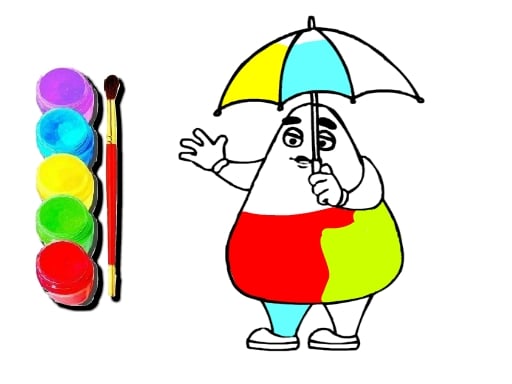
About Grimace Click and Paint
Grimace Click and Paint is a casual digital coloring activity designed for young players and creative fans. Operating directly in your web browser with no download required, the game invites you to select an outline illustration and fill it with vibrant shades using simple mouse clicks. It provides a relaxing, accessible creative space centered around beloved purple character themes.
Grimace Click and Paint delivers a straightforward, stress-free art experience centered on themed line drawings. Upon launching the title, players are presented with a gallery of outline images featuring the iconic Grimace character. The core gameplay loop is purely creative: you select an illustration that catches your eye, pick your preferred hues from the available palette, and click on different sections of the canvas to color them in.
Because the game requires no installation or complex setup, it functions smoothly across casual play sessions at home or school. Players have complete freedom to paint each illustration the way they like, whether that means staying close to familiar character palettes or inventing entirely new color schemes. Once an artwork is complete, players can celebrate their finished piece and share their artistic creations with friends.
Your goal
The primary objective in Grimace Click and Paint is to explore your personal artistic taste by completely filling in your chosen character illustrations. Rather than racing against timers or chasing high scores, your goal is to experiment with color balance, complete detailed sections neatly, and produce polished digital pictures you are proud to display and share.
How to play Grimace Click and Paint
1. Open the game directly in your browser without needing any separate downloads.
2. Browse the gallery menu and click to choose one of the available outline images.
3. Select a color shade from the on-screen palette with your mouse cursor.
4. Click inside the distinct segments of the drawing to apply your chosen color.
5. Continue filling in every section until your overall picture feels complete and harmonious.
6. Show your finished artwork to friends and try painting another image in a different style.
Controls and device support
The game is designed to be played using your mouse to browse menus, pick colors, and click on picture areas to paint.
- Controls: Mouse or touch
- Device support: Browser
- Game frame: 1280 x 720
What makes the challenge interesting
The core appeal of Grimace Click and Paint lies in its calm, unhurried creative rhythm. Digital coloring activities remove the physical mess and accidental mistakes of traditional paint, letting players focus entirely on aesthetic choices and visual experimentation. The central creative tradeoff involves deciding whether to use realistic, recognizable colors for the character or to explore wild, imaginative color combinations across the background and accessories.
Because there are no countdowns or accuracy penalties, players can take all the time they need to test complementary colors. This low-pressure environment encourages younger audiences to build hand-eye coordination and spatial awareness while enjoying familiar pop-culture character art.
Tips for Grimace Click and Paint
- Start by filling in the largest background and body areas first. This sets an overall visual tone before you move on to smaller accessories, preventing adjacent sections from blending together accidentally.
- Try contrasting bold character colors with softer background shades. Placing vibrant foreground tones against neutral backdrops helps your main subject pop, avoiding a visually cluttered composition.
- Take your time scanning the canvas for tiny line-art pockets before finishing. Overlooking small sections like collars or background patterns is common, so double-check every zone for completeness.
- Experiment with different palette concepts across multiple sessions. Instead of repeating the exact same shades on every picture, challenge yourself to try warm, cool, or pastel variations.
The skills behind the game
Positioned within casual, educational, and kids coloring categories, digital paint games offer an accessible entry point for creative play. By translating tactile coloring books into interactive web software, these titles allow children and beginners to practice color recognition and fine motor control without the friction of physical art supplies.
The inclusion of familiar casual themes keeps the experience lighthearted and immediately engaging. Whether used during quick leisure breaks or quiet creative sessions at school, coloring titles emphasize relaxation, visual experimentation, and simple entertainment over competition.
Who will enjoy this game
Players looking for an engaging coloring game online will find Grimace Click and Paint to be an easy, pick-up-and-play browser experience. It appeals to casual gamers, parents seeking wholesome art activities for children, and fans of popular character trends who want a relaxing visual hobby.
The format is well-suited for brief creative breaks or sustained coloring projects. Because the mechanics are intuitive and forgiving, it serves as a wonderful casual pastime for practicing color coordination and enjoying stress-free digital art.
Games with a similar feel
Happy Color: While Happy Color focuses on guided color-by-number mechanics where specific numerical regions dictate your palette, Grimace Click and Paint offers freeform coloring where you pick any shade for any segment. Players who prefer following strict structured templates may lean toward Happy Color, whereas those who want complete artistic freedom on character line art will appreciate Grimace Click and Paint.
Frequently asked questions
How do you apply colors to drawings in Grimace Click and Paint? You use your mouse to select a color from the palette, then click directly on the canvas area you wish to fill.
Do I need to install or download anything to play the game? No download is required. The game runs directly in any modern web browser for immediate free access.
Can I choose between different pictures to color? Yes, you can browse and choose one of the available character images from the menu before you start painting.
Are there time limits or scoring penalties while painting? No time limits or penalties are imposed, giving you full freedom to paint at your own pace and style.
Something not right?
Tell us if the game does not load, the information is wrong or the content needs review.
Report a problem ›