About Grimace Bullet Blender
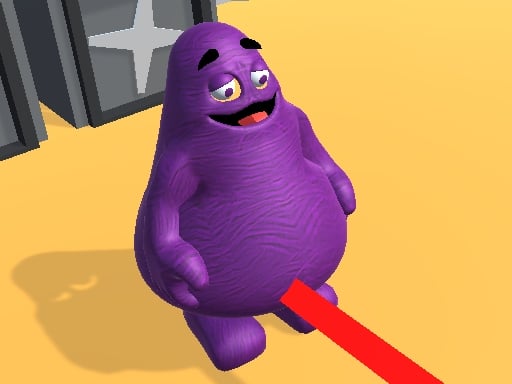
Grimace Bullet Blender is a browser-based shooting puzzle game where players line up precise angles to target the character Grimace. Instead of firing immediately in real time, the challenge centers on selecting the police officer or various environmental objects placed across the layout to map out a clear bullet trajectory. Once your line of fire is perfectly oriented toward Grimace, a dedicated SHOOT button appears to execute the shot.
Grimace Bullet Blender presents a top-down puzzle-shooting challenge built around calculated angles rather than reflex-heavy combat. Players observe a map containing a police officer, Grimace, and scattered obstacles. The primary gameplay loop requires interacting with the environment to steer a bullet's path. By clicking or tapping on the officer or available map objects, you adjust the direction of the upcoming shot, redirecting the projectile until it points directly at Grimace.
The game rewards patience and observational planning. Rather than penalizing players with rapid crosshair tracking, the experience functions like an angle-routing puzzle where every placed object acts as a potential redirection point. The tension builds as you trace the line across the arena, testing alignments until the game registers that the bullet is facing Grimace directly. When that alignment requirement is satisfied, the interface prompts the player with an active SHOOT button, bringing closure to that aiming sequence.
Your goal
The primary objective in Grimace Bullet Blender is to successfully line up a bullet trajectory from the firing position to Grimace using intermediate map objects. Players aim to decipher the layout, determine which obstacles can guide the shot, and achieve flawless alignment so the SHOOT prompt appears. The ongoing challenge lies in visualizing clean geometric paths across the playing field, ensuring every redirection leads closer to the target without misdirected angles.
How to play Grimace Bullet Blender
1. Study the map layout to locate the starting police officer, the target Grimace, and any objects positioned between them.
2. Click or tap the police officer or surrounding map objects to begin setting the bullet trajectory.
3. Adjust the routing angles through environmental items until the bullet path points directly toward Grimace.
4. Watch for the confirmation state where the shot is recognized as perfectly aligned with the target.
5. Press the newly revealed SHOOT button to release the projectile and complete the shot sequence.
Controls and device support
The game is controlled entirely through mouse clicks or screen taps, which are used to select map objects and press the on-screen SHOOT button.
- Controls: Mouse or touch
- Device support: Desktop + mobile
- Game frame: 800 x 600
Rules to keep in mind
- Bullet paths must be established by clicking either the police officer or interactive objects distributed across the map.
- The SHOOT activation button remains unavailable until the bullet path is aligned with Grimace.
What makes the challenge interesting
Grimace Bullet Blender emphasizes spatial reasoning and trajectory calculation over split-second motor reflexes. In traditional top-down shooting games, success often depends on rapid aiming and continuous evasion. Here, the rhythm is deliberate and analytical. Players must mentally trace lines across the play area, recognizing how each intermediary object can bounce or redirect the bullet toward Grimace. The core tradeoff involves efficiency versus experimentation: clicking objects haphazardly might eventually discover a route, but deliberately planning out the angles creates a much smoother experience. Because the firing button only surfaces once alignment is exact, the mechanic eliminates guesswork at the trigger stage, focusing the player's energy entirely on reading angles and recognizing geometric relationships in the arena.
Tips for Grimace Bullet Blender
- Inspect all visible obstacles before clicking. Surveying the entire map first helps you identify which intermediary points create a direct path toward Grimace rather than wasting effort on disconnected objects.
- Trace the line backward from Grimace. Working in reverse from the target back to the police officer often reveals the necessary final bounce point faster than guessing forward from the start.
- Confirm trajectory changes with single inputs. Clicking erratically can alter previous angles and disorient your path, so make deliberate selections and monitor how the bullet direction shifts.
- Watch the interface closely for the SHOOT prompt. The appearance of the SHOOT button is your signal that alignment is valid, preventing premature attempts before the path is ready.
The skills behind the game
Grimace Bullet Blender fits into the casual shooting category while adopting the structured problem-solving style of top-down puzzle titles. While many browser shooters emphasize rapid firing, dodging enemy fire, and survival timers, this title uses shooting as a resolution mechanic for geometric puzzles. By presenting the playing field from an overhead vantage point, players gain complete visual clarity over the map, allowing them to calculate lines of sight and projectile angles at their own pace. Combining popular cultural character themes with directional mechanics, the game provides an accessible entry point for players seeking straightforward casual shooting puzzles that rely on spatial perception rather than twitch reflexes.
Who will enjoy this game
Players searching for Grimace Bullet Blender or looking for an accessible shooting game online often want quick, engaging browser puzzles that require minimal onboarding. This title serves as an enjoyable mental warmup or casual break, challenging players to evaluate angles and plan trajectories in a compact playing space. Because the core interactions rely purely on clicking objects to establish lines of sight, it suits casual gamers looking for relaxed trajectory practice as well as puzzle enthusiasts interested in geometric ricochet challenges.
Frequently asked questions
How do you fire a shot in Grimace Bullet Blender? You cannot fire immediately at the start of a round. You must first click the police officer or obstacles to orient the bullet path toward Grimace. Once alignment is achieved, a SHOOT button appears on screen, allowing you to trigger the shot.
Can you play Grimace Bullet Blender on a smartphone or tablet? Yes, the game supports touch-screen tap controls alongside desktop mouse clicks. Because it runs on WebGL and Unity3D technology, players can access the puzzle through modern mobile or desktop web browsers without requiring specialized hardware.
What happens if the bullet is not aligned with Grimace? The SHOOT button will not appear until alignment is exact. If you cannot shoot, you must continue selecting the officer or surrounding objects to adjust the trajectory until the target line connects properly.
Something not right?
Tell us if the game does not load, the information is wrong or the content needs review.
Report a problem ›