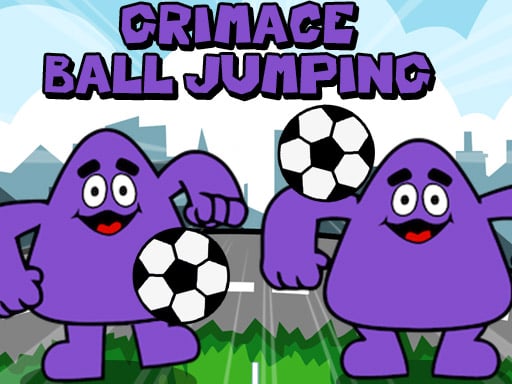
About Grimace Ball Jumpling
Grimace Ball Jumpling is a fast-paced sports arcade game where you help Grimace juggle two soccer balls at the same time. By tapping the left and right sides of the screen to kick each falling football, players challenge their divided attention and reaction speed to see how many successful kicks they can sustain without letting either ball hit the ground.
In Grimace Ball Jumpling, the core gameplay loop revolves around continuous dual-input coordination. Rather than managing a full squad across an expansive pitch, the action centers directly on keeping two independent soccer balls aloft. One ball occupies the left lane while the second ball drops on the right, requiring prompt kicks before either one drops out of reach.
Because both footballs descend on their own arcs, players must monitor both halves of the display simultaneously. A single mistimed tap on either side allows a ball to fall, ending the current juggling run. The quick turnaround between attempts encourages players to jump back in immediately, hone their hand-eye coordination, and aim for a higher continuous juggle count with each try.
Your goal
The primary objective in Grimace Ball Jumpling is to prevent either soccer ball from hitting the ground by executing well-timed kicks on both sides. Players strive to maintain an unbroken juggling rhythm across both lanes, testing how many total kicks they can register in a single continuous attempt before making an error.
How to play Grimace Ball Jumpling
1. Launch the game in your browser window and prepare to interact with both sides of the screen.
2. Watch the descent of the left soccer ball and tap or click the left side of the screen to kick it back up.
3. Track the right soccer ball and tap or click the right side of the screen when it nears kicking range.
4. Alternate your focus between both halves of the display to time each kick before either ball falls.
5. Continue juggling both balls for as long as possible to maximize your kick count during the run.
Controls and device support
Control Grimace using simple mouse clicks on desktop or direct screen taps on mobile devices. Click or tap the left side of the screen to kick the left soccer ball, and click or tap the right side to kick the right soccer ball.
- Controls: Mouse or touch
- Device support: Desktop + mobile
- Game frame: 600 x 1024
Rules to keep in mind
- Both the left and right soccer balls must be kept in the air simultaneously throughout the run.
- Interactions on the left side of the screen only trigger a kick for the left football.
- Interactions on the right side of the screen only trigger a kick for the right football.
- Allowing either soccer ball to fall to the bottom ends the active juggling attempt.
What makes the challenge interesting
Grimace Ball Jumpling builds its challenge around divided attention and split-second reaction timing. In traditional single-target arcade games, players can lock their eyes on one moving object. Here, tracking two separate items dropping at potentially differing intervals demands broad peripheral awareness and quick finger response.
The primary tension stems from balancing the two sides without overcommitting to one. Kicking one ball too early or focusing entirely on a single rebound can cause you to miss the descending arc on the opposite flank. Developing a steady, composed rhythm helps manage both sides effectively under pressure.
Tips for Grimace Ball Jumpling
- Keep your vision centered in the middle of the screen rather than tracking one ball directly, allowing your peripheral vision to spot drops on both sides early.
- Avoid rapid panic clicking when balls descend closely together; wait for each ball to reach a reliable strike height before initiating the kick.
- On touch devices, use both thumbs positioned over their respective sides to reduce input travel time and react promptly to simultaneous drops.
- Try to establish an alternating kick pattern when possible, resetting your mental timing between the left and right footballs.
Stages and progression
Because the game focuses on pure endurance juggling, progression is measured through personal skill improvement and sustained juggle counts. In early attempts, coordinating two inputs at once can feel demanding, often leading to quick misses on the secondary side.
As you practice, tracking asynchronous drops becomes more natural. Structuring your play sessions around beating your previous consecutive kick record provides a steady benchmark for sharpening your reaction speed and dual-target tracking over time.
Playing on different devices
Grimace Ball Jumpling features a vertical 600 by 1024 layout, making it naturally suited for portrait orientation on mobile phones and tablets. On touchscreen devices, holding the device with two hands and tapping each half with your thumbs offers responsive dual-input control.
On desktop browsers, the game operates via mouse clicks. While moving a single cursor back and forth between the left and right sides introduces an extra movement challenge, quick mouse sweeps and centered clicks allow desktop players to stay competitive.
The skills behind the game
Classified under soccer and arcade sports, Grimace Ball Jumpling strips away traditional pitch tactics, offside rules, and team formations to isolate the fundamental physical skill of ball juggling. While conventional soccer simulations focus on passing strategies and scoring goals, arcade sports titles highlight accessible reflex challenges that test pure timing.
By incorporating character styling alongside fast-paced ball bouncing mechanics, the game delivers an instant pick-up-and-play experience. It fits alongside casual sports micro-games where the primary satisfaction comes from mastering a focused, repeatable physical rhythm under pressure.
Who will enjoy this game
Players looking for a lighthearted grimace ball jumpling game will find an immediate reflex test built around dual-lane coordination. Instead of lengthy tutorials, the action begins instantly, challenging your ability to process two separate visual cues and execute prompt left and right inputs.
For casual enthusiasts searching for a quick soccer game online to test reaction speed during short breaks, this title provides an accessible mini-game loop. It works well as a short concentration drill, allowing players to practice hand-eye coordination and dual-target focus in quick, bite-sized sessions.
Games with a similar feel
EA SPORTS FC: While EA SPORTS FC delivers an extensive football simulation centered on team tactics, passing lanes, and scoring goals across full pitches, Grimace Ball Jumpling isolates soccer juggling into a twin-target arcade reflex drill. Players looking for deep strategic sports play will prefer full simulations, whereas this title suits those wanting immediate, two-button coordination practice.
Frequently asked questions
How do you control both footballs in Grimace Ball Jumpling? You tap or click the left side of your screen to kick the left soccer ball and the right side to kick the right soccer ball. Each side functions independently to manage its respective ball.
Can I play Grimace Ball Jumpling on mobile devices? Yes, the HTML5 browser format supports touchscreen devices. You can tap directly on the left and right halves of your mobile screen to play in portrait orientation.
What is the main goal in a soccer game online like this? The main goal is arcade endurance. You try to keep both soccer balls in the air for as many consecutive kicks as possible without letting either one hit the ground.
Something not right?
Tell us if the game does not load, the information is wrong or the content needs review.
Report a problem ›