About Girls Nail Art Salon
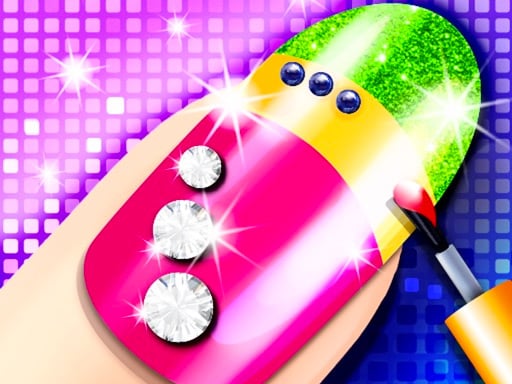
Girls Nail Art Salon is a casual styling game where players design custom manicures by applying accessories directly to nails. Built with a relaxed creative loop, the title lets you experiment with decorative pieces on both desktop and mobile web browsers without real-world salon mess.
Girls Nail Art Salon places players in the role of a nail designer focused on creating decorative nail looks. While decorating nails in everyday life can require steady hands and specialized tools, the game provides a digital canvas where crafting manicure designs is straightforward and accessible.
The core experience revolves around selecting and attaching accessories to complete each visual styling concept. Players interact using standard mouse clicks or touchscreen taps to place decorative items onto the visible nails, making it a quick pick-up-and-play title for creative fashion play.
Your goal
The primary goal in Girls Nail Art Salon is to assemble attractive, personalized nail designs by decorating each nail with available accessories. Players aim to balance colors, patterns, and ornaments to create unified manicure looks that match their creative vision.
How to play Girls Nail Art Salon
1. Open Girls Nail Art Salon in your desktop or mobile browser window.
2. Look over the provided hand model and identify which nail you want to decorate first.
3. Browse the available nail accessories displayed in the creative toolkit.
4. Click with your mouse or tap with your finger to attach your chosen accessory onto the target nail.
5. Continue styling adjacent nails with complementary accessories to complete a cohesive manicure look.
Controls and device support
On desktop computers, use the mouse to click or tap to attach accessories to the nails. On mobile devices, use your finger to tap the screen to attach accessories to the nails.
- Controls: Mouse or touch
- Device support: Desktop + mobile
- Game frame: 504 x 800
What makes the challenge interesting
The central appeal of Girls Nail Art Salon lies in open-ended visual styling rather than mechanical pressure or fast reflexes. In real life, detailed nail painting demands high manual dexterity, but this digital adaptation simplifies the process so players can focus purely on aesthetic choices.
Because interaction is centered on tapping to attach accessories, player satisfaction comes from experimenting with visual contrast and symmetry across the hand. Choosing whether to make every nail match or designing an accent nail allows players to explore varied fashion themes at their own pace.
Tips for Girls Nail Art Salon
- Establish a consistent color palette before placing accessories so all five nails look coordinated rather than clashing randomly.
- Try creating an accent nail by putting a bolder accessory on a single finger while keeping the surrounding nails subtle.
- Take your time with tap placement to ensure accessories land neatly where you want them on the nail surface.
- Step back to examine the entire hand together periodically, avoiding overly crowded arrangements that obscure individual decorative pieces.
Playing on different devices
Girls Nail Art Salon is formatted in portrait dimensions of 504 by 800 pixels, making it well suited for upright mobile phone and tablet screens where direct fingertip tapping feels natural.
On desktop monitors, the game runs inside standard web browsers, where cursor clicks substitute for touch input. A stable mouse grip helps players position decorative accessories onto specific nail areas with high precision.
The skills behind the game
Within the casual makeover and styling genre, nail decoration games offer a specialized creative focus compared to full-body makeover titles. Rather than styling hair or garments, these games concentrate purely on cosmetics, manicure patterns, and decorative accents.
Designed for quick creative sessions, titles like Girls Nail Art Salon give younger players and casual fashion fans an easy sandbox to assemble colorful accessory combinations without complex menu management or skill barriers.
Who will enjoy this game
Players searching for a girls nail art salon game or an approachable dress up game experience are typically looking for gentle, aesthetic play where they can explore visual ideas quickly. Digital salon games eliminate the cleanup and cost of real manicure sets while still letting users practice color pairing and detail placement.
Because the game requires only simple taps or clicks, it serves as an easy creative warm-up or relaxing pastime for anyone who enjoys personal styling, jewelry accents, and hands-on design without strict challenge mechanics.
Games with a similar feel
Love Nikki-Dress UP Queen: Love Nikki-Dress UP Queen centers on coordinating complete clothing outfits and fashion ensembles across broad stylistic themes. In contrast, Girls Nail Art Salon narrows its scope entirely to manicure art, having players tap accessories directly onto individual nails rather than managing head-to-toe wardrobe choices.
Project Makeover: Project Makeover revolves around holistic makeover transformations, updating overall styling, hair, and appearance for various characters. Girls Nail Art Salon offers a lighter, self-contained alternative focused strictly on decorating nails with accessories, suited for players seeking a quick, focused manicure session.
Frequently asked questions
How do you apply accessories in Girls Nail Art Salon? You attach decorative accessories to the nails by clicking with a mouse on desktop browsers or tapping with your finger on touch-enabled mobile devices.
Is Girls Nail Art Salon playable on mobile phones? Yes, the title supports mobile web browsers with touch controls and runs in a portrait canvas layout designed for handheld viewing.
Does Girls Nail Art Salon feature time limits or penalties? No timers or penalties are described in the game instructions. The title focuses on casual decoration, allowing players to attach accessories at whatever pace they prefer.
Something not right?
Tell us if the game does not load, the information is wrong or the content needs review.
Report a problem ›