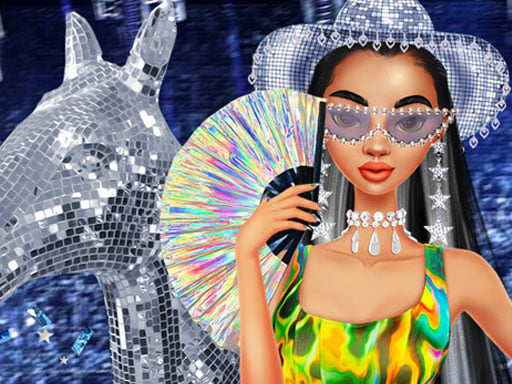
About Get Ready With Me Concert Day
Get Ready With Me Concert Day invites players to step into the role of a personal stylist for teen Riri as she prepares for a major concert event. The game centers on coordinating a head-to-toe event look, starting with a custom cowgirl hat before moving through makeup application, vibrant hair coloring, and wardrobe selection to assemble an eye-catching stage-ready ensemble.
In Get Ready With Me Concert Day, players guide Riri through a complete pre-concert beauty transformation. The creative process kicks off with decorating a signature cowgirl hat, establishing a distinctive theme for the upcoming concert. From there, players explore a range of makeover stations to refine Riri's look.
The styling sequence allows you to test subtle highlights or bold hair dyes, apply colorful cosmetic options, and browse an assortment of concert outfits and accessories. With a relaxed single-player pacing driven entirely by mouse selections, the game provides a casual creative space focused on visual experimentation and aesthetic harmony.
Your goal
The primary goal is to complete Riri's entire makeover journey and craft a cohesive concert outfit. Success comes from exploring diverse cosmetic palettes, matching hair tones with statement garments, and tailoring the signature cowgirl hat to produce a memorable, standout look for the big show.
How to play Get Ready With Me Concert Day
1. Begin by customizing Riri's signature cowgirl hat with decorative options to set the tone for her concert aesthetic.
2. Experiment with different hair color options, choosing between subtle highlight tones and bold, vibrant hues.
3. Apply makeup selections across the available beauty tools to accentuate her facial features.
4. Browse the wardrobe collection to select a standout concert outfit that complements the chosen hairstyle.
5. Complete the transformation by adding matching accessories to tie the entire ensemble together.
Controls and device support
Use your mouse to click on beauty tools, clothing items, and customization options throughout the styling stages.
- Controls: Mouse or touch
- Device support: Browser
- Game frame: 1024 x 768
What makes the challenge interesting
Get Ready With Me Concert Day focuses on aesthetic coordination, color theory, and creative styling. Rather than demanding rapid reflexes or strict timing, the experience rewards thoughtful decision-making across individual design phases. Players balance vibrant hair colors with expressive makeup shades and complementary garments, ensuring the customized cowgirl hat remains a balanced focal point. The core appeal lies in the freedom to experiment with distinct aesthetics, from bold neon concert looks to softer festival styles, without the pressure of failure states.
Tips for Get Ready With Me Concert Day
- Establish a core color palette during the hat customization step to make choosing matching garments and hair dyes smoother later.
- Test both subtle highlights and vibrant hair tones against different makeup shades before settling on a final clothing piece.
- Avoid clashing bold makeup with overly complex outfit patterns; balance strong cosmetic colors with complementary clothing tones.
- Check accessories against the customized hat to ensure statement jewelry and headwear harmonize rather than compete visually.
Stages and progression
The styling flow follows a guided sequential journey. Players advance step by step, beginning with signature hat crafting, proceeding into hair coloring and cosmetic application, and finishing with wardrobe selection and accessory pairing. While the game provides structured stages to walk Riri through her pre-concert routine, players can freely replay the process to try alternate color schemes and fashion combinations.
Playing on different devices
Designed around straightforward point-and-click mouse controls, the game runs within a standard 1024 by 768 display canvas. Desktop players can comfortably view and select fine cosmetic details and accessory choices across the beauty stations.
The skills behind the game
Within the dress-up and makeover genre, Get Ready With Me Concert Day captures the popular format of preparing a character for a specific high-energy event. By incorporating craft-style item customization alongside traditional cosmetic and wardrobe choices, it provides a well-rounded creative experience tailored for fans of fashion and character styling.
Who will enjoy this game
Players looking for a get ready with me concert day game or a casual dress up game will appreciate the focused, step-by-step styling loop. The experience serves as a relaxing creative playground where anyone interested in fashion design can test contrasting color palettes, mix accessory styles, and assemble complete concert outfits at their own pace.
Games with a similar feel
Love Nikki-Dress UP Queen: Like Love Nikki-Dress UP Queen, this game focuses on the enjoyment of coordinating garments, hairstyles, and accessories into expressive outfits. While Love Nikki offers an extensive fashion collection with structured scoring, Get Ready With Me Concert Day delivers a streamlined, casual browser session focused specifically on a single concert makeover.
Project Makeover: Sharing the visual makeover appeal of Project Makeover, this title centers on transforming a character's appearance through makeup, hair styling, and wardrobe updates. However, Get Ready With Me Concert Day focuses purely on direct styling without external puzzle layers, making it ideal for quick, relaxing design sessions.
Frequently asked questions
What is the main objective in Get Ready With Me Concert Day? Your goal is to style teen Riri for a major concert by customizing her cowgirl hat, choosing a hair color, applying makeup, and selecting a full outfit with accessories.
Can I customize Riri's hair color in the game? Yes. The makeover process includes options to experiment with various hair colors, ranging from subtle highlight tones to vibrant, bold shades.
How do you control the styling and makeover tools? The game is played entirely with mouse controls, allowing you to click on customization options, beauty tools, and wardrobe pieces directly on the screen.
Something not right?
Tell us if the game does not load, the information is wrong or the content needs review.
Report a problem ›