Official listing
Game description
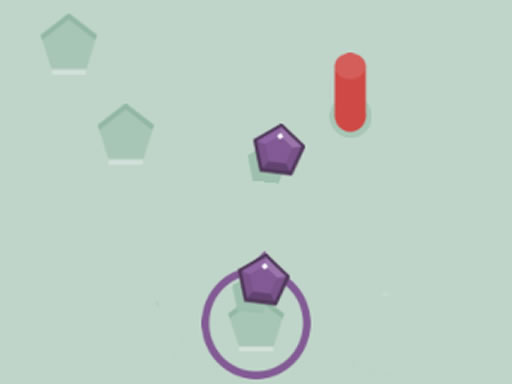
You need to fill in the empty spaces with 10 crystals and tray to avoiding the red columns. Every time you hit red columns loose one of 30 life you have. Have fun.
Shooting game
Gems Shot is an engaging online shooting and skill game where your mission is to launch crystals into empty spaces without striking hazardous red columns. With a total pool of 30 lives, you must balance accuracy and timing to place 10 crystals successfully into target gaps before your health runs out.
Choose Play now to load the game.
Official listing
You need to fill in the empty spaces with 10 crystals and tray to avoiding the red columns. Every time you hit red columns loose one of 30 life you have. Have fun.
From the game listing
Use your mouse to play the game or tap on the screen
Open this card to load the gameplay video.
Gems Shot is an engaging online shooting and skill game where your mission is to launch crystals into empty spaces without striking hazardous red columns. With a total pool of 30 lives, you must balance accuracy and timing to place 10 crystals successfully into target gaps before your health runs out.
In Gems Shot, players face a precision-based challenge that tests timing, patience, and visual coordination. The primary objective is to shoot crystals into open spaces while dodging red column obstacles. Each round challenges you to successfully deposit 10 crystals into designated target areas. However, every mistimed shot that collides with a red column deducts one life from your starting bank of 30 lives. Designed with responsive HTML5 mechanics, the game accommodates quick reflexes across both desktop mouse inputs and mobile touchscreen taps, offering accessible arcade action for players looking to test their aiming skills under pressure.
The objective in Gems Shot is to shoot and place exactly 10 crystals into empty target spaces while avoiding contact with red columns. You must complete this task before depleting your 30 available lives, ensuring each shot is timed precisely to slip cleanly between the red barriers without causing accidental collisions.
1. Observe the layout and track the movement and placement of the red columns around the target spaces.
2. Use your mouse to click or tap on your screen to launch a crystal forward.
3. Time your shot so the crystal passes safely into an empty space without striking any red column.
4. Monitor your remaining life count, ensuring you do not lose all 30 lives to obstacle hits.
5. Successfully place all 10 crystals into the empty spaces to achieve the objective.
Mouse Click: Shoot crystal
Tap Screen: Shoot crystal
Gameplay in Gems Shot centers around rhythmic timing and careful observation. Because you have 30 lives to spare, minor errors will not immediately end your run, but reckless firing can quickly drain your vitality. Success requires identifying clear shooting lanes between red obstacles before tapping or clicking to release a gem. Players must stay composed and wait for clear openings rather than rushing shots in rapid succession. Combining spatial awareness with steady control allows you to deliver all 10 crystals cleanly into the open gaps.
As part of the shooting and skill genre, Gems Shot emphasizes timing and target acquisition over combative firepower. In browser shooting games of this style, players focus on launching items accurately past dynamic hazards into predetermined slots, challenging reflexes and precision rather than complex tactical combat.
If you enjoy looking for a casual shooting game online, Gems Shot offers a straightforward obstacle-avoidance challenge. As a gems shot game built on lightweight HTML5 technology, it provides quick, responsive browser play centered around launching colorful crystals past defensive columns on both computers and mobile screens.
How many lives do you start with in Gems Shot? Players begin Gems Shot with 30 lives. Every time a fired crystal makes contact with a red column obstacle, one life is deducted from your remaining balance.
What is the main objective to complete the game? The goal is to safely shoot and fit 10 crystals into the empty spaces while avoiding collisions with the red column barriers before your 30 lives run out.
What controls are used to play Gems Shot? On desktop devices, you can play by clicking your mouse to launch crystals. On mobile devices or tablets, you simply tap the screen to shoot.
Tell us if the game does not load, the information is wrong or the content needs review.
Report a problemExplore popular games by category, shared tags and site-wide activity.






















