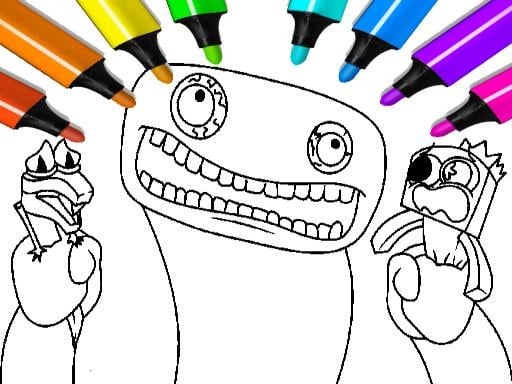
About Garten of Banban Coloring Games
Garten of Banban Coloring Games is a browser-based creative puzzle and art game built on HTML5. Designed around recognizable characters and varied landscapes from the Garten of Banban universe, the game invites players of all ages to relax and experiment with digital illustration. Using simple mouse controls, you can pick illustrations from an expansive selection, customize your brush sizes, apply distinct color palettes, and layer textures onto line art to design personal visual interpretations.
The core activity in Garten of Banban Coloring Games revolves around bringing monochrome outlines to life using an accessible set of creative tools. Players encounter a wide variety of scenes featuring the iconic cast and surroundings from the Garten of Banban setting. Rather than rushing against a countdown or avoiding hazards, the experience centers entirely on self-paced creative expression, allowing both kids and adults to de-stress through drawing and coloring.
Each session begins with selecting an illustration from the gallery, spanning individual character portraits to broader environmental scenes. From there, the digital workspace provides interactive coloring tools and visual effects. You can test varied brush sizes to handle both wide background fills and precise edge work, switch between colors, and apply specialized textures to give finished illustrations an individual look. The straightforward interface keeps the focus on artistic exploration from the moment you press play.
Your goal
Your primary objective in Garten of Banban Coloring Games is to complete digital coloring sheets by filling character outlines and background environments with your chosen visual styles. Because the game does not impose time limits or scoring penalties, personal satisfaction and artistic experimentation serve as your guiding benchmarks. Strive to produce neat, balanced compositions by coordinating complementary tones, practicing controlled strokes with diverse brush settings, and testing different textural effects across every available illustration in the catalog.
How to play Garten of Banban Coloring Games
1. Launch the game in your web browser and click the play button on the welcome screen to enter the main menu.
2. Browse through the gallery of Garten of Banban coloring pages and select a character or landscape outline that appeals to you.
3. Pick your starting hue from the available color palette using the mouse.
4. Select an appropriate brush size and texture effect suited to either broad shading or fine line work.
5. Click and drag your mouse across the canvas to apply color, filling in sections of the character and surrounding backdrop.
6. Refine details by alternating tools, adjusting brush sizes, and layering complementary textures until your artwork is complete.
Controls and device support
The official instructions indicate that you use the mouse to play and navigate the canvas.
- Controls: Mouse or touch
- Device support: Desktop + mobile
- Game frame: 800 x 600
What makes the challenge interesting
Unlike fast-paced arcade puzzles that demand quick reflexes, Garten of Banban Coloring Games emphasizes calm visual design, motor control, and deliberate pacing. The core appeal stems from transforming stark black-and-white character silhouettes into vibrant, personalized artwork. The main gameplay tradeoff involves balancing speed against precision. Sweeping mouse strokes fill wide background areas rapidly, but working near interior line boundaries requires patient hand movement and smaller brush sizes to avoid messy overlap. Furthermore, experimenting with varied textures introduces depth, challenging players to consider how light and surface detail interact on the canvas. This relaxed rhythm provides an engaging artistic outlet that encourages personal experimentation without the pressure of failure states.
Tips for Garten of Banban Coloring Games
- Start with large brush sizes to block in broad base tones across major character bodies or background sections. Downsize your brush later to detail intricate outlines, which prevents accidental color spillage over fine borders.
- Establish an intentional color palette before filling neighboring zones. Grouping harmonious or high-contrast shades helps distinct character limbs and environmental features stand out clearly rather than blending together into visual clutter.
- Apply texture effects sparingly across broad flat regions rather than over fine detail lines. Texturing large expanses adds tactile visual interest, whereas overusing heavy textures near facial contours can obscure character silhouettes.
- Maintain steady, short mouse strokes when working close to boundaries instead of attempting long, continuous sweeps. Shorter drags provide tighter control and reduce the likelihood of painting over structural line art.
- Take advantage of the wide variety of available pages to practice different shading styles. Alternating between single-character portraits and detailed landscape scenes helps you build versatile brush techniques.
Playing on different devices
Operating within an 800 by 600 window on the HTML5 platform, the game runs smoothly across standard desktop web browsers. Official instructions designate the mouse as the primary control method, which provides fine mechanical control when tracing thin character contours and selecting tools. Keeping your browser zoom at its default scale prevents canvas distortion and ensures that color palettes and brush sliders remain fully accessible during creative sessions.
The skills behind the game
While filed under the broad puzzle and arcade labels, Garten of Banban Coloring Games belongs squarely to the digital coloring and drawing genre. In traditional puzzle games, players manipulate pieces or deduce solutions against rigid logical constraints. Here, the puzzle element manifests visually: deciding how to distribute colors, separate background layers from foreground subjects, and maintain visual balance across the frame. Drawing games provide a therapeutic change of pace from arcade reflex challenges, substituting timers and hazards with open-ended creative choices. This focus makes the format particularly welcoming for casual players seeking a calming visual diversion.
Who will enjoy this game
Players looking for a coloring game online often seek accessible, browser-friendly titles that launch immediately without lengthy setup. Garten of Banban Coloring Games satisfies this search by offering a self-directed art suite featuring well-known preschool horror characters in an approachable coloring format. While users browsing for a puzzle game online typically expect logic problems or matching mechanics, coloring titles fulfill a complementary desire for mindful, visual problem-solving. It serves as an ideal creative break for younger audiences exploring color relationships as well as older fans looking to unwind with familiar character art during brief casual sessions.
Games with a similar feel
Happy Color: Like Happy Color, this title centers on the relaxing activity of filling line illustrations with color on a digital screen. However, Happy Color relies on a guided color-by-number format where specific numbered zones mandate exact palette choices, whereas Garten of Banban Coloring Games provides freehand freedom with customizable brush sizes, textures, and open color selection. Players seeking a strict paint-by-numbers puzzle prefer Happy Color, while those wanting creative control over character styling will appreciate the open canvas here.
Frequently asked questions
What tools are available in Garten of Banban Coloring Games? The game provides an interactive art kit featuring adjustable brush sizes, an extensive color palette, and distinct texture effects. Players can freely switch between tools to color broad background areas, trace character silhouettes, or apply tactile finishes across various scenes.
How do the controls work in this coloring game online? The game is designed for mouse navigation. You use your mouse pointer to select drawings from the gallery, choose colors and brush properties from the on-screen menus, and click and drag across the canvas to draw and color.
Is there a timer or penalty for coloring outside the lines? No, there are no countdown timers, score counters, or failure conditions in the game. It is designed as a relaxing, open-ended coloring experience suitable for kids and adults, allowing you to create and experiment at your own comfortable pace.
What subjects can you color in the game? The coloring book offers a wide selection of pages featuring characters and landscapes inspired by the Garten of Banban world. Players can choose between individual character illustrations and wider environmental backdrops depending on what kind of scene they want to paint.
Something not right?
Tell us if the game does not load, the information is wrong or the content needs review.
Report a problem ›