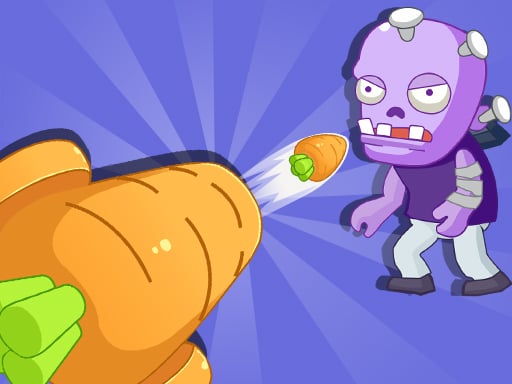
About Garden Defense Zombie Siege
Garden Defense Zombie Siege is a 2D cartoon defense game where you operate a defensive cannon to protect a garden entrance from approaching zombies. With limited shooting and threats arriving from both sides of the gate, you must manage your targeting carefully using a single-button crosshair control before enemies break through your defenses.
Presented in a colorful 2D animated style, Garden Defense Zombie Siege places you in direct control of a central garden cannon. Unlike automated placement games, your survival depends on active crosshair management to intercept zombie waves emerging from two sides of the protective gate.
Each level challenges you to repel attackers while managing limited shots. You begin each defense with three hearts, but you can only sustain two enemy hits before your garden falls. This tight safety margin turns every encounter into an exercise in target prioritization and steady timing, as letting even a few stray zombies reach the barrier leaves no room for further errors.
Your goal
Your objective in Garden Defense Zombie Siege is to protect the garden gate across each level by eliminating every oncoming zombie before they breach your position. To succeed, you must conserve limited ammunition, eliminate nearby threats immediately, and complete stages while absorbing fewer than three hits.
How to play Garden Defense Zombie Siege
1. Observe both sides of the gate as each level starts to spot where zombies begin approaching.
2. Use the single-button input to steer your crosshair toward incoming targets.
3. Fire at the closest zombies first to prevent them from closing the distance to your barrier.
4. Monitor your remaining shots and avoid firing erratically during heavy rushes.
5. Keep track of your heart count and maintain defense until the wave is cleared.
Controls and device support
The game uses mouse click or screen tap inputs to control the cannon crosshair with a single button.
- Controls: Mouse or touch
- Device support: Desktop + mobile
- Game frame: 750 x 1334
Rules to keep in mind
- Defend the garden using a cannon across discrete challenge levels.
- Zombies approach the garden gate from two separate sides.
- Shooting capacity is limited, requiring deliberate aim rather than continuous fire.
- You start with three hearts but can only tolerate two hits from reaching zombies.
What makes the challenge interesting
The core gameplay of Garden Defense Zombie Siege revolves around rapid visual scanning and split-second prioritization. Because threats advance simultaneously from both sides of the gate, you cannot afford tunnel vision on a single lane. You must constantly compare the relative distances of advancing zombies and swing your crosshair toward the immediate hazard.
A key strategic tension comes from the limited-shooting mechanic paired with a low hit tolerance. Since you can only withstand two hits before losing your three-heart defense, missing shots creates immediate pressure. Successful defense requires smooth, deliberate inputs rather than panicked tapping.
Tips for Garden Defense Zombie Siege
- Prioritize the closest zombie in either lane before targeting distant followers. Chasing far-off enemies often allows advancing threats to strike the gate, costing valuable hearts.
- Alternate your visual checks regularly between the left and right gate paths. Focusing entirely on one side makes it easy to overlook a quiet advance on the opposite flank.
- Time your shots when your crosshair firmly overlaps an enemy hitbox. Firing prematurely wastes limited ammunition and forces you into awkward recovery delays.
- Treat your first hit as a warning to reset your defensive tempo. With only two hits permitted across three initial hearts, maintaining calm precision prevents sudden defeats.
Stages and progression
Garden Defense Zombie Siege structures its challenge across distinct levels, presenting fresh zombie assaults at each stage. While specific upgrade trees or wave counts are not detailed, player success comes down to mastering threat pacing and rhythm.
As you move from one level to the next, try building a consistent routine for lane scanning. Practicing clean single-button target swaps during early encounters prepares you for faster simultaneous rushes from both sides of the gate.
Playing on different devices
Built in a vertical 750 by 1334 aspect ratio, Garden Defense Zombie Siege suits portrait-oriented play on mobile devices as well as centered browser windows on desktop. The one-button control scheme makes it easy to guide the crosshair with either a single finger tap or a mouse click.
The skills behind the game
As a hypercasual tower defense title, Garden Defense Zombie Siege blends simple arcade inputs with classic perimeter defense. Instead of managing complex build orders, players focus on immediate reflexes, spatial awareness, and shot discipline.
This accessible format makes it a great match for quick gameplay sessions, offering instant action through vibrant cartoon visuals and focused single-button cannon mechanics.
Who will enjoy this game
Players looking for a lightweight garden defense zombie siege game will appreciate its straightforward pick-up-and-play design. It offers a direct alternative to dense strategy titles by concentrating entirely on lane coverage and precision.
If you enjoy arcade defense challenges, this title serves as an enjoyable reflex drill where timing your shots across two incoming lanes tests both focus and composure under pressure.
Games with a similar feel
Plants vs. Zombies: Like Plants vs. Zombies, this title centers on defending a garden boundary against oncoming cartoon undead. However, rather than planting diverse automated defenders across multiple lawn rows, Garden Defense Zombie Siege tasks you with manually aiming a single cannon against dual-flank rushes.
Bloons TD 6: Bloons TD 6 relies on placing specialized monkey towers to pop waves along winding tracks. In contrast, Garden Defense Zombie Siege strips away complex tower placement in favor of immediate, single-button crosshair action defending a central gate.
Frequently asked questions
How many hits can you take before losing in Garden Defense Zombie Siege? Although you start each defense with three hearts, you can only allow two hits from zombies before your position is overwhelmed.
Which zombies should you shoot first? Always aim for the targets closest to the gate first. Eliminating imminent breaches gives you time to swing back and clear distant attackers.
Can you play Garden Defense Zombie Siege on mobile devices? Yes. The game supports touchscreen tap controls and runs in a portrait 750 by 1334 resolution, making it easily playable on mobile browsers.
Something not right?
Tell us if the game does not load, the information is wrong or the content needs review.
Report a problem ›