About Fruit Slicer
Fruit Slicer is a fast-paced slicing action title where players test their hand-eye coordination by cutting flying produce out of the air. Armed with a responsive cutting trail on desktop or touchscreen displays, you must clear fruit targets quickly while avoiding hazardous explosives that disrupt your run.
The core loop of Fruit Slicer centers on sharp observation and quick physical swipes across an uncluttered playfield. Pieces of fruit launch upward into view, requiring swift slicing motions before gravity pulls them downward off the screen. Allowing unchopped fruit to drop past the lower threshold depletes your remaining chances, making route discipline and timing just as critical as raw speed.
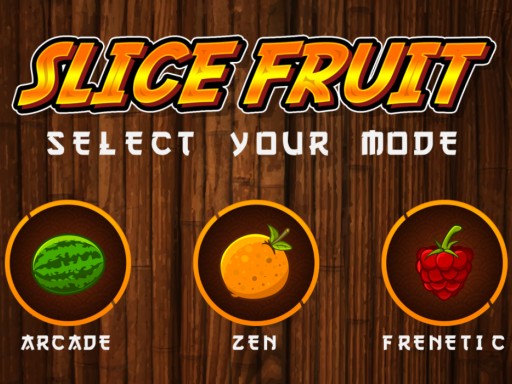
To keep runs engaging, explosive bombs are mixed into the item launches alongside juicy targets. Slicing blindly across the screen risks detonating these hazards, punishing careless swings. The game provides three distinct selectable options—Arcade, Zen, and Fenetic—allowing players to test their reflexes under differing playstyles while comparing high scores against friends and colleagues.
Your goal
Your main objective is to slice every piece of fruit that enters the screen while preserving your three allotted lives. A life is lost whenever an unsliced fruit falls off the screen, and slicing a bomb damages your survivability as well. Players aim to maintain uninterrupted cutting streaks across Arcade, Zen, or Fenetic modes to achieve the highest possible personal record.
How to play Fruit Slicer
1. Select your preferred game mode from the menu screen, choosing between Arcade, Zen, or Fenetic.
2. Watch the playfield carefully as fruits launch upward toward the peak of their flight paths.
3. Hold your left mouse button on desktop or press your finger on mobile to draw a slicing stroke across the fruit.
4. Hold your swing whenever a bomb appears alongside fruits to prevent an accidental detonation.
5. Keep cutting targets before they fall off-screen to avoid losing all three lives and concluding the round.
Controls and device support
On desktop computers, hold down the left mouse button and drag the cursor arrow across the screen to slice fruit. On mobile devices, drag your finger across the touchscreen display over the targets.
- Controls: Keyboard
- Device support: Desktop + mobile
- Game frame: 1280 x 720
Rules to keep in mind
- Fruits that appear on the screen must be sliced before they fall past the lower edge.
- Letting an unsliced fruit fall costs one life, and losing three lives ends the game.
- Bombs must be avoided, as detonating them also damages your life count.
- Three selectable modes are available: Arcade, Zen, and Fenetic.
What makes the challenge interesting
The primary test in Fruit Slicer is impulse control combined with rapid spatial tracking. When multiple targets enter the screen at varying trajectories, your instinct is often to make wide, sweeping cuts across the entire display. However, because bombs launch among the fruit, sweeping erratically creates an immediate hazard. Players must develop a measured rhythm where cuts are targeted and deliberate rather than frantic.
The tradeoff lies between striking fruit early at the peak of its ascent versus waiting for clear separation from nearby explosives. Slicing near the apex provides the cleanest target window, giving you enough time to redirect your cursor away from dangerous objects before targets drop away.
Tips for Fruit Slicer
- Target fruit at the apex of its upward arc. Fruit slows down momentarily at the top of its flight, making precision strokes much safer than chasing rapidly falling targets near the bottom edge.
- Use short, controlled swipes instead of edge-to-edge drags. Wide swipes frequently run into rising bombs that appear unexpectedly along your cursor path.
- Prioritize isolated fruits first when a mixed cluster appears. Clearing safe targets early prevents drops while giving you space to navigate around lingering hazards.
- Watch the spawn angles from the bottom edge before committing your cursor. Anticipating where items will peak prevents panicky overcorrections mid-flight.
Stages and progression
While Fruit Slicer does not feature rigid campaign stages or unlockable equipment tiers, player progression is structured around mastery across its three distinct modes: Arcade, Zen, and Fenetic. Each mode offers a different testing environment for your hand-eye coordination and speed.
A practical training plan involves starting with measured sessions to understand the flight duration of dropped fruit, then transitioning toward the high-density demands of Fenetic mode. Tracking personal longevity and life preservation provides clear milestones as you build cleaner slicing habits and sharper hazard recognition.
Playing on different devices
Fruit Slicer accommodates both desktop mouse navigation and mobile touch input. On desktop, holding the left mouse button provides crisp tracking and keeps the entire 1280x720 canvas visible, though quick mouse movements require consistent surface friction. On mobile devices, dragging a finger directly over targets offers intuitive, tactile response, but players should position their hands to avoid obstructing the lower spawn zones where bombs and fruits emerge.
The skills behind the game
Fruit Slicer sits comfortably within the hypercasual and arcade action space, emphasizing immediate playability, clear visual feedback, and simple input mechanics. In casual slicing titles, satisfaction comes from direct physical interaction with on-screen objects, transforming basic swiping inputs into clean slicing feedback.
By paring down complex controls in favor of swift dragging motions, the game provides approachable hand-eye coordination training. Players of all experience levels can jump in immediately without memorizing keybindings, focusing entirely on reaction speed, visual tracking, and timing discipline.
Who will enjoy this game
Players looking for a fruit slicer experience typically seek straightforward arcade reflex tests that can be enjoyed in short, intense bursts. Whether playing on a desktop browser during a quick break or tapping through a mobile screen, the primary attraction is testing response times against unpredictable item patterns.
Engaging with a fruit slicer game provides an enjoyable way to sharpen peripheral awareness and hand-eye accuracy. Because errors carry quick consequences through dropped targets and hazardous bombs, every run encourages players to refine their motor control, prioritize targets under pressure, and establish clean cutting routines.
Frequently asked questions
How many lives do you have in Fruit Slicer? Players have three lives per game. Allowing any uncut fruit to fall off the screen costs you one life, and losing all three lives ends the round.
What happens if you slice a bomb? Slicing an explosive bomb detonates it and damages your life pool, bringing you closer to a game over. Players must steer clear of them during slicing runs.
What game modes are included? Fruit Slicer features three dedicated play modes: Arcade, Zen, and Fenetic, each offering a different pacing variation for casual practice or high-intensity cutting.
Can you play Fruit Slicer on both PC and mobile? Yes. On desktop PCs, you hold the left mouse button and drag across the screen. On mobile devices, you drag your finger directly over the display.
Something not right?
Tell us if the game does not load, the information is wrong or the content needs review.
Report a problem ›