About Fruit Candy Merge
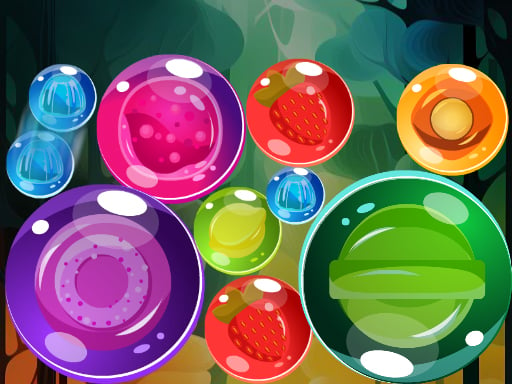
Fruit Candy Merge is a casual drop-and-match puzzle game where players release fruit candies from the top of the screen to form matching combinations. By dropping pieces into place, identical candies unite into new fruity creations while earning points. Players can also utilize a dedicated removal tool to eliminate the smallest candy pieces and free up vital space on the stage.
Fruit Candy Merge presents a vibrant puzzle environment centered on dropping colorful treats into an active play area. The core gameplay loop revolves around positioning candies at the top of the board and letting gravity do the work. When two identical fruit candies touch, they merge into a newer, larger combo, rewarding points and altering the layout of the resting pieces.
As the playing area fills with various fruit candy instances, spatial management becomes the primary challenge. Physics and collision play a continuous role as rolling or settling pieces shift when fresh items arrive. To assist with crowded arrangements, the game features a Remove Smallest Item option, giving players a tactical way to clear tiny candies that might otherwise obstruct bigger mergers.
Your goal
The main objective in Fruit Candy Merge is to maximize your total score by continuously merging identical candies to create higher-tier combos. Players strive to keep the playfield organized, creating chain reactions and sustaining continuous merges while preventing the stage from becoming cluttered with unmerged fruit candies.
How to play Fruit Candy Merge
1. Observe the current fruit candy queued at the top of the screen and identify matching candies already sitting on the stage.
2. Tap the screen to drop the fruit candy into your desired drop column.
3. Guide identical candies so they collide and merge into new, higher-level fruit combos.
4. Rack up score points with every successful merge you complete across the board.
5. Activate the Remove Smallest Item action when tiny candy pieces clutter the board or block potential matches.
Controls and device support
Tap or click the screen to drop incoming fruit candies from above. Select the Remove Smallest Item on-screen button whenever you need to clear tiny fruit candy instances from the play area.
- Controls: Mouse or touch
- Device support: Desktop + mobile
- Game frame: 960 x 1280
Rules to keep in mind
- Candies enter from above and fall downward into the stage upon tapping.
- Only identical fruit candies will merge together when making contact.
- Successful merges yield points and produce newly upgraded fruit candy types.
- The Remove Smallest Item feature targets and clears the smallest candy pieces from the board.
What makes the challenge interesting
The core appeal of Fruit Candy Merge lies in physics-driven planning and spatial anticipation. Because candies react dynamically upon impact, each drop requires assessing not just where a piece lands, but where it might roll or push neighboring items. Placing matching pieces close together creates opportunities for immediate combinations, but dropping mismatched items can bury smaller pieces underneath larger ones.
A key strategic tradeoff involves deciding when to use the Remove Smallest Item ability. While tiny candies are easy to merge early on, they can become trapped beneath larger fruits as the session continues. Knowing when to clear minor clutter helps maintain a clean layout, opening up pathways for larger matching chains and higher point gains.
Tips for Fruit Candy Merge
- Try to group candies of similar sizes near each other to prevent small pieces from getting wedged beneath large items where they cannot be reached.
- Scan the stage before dropping to identify natural slopes and gaps where a rolling fruit candy might settle into an existing identical match.
- Save the Remove Smallest Item button for critical moments when tiny fruit candies are directly blocking high-value merges.
- Avoid dropping candies impulsively down the center; distribute items across the width of the board to maintain balanced vertical space.
Stages and progression
As your run progresses, creating larger combos increases your accumulated score and introduces increasingly varied candy types to the stage. Because larger candies occupy significantly more physical space, the room available for error naturally tightens as your board fills.
Players looking to improve their performance should focus on establishing a steady dropping rhythm and building tiered arrangements, striving to keep higher-value combos toward one side of the stage while managing new entries on the other.
Playing on different devices
Fruit Candy Merge runs in a vertical 960x1280 resolution, making it well-suited for portrait orientations on mobile browsers as well as centered gameplay windows on desktop screens. Simple tap or click interactions allow for effortless one-handed play across touchscreens and mouse-driven devices alike.
The skills behind the game
Fruit Candy Merge brings together elements of classic matching puzzles and arcade physics games. Rather than swapping tiles on a rigid grid, players drop dynamic objects that interact physically within an open container, rewarding both spatial foresight and opportunistic merging.
Fans of matching games will appreciate the colorful fruit and candy theme, while puzzle enthusiasts can enjoy the ongoing challenge of organizing irregular shapes and building cascading combinations as the stage evolves.
Who will enjoy this game
For players searching for an engaging merge puzzle game to enjoy in short sessions, Fruit Candy Merge offers accessible drop mechanics with satisfying chain reactions. The game requires no complex setup, allowing casual puzzle fans to jump straight into matching colorful fruit pieces.
Practicing with different drop placements helps players refine their board management skills, making the fruit candy merge game experience rewarding whether you are looking for a quick break or aiming to build the largest possible fruit combos.
Frequently asked questions
How do you merge items in Fruit Candy Merge? You merge items by dropping identical fruit candies so they make contact with one another. When two matching candies collide, they combine to form a new fruit combo and award score points.
What does the Remove Smallest Item button do? The Remove Smallest Item button clears tiny fruit candy instances currently sitting on the board, helping you remove low-tier clutter and create space for larger matching opportunities.
Are there physics elements involved during gameplay? Yes, candies dropped from above interact with gravity and roll over existing items on the stage, meaning their resting position depends on how they bounce and settle among other pieces.
Can I play Fruit Candy Merge on desktop and mobile browsers? Yes, the game is configured in a vertical display format and uses straightforward tap or click controls, making it accessible on both desktop computers and mobile devices.
Something not right?
Tell us if the game does not load, the information is wrong or the content needs review.
Report a problem ›