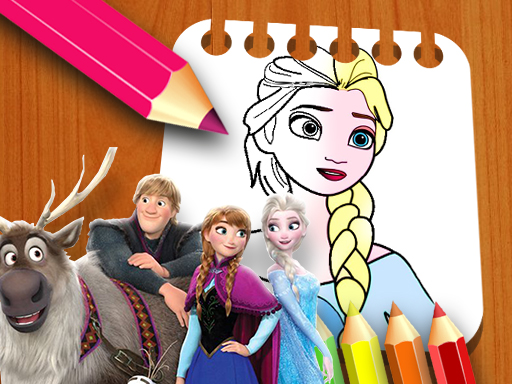
About Frozen II Coloring Book
Frozen II Coloring Book is a creative digital coloring title suitable for players of all ages. Offering a selection of eight distinct character illustration pages, the game provides an accessible drawing canvas where you can freely experiment with vibrant color palettes, customizable brush tip sizes, and corrective eraser tools directly within your browser.
Frozen II Coloring Book presents players with an inviting artistic space designed around themed line-art illustrations. Upon loading the title, you are presented with eight individual picture outlines ready for coloring. The user interface places all essential artistic tools along the bottom of the screen, making palette selection and tool adjustments immediate and straightforward. Players can select any color from the available palette and apply it directly onto the drawing board.
Unlike structured puzzles with strict fail conditions, the game focuses on freeform artistic recreation. You control the stroke width using the point size selector, allowing for broad backdrop coverage or precise line detailing. An integrated eraser tool lets you correct mistakes or reshape colored areas at your own pace without pressure.
Your goal
The primary objective in Frozen II Coloring Book is to complete and customize any of the eight available illustration pages using your personal artistic choices. You achieve this by selecting hues from the palette, adjusting your coloring point size to suit different areas, and applying smooth brush strokes to bring the uncolored line drawings to life.
How to play Frozen II Coloring Book
1. Browse the selection screen and click on one of the eight available drawing pages to load the canvas.
2. Look at the bottom toolbar to choose your preferred color swatch from the provided palette.
3. Select your preferred point size from beneath the page to adjust the thickness of your coloring tool.
4. Click and hold down the mouse button while dragging across the page to apply smooth color strokes.
5. Select the eraser tool whenever you wish to clear or refine sections of your drawing canvas.
Controls and device support
Left Click: Select illustration pages, choose palette colors, switch to the eraser, or modify brush point size
Left Click and Drag: Apply continuous color or erase markings across the active drawing canvas
- Controls: Mouse or touch
- Device support: Browser
- Game frame: 800 x 600
Rules to keep in mind
- You must select a specific color or the eraser tool from the bottom toolbar before applying marks to the drawing.
- Color application requires actively holding and dragging the pointer across the canvas area.
- You may freely switch between all eight available outline pages at any time during your play session.
What makes the challenge interesting
The core gameplay loop centers on creative freedom and motor control. Because the game utilizes a continuous drag-to-color mechanic rather than an automatic fill bucket, players directly influence the texture and coverage of each stroke. Choosing the right point size beneath the canvas is essential for managing broad background fills versus delicate character outlines. With eight separate templates available, the focus remains entirely on exploring varied color combinations and refining digital coloring techniques without time limits or penalty systems.
Tips for Frozen II Coloring Book
- Set the point size to its widest setting when filling expansive backgrounds, then switch down to a finer point for outlines.
- Use steady, overlapping drag strokes to create uniform color distribution across open sections of the illustration.
- Keep the eraser ready to tidy up any stray strokes that cross outside the character borders.
The skills behind the game
Categorized under puzzle and creative drawing titles, Frozen II Coloring Book offers relaxed, visual interaction. Unlike logic-heavy puzzle formats with strict solutions, art-oriented games emphasize fine motor coordination, spatial awareness, and creative presentation within structured outlines.
Who will enjoy this game
For players searching for an engaging coloring game online or casual puzzle game online, Frozen II Coloring Book provides an open canvas experience. It delivers instant browser play without complex setups, making it an accessible frozen ii coloring book game for audiences of all skill levels.
Games with a similar feel
Happy Color: While Happy Color relies on a guided color-by-number tap mechanic to fill predefined zones, Frozen II Coloring Book emphasizes freeform brush dragging, point size adjustments, and manual eraser corrections.
Frequently asked questions
How many coloring pages are available in Frozen II Coloring Book? The game features eight distinct illustration pages that players can choose from freely at the start of their coloring session.
Can you fix coloring mistakes in the game? Yes, an eraser tool is located under the coloring page, allowing you to remove unwanted marks and refine your artwork whenever needed.
How do you adjust line thickness when coloring? You can adjust the drawing thickness by selecting different point sizes located beneath the active coloring page before painting.
Something not right?
Tell us if the game does not load, the information is wrong or the content needs review.
Report a problem ›