About Frisbee 3D
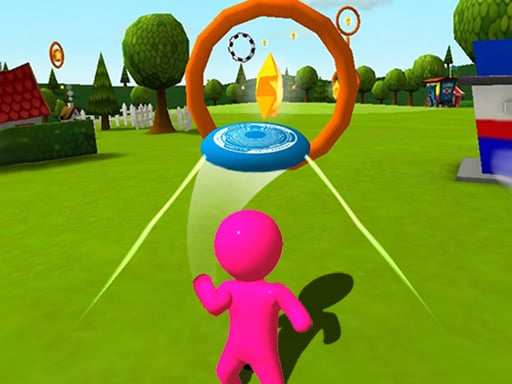
Frisbee 3D is a casual sports game where players launch a flying disc and steer its flight through open airspace toward a target basket. Each flight requires careful midair steering to pass cleanly through suspended rings while avoiding hazardous trees and environmental obstacles along the flight path.
Frisbee 3D presents a bright, three-dimensional outdoor throwing challenge built around steering and precision. The core gameplay loop begins with a single launch input that sends the disc gliding forward through the sky. Once airborne, your focus shifts immediately to continuous steering, swiping smoothly left and right to align with floating rings that mark the optimal flight corridor.
Successfully navigating each route requires anticipating environmental hazards such as tall trees and assorted obstacles standing between the thrower and the goal. The run concludes when your disc lands in the target basket, which unlocks the next stage in the sequence. Because subsequent levels introduce fresh obstacles and tighter layouts, players must refine their handling to keep the disc stable over longer, more demanding glide paths.
Your goal
The primary objective in Frisbee 3D is to guide your airborne disc cleanly through every floating circle and land it safely inside the target basket. Players strive to maintain a smooth flight line without colliding with trees or stage obstacles, unlocking successive levels and conquering progressively tougher flight layouts.
How to play Frisbee 3D
1. Start the stage by tapping or clicking to release and launch your disc into the air.
2. Observe the flight path ahead to spot the sequence of floating target circles.
3. Swipe or drag left and right to adjust your trajectory as the disc glides forward.
4. Thread through each circle while steering clear of trees and surrounding obstacles.
5. Steer into the final basket to complete the stage and unlock the next level.
Controls and device support
Launch your disc using a mouse click or screen tap, then swipe or drag left and right across the play area to steer midair movement.
- Controls: Mouse or touch
- Device support: Desktop + mobile
- Game frame: 350 x 600
Rules to keep in mind
- Launching the disc requires an initial click or tap input to begin flight.
- Horizontal flight direction is adjusted exclusively by swiping left and right.
- Collisions with trees or course obstacles interrupt the flight path.
- Reaching and landing in the target basket successfully unlocks the next level.
What makes the challenge interesting
The defining skill in Frisbee 3D centers on lateral steering control and flight corridor anticipation. Because the disc glides steadily forward after launch, players must balance aggressive course corrections with smooth, controlled adjustments. Oversteering risks sending the disc careening into flanking trees or past narrow target rings, while understeering leaves you unable to line up with the basket.
This creates an engaging rhythm of reading upcoming terrain, centering the disc well before reaching tight gates, and maintaining a steady heading under shifting stage conditions. The satisfaction comes from threading clean aerial lines through crowded outdoor environments.
Tips for Frisbee 3D
- Look one or two rings ahead rather than focusing solely on your disc's current position. Anticipating future turns prevents sudden overcorrection near obstacles.
- Make small, measured horizontal swipes instead of broad, erratic gestures. Gentle steering keeps the flight stable and prevents unexpected drift into nearby trees.
- Center your disc through each target circle as early as possible. Entering rings cleanly leaves more room to react to whatever obstacle lies immediately behind them.
- Keep your focus centered on the final basket during the approach. Aligning your angle well ahead of time ensures a smooth entry into the target zone.
Stages and progression
Progression in Frisbee 3D is structured across sequential stages, each unlocked by successfully landing the disc in the target basket. As you advance, stages introduce increased difficulty through new obstacle types and more demanding flight paths.
To tackle harder stages, players should focus on building consistent steering habits. Practicing smooth, incremental lane changes and learning to read environmental gaps early will help you adapt as courses become tighter and more populated with hazards.
Playing on different devices
Frisbee 3D features a vertical 350 by 600 display format that works well across both desktop web browsers and mobile touchscreens. On mobile devices, direct touch swiping offers natural left-and-right steering. On desktop setups, clicking and dragging with a mouse provides precise directional adjustments throughout each throw.
The skills behind the game
Frisbee 3D fits naturally within the casual sports genre, combining recognizable outdoor athletic equipment with physics-driven steering mechanics. Rather than simulating complex team sports rules or extensive athletic management, the game focuses squarely on the pure physical trajectory of a single thrown object.
This accessible design makes it an ideal pick-and-play experience for casual sports fans who enjoy precision flying challenges, target navigation, and responsive steering mechanics in three-dimensional environments.
Who will enjoy this game
Players looking for an engaging sports game online will appreciate the straightforward arcade flow of Frisbee 3D game sessions. The intuitive launch-and-steer system allows anyone to jump straight into action without studying complicated control layouts.
Whether playing quick casual rounds on a mobile browser or practicing steady disc control on a desktop setup, this frisbee 3d title provides quick, satisfying gameplay centered on timing, route planning, and obstacle avoidance.
Frequently asked questions
How do you control the disc in Frisbee 3D? You launch the disc with an initial tap or click, then swipe or drag left and right to steer its flight path through the air.
What is required to complete a level in Frisbee 3D? You complete a stage by guiding the disc through the course, avoiding obstacles and trees, and landing successfully inside the target basket to unlock the next level.
What happens as you advance through the game? Each subsequent stage brings increasing difficulty, introducing new obstacle layouts and tighter aerial courses that test your steering precision.
Something not right?
Tell us if the game does not load, the information is wrong or the content needs review.
Report a problem ›