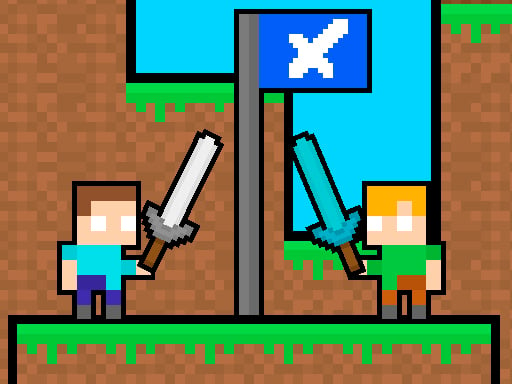
About Friends Battle Swords Drawn
Friends Battle Swords Drawn is a competitive two-player 2D arcade combat game where rivals face off in a close-quarters duel. Armed with sharp blades, both combatants must navigate the arena, eliminate their opponent with well-timed sword strikes, and maintain control of the objective flag for a full 20 seconds to secure the round.
Representing the third installment in the Friends Battle series, Friends Battle Swords Drawn sets two players directly against one another in a shared screen battleground. Each participant takes command of a distinct warrior—one designated as the Red player and the other as the Blue player. The action combines fast platform navigation with tense melee combat, requiring players to balance offensive pushes toward the enemy flag with the protection of their own territory.
Victory in this pixelated arena hinges on holding position at the flag for 20 seconds while keeping the opposing fighter at bay. Because both characters are equipped with lethal swords capable of striking down the rival, every duel turns into a rapid cycle of positioning, defensive retreats, and swift counter-attacks across the 2D layout.
Your goal
The main goal in Friends Battle Swords Drawn is to capture the flag by remaining within its zone for 20 seconds. Players must actively pursue the enemy flag, set up their own defenses, and use their swords to eliminate the rival before the opponent can complete their own capture timer.
How to play Friends Battle Swords Drawn
1. Situate both players at the keyboard, with one taking the Red fighter and the other controlling the Blue fighter.
2. Navigate across the 2D arena toward the flag location using WASD for the Red player or the Arrow keys for the Blue player.
3. Execute a sword attack by pressing S as Red or the Down Arrow as Blue whenever the opponent moves within striking distance.
4. Hold your position at the flag zone for a continuous 20 seconds while fending off incoming attacks to win the contest.
Controls and device support
The Red player navigates using the WASD keys and strikes with the sword by pressing S. The Blue player moves using the Arrow keys and executes sword attacks by pressing the Down Arrow.
- Controls: WASD + arrow keys
- Device support: Browser
- Game frame: 800 x 600
Rules to keep in mind
- A player must remain at the flag for 20 seconds to achieve the required capture and win the match.
- Red combatants utilize S to swing their sword, while Blue combatants use the Down Arrow to attack and eliminate the rival.
- Fighters must balance setting up their own flag position while advancing across the arena to claim the enemy objective.
What makes the challenge interesting
The core dynamic of Friends Battle Swords Drawn revolves around territory control under direct melee threat. Because staying near the flag for 20 seconds is mandatory for victory, camping the objective creates a high-stakes standoff where one mistimed attack can leave a player vulnerable to an enemy sword strike. Success demands precise timing, knowing when to hold ground and when to step forward aggressively to interrupt the opponent's capture progress.
Tips for Friends Battle Swords Drawn
- Time your sword swings carefully as your rival approaches; swinging too early leaves you open to an immediate counter-attack while defending the capture point.
- Keep constant track of the 20-second capture duration to judge whether you should contest the flag directly or bait the enemy away from the objective zone.
- Coordinate your keyboard hand placement before the round begins so both players can execute movement and attack keys smoothly without accidental hand clashes.
- Advance toward the enemy's flag rather than remaining completely passive, applying offensive pressure to prevent the rival from establishing easy territorial control.
Stages and progression
As the third installment in the series, match-to-match development comes from refined timing, tactical positioning, and adapting to your opponent's dueling habits across repeated flag skirmishes. Players improve by developing better spatial awareness around the capture area and mastering the precise range of their sword strikes during heated 20-second standoffs.
Playing on different devices
The game operates in an 800 x 600 window designed for local shared-keyboard play. Red uses WASD on the left side of the keyboard while Blue utilizes the Arrow cluster on the right, ensuring both combatants can control their characters simultaneously without input obstruction.
The skills behind the game
As an action-focused arcade release, Friends Battle Swords Drawn delivers quick, high-intensity rounds designed around accessible controls and straightforward competitive goals. Arcade duel games emphasize immediate responsiveness, clear visual cues, and head-to-head friction, allowing players to jump directly into the action without complex setup or lengthy tutorials.
Who will enjoy this game
Players looking for a competitive friends battle swords drawn experience will appreciate the direct two-player split-keyboard mechanics that turn every match into a battle of reflexes. As an engaging arcade game online, it suits friends seeking quick-fire dueling sessions where territorial defense and sword combat collide on a single screen.
Games with a similar feel
Minecraft: While Minecraft is an expansive 3D voxel sandbox centered on open-ended exploration, crafting, and building, Friends Battle Swords Drawn shares a block-inspired pixel aesthetic but focuses squarely on immediate 2D arcade flag-capture duels. Players seeking open-world survival should look to Minecraft, whereas those wanting fast local sword skirmishes will prefer Friends Battle.
Frequently asked questions
How do you win a round in Friends Battle Swords Drawn? A player wins the round by staying at the flag zone for a total of 20 seconds while defeating or outmaneuvering the opposing player with their sword.
What are the attack controls for Red and Blue players? The Red player strikes with their sword by pressing the S key, while the Blue player attacks by pressing the Down Arrow key.
Can two players play simultaneously on the same computer? Yes, the game is built for shared local play using split keyboard bindings: WASD for the Red player and Arrow keys for the Blue player.
Something not right?
Tell us if the game does not load, the information is wrong or the content needs review.
Report a problem ›