About FreelancerSim
FreelancerSim puts you in the role of a remote worker balancing digital tasks and basic survival needs. As a freelancer working from home, you earn cash by typing required words or detonating viruses on computers. The income you collect funds your daily meals and upgrades for your living space, but neglecting your hunger leads to defeat and forces you to restart your career from scratch.
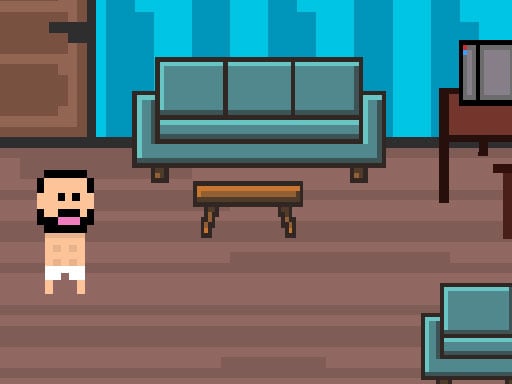
FreelancerSim presents a 2D pixel simulation of working from home. Your character navigates their living and working space to take on computer tasks, choosing between completing text assignments by typing target words and neutralizing virtual threats by detonating computer viruses. Each successful task yields income that flows directly into your personal budget.
Earning money is only half the battle, as your freelancer must actively spend their wages to stay alive. Cash can be used to feed yourself when hunger sets in or to purchase items for your household. If you run out of funds and go hungry, your character perishes and your entire run restarts from the beginning, creating a steady cycle of earning, eating, and managing domestic priorities.
Your goal
The primary objective in FreelancerSim is to sustain a stable work-from-home routine by consistently earning money through typing and virus tasks while avoiding starvation. To succeed over time, players aim to build a comfortable household buffer by funding regular meals and acquiring home furnishings without letting their freelancer's hunger trigger a complete reset.
How to play FreelancerSim
1. Move your character around the room using the navigation controls to position yourself near your computer setup.
2. Begin earning money by taking on work tasks, such as typing the required prompt words accurately on your keyboard.
3. Tackle maintenance chores on your workstation by detonating incoming viruses to secure additional earnings.
4. Monitor your character's needs and spend your earned wages on food before hunger causes a fatal game-over reset.
5. Use surplus earnings to purchase items for your home and establish a consistent routine between typing tasks and self-care.
Controls and device support
Move back and forth with the WASD keys on desktop keyboards, or use the dedicated on-screen mobile control buttons when playing on a touchscreen device.
- Controls: See in-game controls
- Device support: Desktop + mobile
- Game frame: 800 x 600
Rules to keep in mind
- Income is generated by typing the required words or by detonating viruses on computers.
- Earned money can be spent to buy food for survival or to purchase items for your home.
- If your character goes hungry and dies, all progress is lost and everything starts over from scratch.
What makes the challenge interesting
The central appeal of FreelancerSim lies in balancing immediate survival pressure with steady keyboard productivity. Unlike purely educational typing trainers that isolate text entry into sterile drills, this title embeds typing words into a broader simulation loop. Players must split their attention between clearing computer tasks and managing biological upkeep.
This structure creates a distinct resource management tradeoff. Spending time on typing prompts and detonating viruses generates the funds needed to buy food, but pausing work to purchase sustenance cuts into your active earning window. Developing a consistent typing rhythm while keeping an eye on your hunger creates an engaging rhythm of work, reward, and domestic upkeep.
Tips for FreelancerSim
- Prioritize purchasing food over decorative household items during your early sessions. Splurging on furniture while low on funds risks sudden starvation and a full reset.
- Focus on clean, deliberate keystrokes when typing required words. Rushing through prompts often leads to typos that slow down your overall money-making rate.
- Alternate smoothly between typing assignments and detonating viruses to maintain a steady stream of income for upcoming meal expenses.
- Keep a small financial reserve on hand instead of spending your wallet down to zero, ensuring you can buy food immediately when hunger strikes.
Stages and progression
Progression in FreelancerSim is driven by personal survival longevity and home development rather than rigid linear mission stages. Because dying of hunger resets your journey from scratch, your long-term advancement relies on refining your daily workflow and steadily accumulating household upgrades across successful sessions.
To build consistency, treat each run as an opportunity to establish a safer financial margin. Aim to complete typing tasks more cleanly and handle virus threats promptly so that buying food becomes an effortless part of your routine rather than an emergency scramble.
Playing on different devices
Desktop users navigate their workspace using the WASD keys, allowing one hand to handle positioning while maintaining quick access to standard typing input. On mobile and touchscreen devices, dedicated on-screen control buttons provide the necessary navigation inputs for maneuvering through the environment.
The skills behind the game
Within the simulation and arcade categories, life simulators often combine routine real-world activities with high-stakes resource meters. FreelancerSim blends the thematic charm of 2D pixel life management with active micro-challenges like word typing and virus clearing, giving casual players a tangible gameplay loop beyond simple menu navigation.
Who will enjoy this game
Players looking for an engaging typing game online often seek experiences that go beyond basic speed tests. FreelancerSim pairs typing practice with survival simulation elements, making it an entertaining choice for anyone wanting to practice everyday keyboard precision while managing a virtual home and avoiding starvation.
Games with a similar feel
ZType: ZType turns word typing into an intense space arcade shooter where each correct letter fires at incoming hostile projectiles. FreelancerSim shares the core mechanic of typing prompts under pressure, but replaces the outer-space combat theme with a domestic work-from-home life simulator where typed words fund food and home items.
TypeRacer: TypeRacer focuses purely on competitive speed typing across full text passages formatted as a racetrack. FreelancerSim, in contrast, integrates word entry into a broader pixel survival loop where earned wages must be budgeted between buying sustenance and outfitting your apartment.
Frequently asked questions
How do you make money in FreelancerSim? You earn cash by working from home on your computer, specifically by typing required words correctly or by detonating computer viruses.
What happens if your character runs out of food? If your freelancer goes hungry and perishes, your game ends immediately and all progress restarts from the very beginning.
What can you buy with your earned income? Earned wages can be spent on food to keep your character fed and alive, as well as on various items to furnish your home.
Can FreelancerSim be played on both desktop and mobile devices? Yes, desktop players can navigate with WASD keys, while mobile users can control movement using available on-screen buttons.
Something not right?
Tell us if the game does not load, the information is wrong or the content needs review.
Report a problem ›