Official listing
Game description
touch and jump
Hypercasual game
fly man is an accessible 2D hypercasual action game built around straightforward click mechanics. Players jump and fly through quick-reaction gameplay, responding to on-screen movement with simple inputs. Designed for quick browser sessions, it focuses on direct engagement where every touch and jump dictates your airborne momentum across the 2D action space.
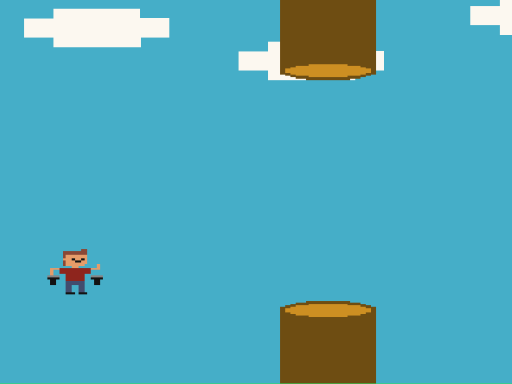
Choose Play now to load the game.
Official listing
touch and jump
From the game listing
mouse left click
Open this card to load the gameplay video.
fly man is an accessible 2D hypercasual action game built around straightforward click mechanics. Players jump and fly through quick-reaction gameplay, responding to on-screen movement with simple inputs. Designed for quick browser sessions, it focuses on direct engagement where every touch and jump dictates your airborne momentum across the 2D action space.
In fly man, the core loop emphasizes immediate action and timing. Categorized as a hypercasual title, the game strips away complex menus and elaborate configurations in favor of instant playability. The primary interaction is built entirely on the concept of touch and jump, challenging players to maintain flight and maneuver in a 2D setting.
Rendered in an 800 by 600 display resolution, fly man provides a focused visual window for click-based navigation. Whether testing reflexes or seeking brief entertainment, the title offers streamlined arcade-style action driven solely by responsive single-button timing.
The main goal in fly man is to successfully time your clicks to touch and jump, sustaining your character's flight across the 2D action environment. Players aim to stay active as long as possible by coordinating left-click inputs to handle airborne movement smoothly without losing control.
1. Launch the fly man game window inside your browser at the standard 800 by 600 display view.
2. Use the left mouse button to initiate the primary touch and jump command.
3. Click periodically to maintain your character's height and manage airborne flight.
4. Continue timing your mouse clicks steadily to keep the action going in the 2D space.
Left Mouse Click: Touch and jump
The central gameplay focus of fly man revolves around rhythmic timing and single-input control. Because navigation relies on mouse clicks to jump and stay aloft, players must develop a steady cadence rather than clicking erratically. Maintaining a consistent click rhythm allows for smoother trajectory management within the 2D arena. The hypercasual structure ensures that gameplay starts instantly, placing the full emphasis on hand-eye coordination and immediate reaction speed.
As part of the hypercasual genre, fly man delivers fast, unencumbered arcade entertainment. Hypercasual titles emphasize lightweight mechanics that anyone can pick up instantly, relying on minimal inputs such as single-button clicking to create an engaging experience without requiring complex tutorials.
Players looking for fly man or searching for a quick fly man game will find an accessible 2D flying experience centered entirely on simple click-and-jump action suitable for short web sessions.
What controls are used to play fly man? fly man is played using the left mouse click to perform touch and jump actions during flight.
What genre does fly man belong to? fly man is classified as a 2D hypercasual action game centered on simple click mechanics.
Tell us if the game does not load, the information is wrong or the content needs review.
Report a problemExplore popular games by category, shared tags and site-wide activity.