Official listing
Game description
Action Adventure Flappy Game How far can you go? Dodge the columns, save the Rocket. Enjoy!! How to Play? Play with Left Mouse Button or Space Key.
Hypercasual game
FLAPPY ROCKET is a fast-paced hypercasual arcade game where players pilot a rocket through hazardous obstacles. Your main goal is to dodge vertical columns and save the rocket from destruction while attempting to see how far you can travel. With simple mouse or keyboard controls, every tap keeps your craft airborne across an endless gauntlet.
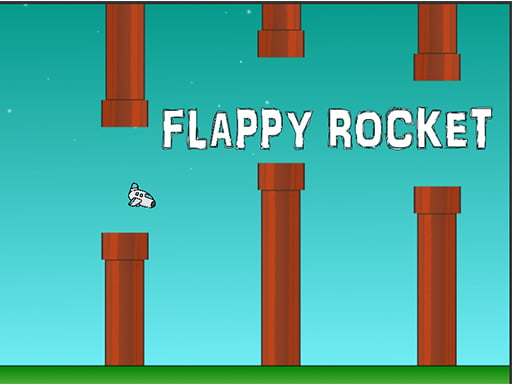
Choose Play now to load the game.
Official listing
Action Adventure Flappy Game How far can you go? Dodge the columns, save the Rocket. Enjoy!! How to Play? Play with Left Mouse Button or Space Key.
From the game listing
Play with Left Mouse Button or With Space Key
Open this card to load the gameplay video.
FLAPPY ROCKET is a fast-paced hypercasual arcade game where players pilot a rocket through hazardous obstacles. Your main goal is to dodge vertical columns and save the rocket from destruction while attempting to see how far you can travel. With simple mouse or keyboard controls, every tap keeps your craft airborne across an endless gauntlet.
In FLAPPY ROCKET, classic arcade bird-flapping mechanics are combined with a futuristic rocket theme to deliver an engaging endless flying challenge. Players take control of a lone rocket navigating through tight corridors bordered by tall columns. Because the craft is constantly pulled downward, maintaining consistent flight requires attentive timing and steady hand-eye coordination. Surviving requires navigating narrow vertical openings while reacting quickly to the terrain. Each moment demands full concentration, as one wrong maneuver or delayed press leads to an immediate impact with the obstacles. The minimalist presentation and immediate restart loop make it a quintessential hypercasual title suited for quick browser sessions and score-chasing enthusiasts looking to test their reflexes.
The primary objective in FLAPPY ROCKET is to save your rocket and travel as far as possible without colliding with any columns. To achieve a high survival distance, you must accurately thread the craft through consecutive openings. Every cleared obstacle extends your flight, challenging your focus and precision as you push your endurance further across the endless track.
1. Launch the game and prepare to steer your rocket into the obstacle course.
2. Click the Left Mouse Button or press the Space Key to lift your rocket upward.
3. Time your inputs to safely thread through the gaps between vertical columns.
4. Keep a steady rhythm to avoid plunging to the floor or colliding with incoming structures.
5. Continue flying as far as possible to maximize your overall distance record.
Left Mouse Button: Flap or boost the rocket upward to maintain flight
Space Key: Flap or boost the rocket upward to maintain flight
Gameplay in FLAPPY ROCKET centers on fine rhythmic control and immediate spatial judgment. Rather than steering freely across a 2D plane, the rocket gains altitude only in brief bursts whenever you click the mouse or press the spacebar. Gravity constantly pulls the craft down, requiring players to gauge the exact trajectory needed to enter and exit gaps cleanly. Managing this momentum is essential, as over-tapping can propel the rocket straight into an overhead column, while hesitating leads to a fatal drop. Success relies on composure, consistent cadence, and quick visual processing.
As a hypercasual arcade title, FLAPPY ROCKET embodies the genre's defining characteristics of instant playability, straightforward mechanics, and a high replay factor. Hypercasual games distill gameplay down to a single core mechanic—in this case, single-button altitude control—allowing players to jump in without tutorials. The endless structure encourages repeat attempts, making it an accessible reflex test for quick entertainment on modern web browsers.
Players searching for flappy rocket or a flappy rocket game will discover an accessible tap-to-fly experience that replaces traditional bird avatars with a swift rocket. The familiar obstacle-dodging formula offers an immediate pick-up-and-play loop that tests patience and timing. Whether practicing short bursts or aiming for a new distance milestone, the game provides a streamlined endless challenge within the casual arcade space.
What controls are available in FLAPPY ROCKET? You can control your rocket using either the Left Mouse Button or the Space Key on your keyboard. Each press lifts the craft upward to help you avoid incoming obstacles.
What is the main goal in FLAPPY ROCKET? The objective is to dodge columns and protect your rocket from crashing, traveling as far as possible through the endless arcade course to achieve your best distance.
Can I play FLAPPY ROCKET directly in my desktop browser? Yes, the game runs directly in standard web browsers at an native display resolution of 960 by 600, using mouse clicks or the spacebar for straightforward desktop control.
Tell us if the game does not load, the information is wrong or the content needs review.
Report a problemExplore popular games by category, shared tags and site-wide activity.


















