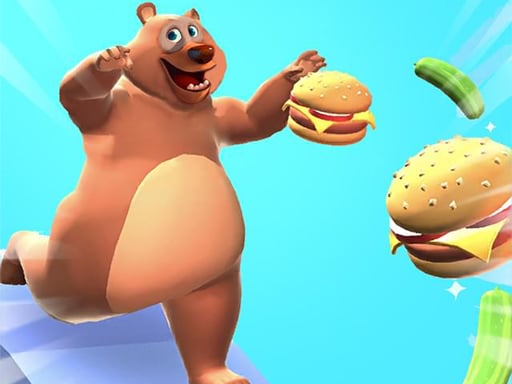
About Fat OR Thin
Fat OR Thin is a casual 3D runner where players help a furry bear get back into shape after winter hibernation. Operating as a responsive browser title, the game challenges you to navigate obstacle tracks while managing the character's diet along the route. By actively dodging junk food temptations and reaching the finish line across dozens of stages, players experience an accessible mix of reflex navigation and dietary decision-making.
Set along bright linear tracks, Fat OR Thin places players in charge of a charming bear aiming to shed extra weight following seasonal rest. The central loop revolves around steering through an obstacle course while actively surveying the items scattered directly across your running path. Rather than merely surviving physical road hazards, you must continuously monitor what the bear consumes before crossing each course's final threshold.
The track environment is filled with contrasting dietary pickups alongside moving or static obstacles. Rich fast foods like pizza slices, burgers, and doughnuts tempt the character, requiring deliberate maneuvers to avoid them in favor of healthier alternatives. Success in each run depends on striking a reliable balance between careful track positioning and prompt item evaluation so the bear finishes each section in optimal condition.
Your goal
The main goal in Fat OR Thin is to successfully complete each course by safely passing through the obstacle layout and crossing the finish marker. Along the journey, your ongoing target is to maintain nutritional discipline by giving up calorie-dense items like burgers, doughnuts, and pizza slices, instead collecting healthier snacks to assist the bear's recovery after hibernation.
How to play Fat OR Thin
1. Launch the game in your browser and click or tap the screen to initiate the run.
2. Scan the upcoming lane ahead to identify physical course obstacles and approaching food items.
3. Steer clear of greasy fast foods such as burgers, pizza, and sweet doughnuts scattered along the floor.
4. Guide the bear toward healthier food options to support its post-hibernation wellness goal.
5. Maintain your lane control through the hazards until you cross the designated finish line.
6. Proceed forward to tackle the next challenge among the more than 30 available stages.
Controls and device support
The supplier instructions specify mouse click or tap to play, allowing players to guide movement using standard pointer or touch inputs.
- Controls: Mouse or touch
- Device support: Desktop + mobile
- Game frame: 800 x 600
Rules to keep in mind
- Navigate through the designated obstacle course and reach the finish line to complete each stage.
- Watch your diet along the track by rejecting burgers, pizza, and doughnuts in favor of healthier nutrition.
What makes the challenge interesting
The core gameplay of Fat OR Thin centers on fast visual scanning and lane discipline. Unlike standard runners that focus entirely on dodging stationary walls, this title forces players to process two distinct categories of road elements simultaneously. You must evaluate incoming geometry to avoid collisions while actively categorizing food pickups into beneficial nutrition or weight-adding indulgences.
This dual priority introduces a constant tradeoff between safe travel and dietary precision. Taking a wide detour around an obstacle might push you directly into an unwanted doughnut or burger, while chasing a healthy item requires commitment to a narrow corridor. Finding a steady steering cadence helps maintain control across the run without panic reactions.
Tips for Fat OR Thin
- Look two obstacles ahead rather than focusing on the bear's feet. Spotting clusters of pizza or burgers early prevents last-second swerves that push you into hazards.
- Prioritize track survival over risky snacks. If reaching a healthy item forces you too close to an obstacle, choose the clearer lane to keep your run alive.
- Memorize junk food appearances so you instinctively avoid round doughnuts and flat pizza slices without pausing your forward movement across the path.
- Use gentle, continuous steering adjustments. Making violent directional cuts often throws the bear across multiple lanes, unintentionally gathering unwanted high-calorie food.
Stages and progression
Fat OR Thin features more than 30 distinct levels, giving players an extensive sequence of obstacle tracks to conquer. As you advance through the series, the courses continue to test both your navigation consistency and your ability to make rapid nutritional choices under ongoing movement pressure.
To build reliable mastery across this multi-level journey, adopt a methodical practice mindset. Treat early courses as calibration runs to establish comfortable pointer sensitivity and visual rhythm. When encountering complex obstacle configurations in later stages, focus first on securing a clean path to the finish before fine-tuning optimal item routes.
Playing on different devices
Built on HTML5 architecture with a native canvas ratio of 800 by 600, the game runs directly inside standard web browsers without dedicated installations. Mouse click inputs provide precise steering control on desktop displays, giving players crisp response when weaving through tight gaps.
Mobile users can utilize direct tap gestures to guide the bear along the course. For touchscreens, holding the device securely and using steady thumb drags prevents your hand from blocking the forward view of upcoming food pickups and obstacles.
The skills behind the game
Belonging to the arcade and casual runner space, Fat OR Thin delivers immediate, pick-up-and-play entertainment powered by responsive HTML5 technology. Arcade runners emphasize quick perceptual checks, rhythm, and clear visual contrasts over elaborate narrative setups or deep inventory systems. The 3D presentation provides distinct depth of field, enabling players to anticipate route hazards several paces before contact.
Within the casual domain, the game suits quick practice sessions where players want uncomplicated mechanics paired with lighthearted thematic goals. The straightforward input design ensures that anyone can jump in instantly, practicing hand-eye coordination and lane awareness during short play breaks.
Who will enjoy this game
Players looking for a fat or thin game often seek colorful 3D obstacle courses that combine classic dodging action with body-shaping mechanics. Fat or thin presents this dynamic through post-hibernation recovery, giving every lane choice an immediate visual and thematic purpose.
If you enjoy discovering an arcade game online that loads effortlessly without long setup times, this title fits into short leisure sessions. Engaging with over 30 levels provides a satisfying way to practice rapid lane switching, hazard avoidance, and selective collection in a light, approachable format.
Games with a similar feel
Fall Guys: Both Fat OR Thin and Fall Guys feature playful obstacle courses requiring timed maneuvers around physical hazards. However, Fall Guys emphasizes competitive multiplayer races with dynamic physical collisions, whereas Fat OR Thin delivers a relaxed browser runner focused on personal diet management and avoiding junk food pickups across solo tracks.
Frequently asked questions
What is the main objective in Fat OR Thin? Your goal is to guide the bear through each obstacle course to the finish line while avoiding junk food like burgers, pizza, and doughnuts in favor of healthier choices.
How many stages are available to play? The game includes more than 30 levels, each offering a separate obstacle course to clear as the bear works off post-hibernation weight.
How do you control the bear on desktop and mobile? You can steer using mouse clicks on desktop computers or tap inputs on mobile touch devices to navigate across running lanes.
Which items should you avoid collecting during a run? You should steer clear of heavy fast food items, specifically burgers, pizza slices, and doughnuts, replacing them with healthy food alternatives.
Something not right?
Tell us if the game does not load, the information is wrong or the content needs review.
Report a problem ›