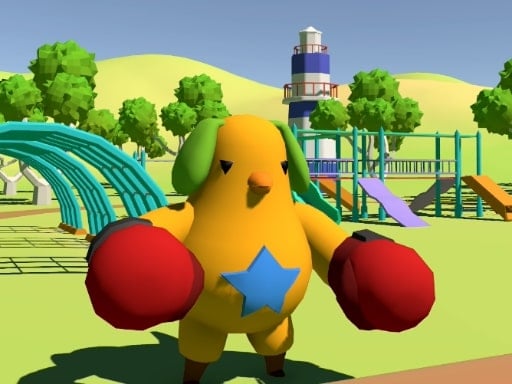
About Event Space
Event Space invites players into a vibrant 3D amusement park environment filled with colorful attractions and a variety of mini-games to discover. As an exploratory adventure, the core challenge centers on navigating the festive park grounds, locating different interactive activities, and engaging with diverse mini-game challenges across the venue.
Set within an expansive, joyous amusement park theme, Event Space delivers a casual 3D exploration experience where visitors can wander through magical grounds and uncover diverse activities. The game loop encourages players to tour the lively environment, seek out distinct event booths or ride areas, and participate in individual mini-games scattered throughout the world.
Rather than confining the player to a single repetitive puzzle or linear hallway, the 3D setting emphasizes freedom of movement and open-ended curiosity. Exploring every corner of the park allows players to test their skills in various playful scenarios while soaking in the cheerful atmosphere designed for lighthearted casual gaming sessions.
Your goal
The primary objective in Event Space is to roam the 3D park, discover all available mini-games, and successfully participate in each featured challenge. Players aim to explore the entire environment thoroughly, test their adaptability across different gameplay styles, and enjoy everything the virtual theme park has to offer.
How to play Event Space
1. Launch the game in your browser and orient your view to survey the initial park surroundings.
2. Use your mouse and keyboard to navigate pathways, explore open plazas, and approach points of interest.
3. Identify interactive mini-game stations or attraction areas positioned throughout the park grounds.
4. Engage with chosen mini-games and adapt your playstyle to the specific rules of each individual activity.
5. Continue touring unexplored sections of the amusement park to discover remaining attractions.
Controls and device support
Navigate and interact within the 3D environment using standard mouse and keyboard inputs.
- Controls: Keyboard
- Device support: Browser
- Game frame: 1920 x 1080
What makes the challenge interesting
The central appeal of Event Space lies in its blend of open 3D navigation and multi-activity variety. Players balance the relaxed pace of exploring park avenues with the focused coordination demanded by distinct mini-games. Adapting quickly to different gameplay mechanics as you transition from one attraction to another creates an entertaining, varied rhythm that keeps casual sessions engaging.
Tips for Event Space
- Survey landmark buildings and signage from elevated viewpoints to locate distant mini-game hubs without aimless wandering.
- Observe each mini-game's layout before rushing in; taking a moment to assess the specific task prevents avoidable early missteps.
- Systematically tour peripheral paths and side alleys rather than staying only on main boulevards to avoid missing tucked-away attractions.
- Practice steady mouse look and smooth movement inputs to maintain clean orientation when navigating tight park corners and busy plazas.
Playing on different devices
Event Space is designed around full-screen desktop navigation with a native 1920x1080 resolution. Using a physical mouse alongside keyboard controls provides precise spatial awareness and fluid camera steering, making it easy to traverse 3D pathways and interact smoothly with various amusement park attractions.
The skills behind the game
As part of the 3D adventure genre, Event Space highlights spatial discovery and environmental interaction over high-stress twitch reflexes. Browser-based 3D adventures allow players to immerse themselves in interactive virtual worlds directly from their web browser, offering a comfortable blend of scenic touring and hands-on activity variety.
Who will enjoy this game
Players looking for an event space game or a casual adventure game online will find a welcoming sandbox in this title. It serves as an accessible option for short gaming breaks or casual exploration practice, offering an uplifting theme park setting where users can freely wander and test different interactive mini-games at their own pace.
Frequently asked questions
What is the main gameplay loop in Event Space? Players explore an open 3D amusement park, seeking out interactive booths and participating in a variety of casual mini-games across the grounds.
What input devices are required to play? The game utilizes standard mouse and keyboard controls to manage character movement, camera viewpoint, and interaction during mini-games.
What kind of experience does this adventure game offer? It provides a colorful, relaxed exploration experience suited for players who enjoy freely wandering 3D spaces and discovering diverse casual challenges.
Something not right?
Tell us if the game does not load, the information is wrong or the content needs review.
Report a problem ›