About Easter Bunny Clicker
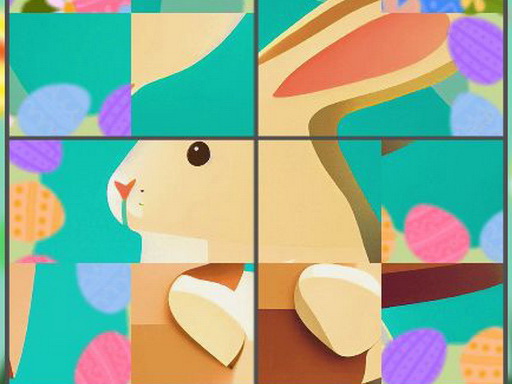
Easter Bunny Clicker is a casual timed puzzle game where players click and rotate scrambled picture segments to assemble festive holiday artwork. Across ten distinct levels featuring cute bunny illustrations, the central challenge is scanning individual image fragments and turning them into their proper orientation before the countdown timer expires.
In Easter Bunny Clicker, players are presented with a series of jigsaw-style illustrations split into rotated sections. Instead of an idle resource builder, the core gameplay loop centers on visual recognition and quick mouse clicks or screen taps. Each round tasks you with observing misaligned image tiles, clicking on individual parts to rotate them, and restoring the full Easter bunny picture.
The game features 10 levels, each offering a fresh bunny illustration to reconstruct. Because an active timer counts down during every puzzle, players must balance rapid clicking with careful pattern observation to align all pieces into their correct places before time runs out.
Your goal
Your main goal is to successfully complete all 10 Easter bunny puzzle levels by rotating every image segment into its correct orientation. To succeed, you aim to identify misaligned tiles quickly and bring the entire picture together before the running countdown reaches zero.
How to play Easter Bunny Clicker
1. Start a level to load a scrambled Easter bunny image divided into rotated segments.
2. Scan the board to spot pieces showing obvious visual anchors, such as borders, ears, or distinctive background colors.
3. Click or tap on a tile to rotate it until its lines and colors align with neighboring pieces.
4. Keep rotating adjacent parts of the image to bring every piece into its right place.
5. Complete the full illustration before the countdown timer runs out to clear the stage.
Controls and device support
Use the mouse to play on desktop browsers by clicking on image segments. On touch screens, tap directly on the screen to rotate tiles.
- Controls: Mouse or touch
- Device support: Desktop + mobile
- Game frame: 1080 x 1920
Rules to keep in mind
- The game contains 10 levels, each featuring a unique Easter bunny image to solve.
- Clicking or tapping an image fragment rotates it toward its intended alignment.
- Every puzzle is played against an active countdown timer requiring fast completion.
- A level is successfully solved once all parts of the image are brought into their right positions.
What makes the challenge interesting
The defining appeal of Easter Bunny Clicker lies in fast-paced spatial alignment under time pressure. While the name features the word clicker, the experience is firmly rooted in tile-rotation puzzle mechanics. Players must quickly inspect visual continuity—connecting whiskers, bunny ears, pastel eggs, and background horizons—while managing rapid mouse or finger inputs.
The main mechanical tradeoff is speed versus precision. Clicking frantically on random pieces can spin them past their correct angle, wasting precious seconds on the countdown timer. Instead, establishing a systematic scanning rhythm across neighboring tiles helps players solve each board efficiently.
Tips for Easter Bunny Clicker
- Anchor your puzzle from the outside in. Identifying flat border lines or corner colors first narrows down the internal orientation and prevents unnecessary clicks in the center.
- Watch the character's facial features. Aligning recognizable bunny eyes, noses, and ears early gives an immediate visual reference point for the surrounding body and background pieces.
- Count your clicks per tile rather than mashing inputs rapidly. A deliberate cadence prevents over-rotating a piece past its correct position, saving valuable time against the clock.
- Keep a steady visual scan across the board. Fixating too long on one difficult piece can drain your timer, so shift to obvious neighboring connections when stuck.
Stages and progression
The game is structured across 10 distinct levels, with each stage presenting a different Easter bunny illustration to reconstruct. As you advance through the series of images, success relies on building a consistent puzzle-solving habit: quickly locating prominent visual landmarks and rotating adjacent segments with minimal wasted motion.
Players aiming to conquer all 10 stages should focus on refining their scanning speed. Trying a steadier rotation rhythm on subsequent attempts helps clear each illustration well within the countdown limit.
Playing on different devices
Easter Bunny Clicker supports both desktop and mobile environments. On desktop computers, precise mouse clicks make it easy to target specific puzzle tiles quickly without obscuring the artwork. On touch screen devices, direct finger taps offer an intuitive way to spin pieces, though holding the device steadily helps maintain clear visibility across the portrait-oriented board.
The skills behind the game
Within the puzzle and casual gaming space, tile rotation challenges provide accessible visual problem-solving that appeals to players of all ages. Rather than demanding complex resource management or reflex-heavy action, these games emphasize visual pattern matching, spatial awareness, and steady hand-eye coordination.
By wrapping rotating jigsaw mechanics in cheerful holiday themes, casual titles like this offer bite-sized brainteasers suitable for quick relaxation sessions or young puzzle enthusiasts practicing picture assembly.
Who will enjoy this game
Players looking for a fun online puzzle game or a casual Easter bunny challenge will find Easter Bunny Clicker to be a fast-paced picture-assembly exercise. The game is well-suited for brief casual breaks, allowing players to practice visual scanning and quick clicking across ten seasonal puzzles.
Because each stage presents a standalone jigsaw challenge with a countdown clock, it serves as an entertaining warm-up for fans of browser-based logic games and image restoration puzzles.
Games with a similar feel
Cookie Clicker: While Cookie Clicker is an incremental idle game centered on repeated clicks to amass resources and purchase ongoing production upgrades, Easter Bunny Clicker uses clicking solely to rotate image tiles and solve a timed jigsaw puzzle. Players seeking automated long-term progression will prefer Cookie Clicker, whereas those who enjoy quick visual matching and festive picture solving will appreciate Easter Bunny Clicker.
Frequently asked questions
Is Easter Bunny Clicker an incremental idle game? No. Despite having clicker in its title, Easter Bunny Clicker is a rotating tile puzzle game where you click image pieces to rotate them and assemble complete bunny pictures against a timer.
How many levels are available in Easter Bunny Clicker? The game contains 10 levels, with each stage featuring a different cute Easter bunny image to rotate and solve before the countdown timer runs out.
What happens if I over-rotate a puzzle piece? Clicking or tapping an image segment simply continues rotating it through its available positions, allowing you to cycle back around to the correct orientation while watching the timer.
Something not right?
Tell us if the game does not load, the information is wrong or the content needs review.
Report a problem ›