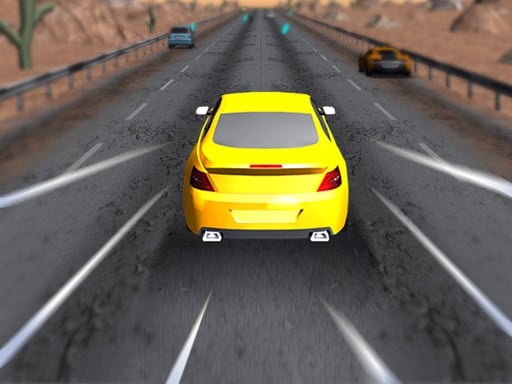
About Drifty Master
Drifty Master is a three-dimensional roadster racing and driving simulation game designed to challenge your handling skills across 200 unique levels. Take the wheel, navigate winding tracks with varying difficulties, and steer through obstacles to master every stage. By upgrading your current ride and unlocking brand-new cars, you can continuously improve your driving performance across both desktop and mobile platforms.
Drifty Master delivers fast-paced roadster driving action presented in full 3D animation. The game offers a progression journey spanning 200 distinct track layouts that introduce escalating difficulty tiers as you advance. Throughout each stage, players must react to tight turns, track hazards, and timing windows that demand precise steering. As you complete challenges, you can invest in vehicle upgrades or expand your garage by unlocking new vehicles, providing smoother handling and higher performance for tougher courses. Whether playing via keyboard or on-screen mobile touch controls, the driving mechanics emphasize smooth cornering, clean maneuvering, and steady control from start to finish.
Your goal
The main goal in Drifty Master is to successfully drive through all 200 track levels without failing the course. You achieve this by steering your roadster through diverse corner angles, dodging road obstacles, collecting items along the track, and gathering enough resources to unlock and upgrade high-performance cars. Completing each track allows you to conquer higher difficulty settings and complete the full progression ladder.
How to play Drifty Master
1. Select your current roadster and launch your current available level from the campaign.
2. Use the A/D keys, Arrow keys, or mobile on-screen buttons to steer your vehicle along the track.
3. Time your turns carefully to drift around bends while avoiding obstacles placed on the road.
4. Collect items scattered along the course to build up your resources during your run.
5. Reach the finish line safely to complete the stage and unlock the next track difficulty.
6. Visit the garage between stages to upgrade existing vehicle parts or purchase newly unlocked cars.
Controls and device support
A / D Keys: Steer left or right
Arrow Keys: Steer left or right
On-screen Buttons: Tap directional buttons to steer
- Controls: Keyboard
- Device support: Desktop + mobile
- Game frame: 800 x 600
Rules to keep in mind
- You must steer along the marked track path and avoid colliding with obstacles along the road.
- Track difficulty increases across the 200 sequential levels as courses present sharper bends and tighter layouts.
- Upgrades apply directly to your active vehicle to assist with handling higher-tier track difficulties.
What makes the challenge interesting
Gameplay in Drifty Master centers on reactive steering, cornering precision, and timing. Each of the 200 tracks presents distinct layout patterns requiring players to judge turning points carefully. Successfully maintaining control while navigating curves keeps your roadster stable and prevents costly collisions with trackside obstacles. Collecting pickups during your run rewards consistent driving, while regular garage upgrades enhance handling and responsiveness. Balancing clean cornering lines with quick reflexes ensures steady progression through the game's increasingly demanding driving scenarios.
Tips for Drifty Master
- Initiate your turns early before reaching sharp corners to prevent oversteering into obstacles and to maintain vehicle stability.
- Upgrade your existing car regularly to improve its driving responsiveness before tackling higher-difficulty stage tiers.
- Focus on collecting on-track items whenever it is safe to do so without compromising your steering line.
- Switch to newly unlocked vehicles when you encounter track difficulties that demand better overall performance.
Stages and progression
Progression in Drifty Master is built around a comprehensive 200-level track campaign. Advancing through the levels introduces varied course designs and escalating difficulty curves. Alongside level progression, the game features a garage system where players can upgrade their current roadster's capabilities or unlock entirely new vehicles to tackle advanced driving challenges.
Playing on different devices
Drifty Master supports cross-platform play within standard web browsers at an 800x600 display resolution. Desktop players steer using the A and D keys or standard keyboard arrow keys, while touchscreen users can steer by tapping dedicated on-screen interface buttons.
The skills behind the game
As a browser-based entry in the Racing genre, Drifty Master focuses on accessible vehicle handling and track completion. Racing titles emphasize sharp reflexes, spatial awareness, and precision maneuvering. By incorporating car upgrades, collectible items, and a structured multi-level roadmap, the game combines classic arcade driving mechanics with casual progression suitable for both quick sessions and longer playthroughs.
Who will enjoy this game
Players searching for a drifting game or an engaging racing game online can find quick pick-up-and-play driving simulation in Drifty Master. The title blends 3D car handling, obstacle avoidance, and progressive car unlocks to provide a rewarding browser racing experience across 200 challenging tracks on both PC and mobile devices.
Games with a similar feel
Asphalt: Like the Asphalt series, Drifty Master revolves around fast 3D car driving and expanding your garage with upgraded and unlocked vehicles. However, Drifty Master is a streamlined, casual browser simulation with single-lane obstacle courses rather than large-scale multiplayer city circuits.
Frequently asked questions
How many levels are available in Drifty Master? Drifty Master features 200 distinct levels, each presenting different track layouts and increasing difficulty tiers for players to complete.
Can you customize or change cars in the game? Yes, you can upgrade your current vehicle's driving capabilities as well as unlock brand-new cars to handle tougher course layouts.
What controls do I use to steer on desktop and mobile? On desktop browsers, steer using the A/D keys or arrow keys. On mobile devices, steer by tapping the on-screen buttons.
Something not right?
Tell us if the game does not load, the information is wrong or the content needs review.
Report a problem ›