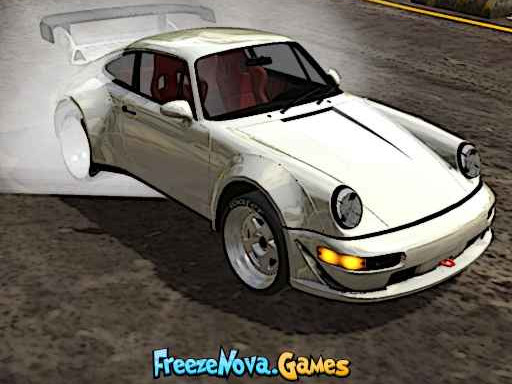
About Drift Rider
Drift Rider is a 3D driving game centered on precise vehicle control, sustained cornering slides, and earning points across distinct environments. Players take the wheel in bustling city settings and long highway stretches, initiating strategic drifts to build up their score. Accumulating points allows drivers to expand their garage with a fleet of cars and personalize vehicles with various customization options.
In Drift Rider, driving focuses on high-speed momentum and controlled tire slip across two distinct backdrop styles: dense city streets and sprawling highway routes. The primary gameplay loop invites drivers to navigate winding pathways, balance acceleration with braking, and sustain slides around bends. Skillful maneuvers generate points, which reward consistent car control rather than just flat-out straight-line speed.
The game provides dedicated camera toggling to help drivers inspect their cornering angles, along with screen resizing and an instant reset function for when vehicles flip or spin off track. As players bank points through successful drifting sessions, they can explore different vehicles and apply styling adjustments to match their personal driving preferences.
Your goal
The main objective in Drift Rider is to master vehicle handling and execute skillful drifting maneuvers to earn as many points as possible. Drivers aim to build continuous drift lines across highway sections and urban corners without losing control. Accumulated drift points are used toward unlocking a wider fleet of vehicles and accessing visual and mechanical customization features.
How to play Drift Rider
1. Choose your vehicle and select an environment, such as the open highway stretches or urban city streets, to begin driving.
2. Accelerate and steer using the WASD keys or Arrow keys to build up speed approaching turns.
3. Tap the Space key to apply brakes, breaking rear tire traction and initiating a controlled slide into corners.
4. Counter-steer through the bend to maintain your drift angle and collect drift points as you travel.
5. Use the C key to cycle camera views for better visibility, and press R to reset your car if it gets stuck or spins out.
6. Bank earned points to unlock additional cars from the fleet and explore available vehicle customization options.
Controls and device support
Navigate and steer using either the WASD keys or Arrow keys. Apply the handbrake using the Space key. Press R to quickly reset the car position, tap C to cycle through camera views, and press P to enlarge the screen.
- Controls: WASD + arrow keys
- Device support: Browser
- Game frame: 960 x 600
Rules to keep in mind
- Drifting and skillful maneuvers continuously generate points during a driving run.
- Earned points grant access to unlock new cars from the available vehicle lineup.
- Customization options can be unlocked and applied as players accumulate points through strategic driving.
- Pressing the R key restores the vehicle to an upright, drivable position after collisions or spin-outs.
What makes the challenge interesting
The core discipline in Drift Rider centers on managing weight transfer and throttle control during prolonged cornering. Unlike standard point-to-point racing where adhering strictly to the shortest racing line is vital, drifting demands that drivers intentionally break traction while maintaining directional control. Balancing steering adjustments with timely taps of the Space brake allows players to slide smoothly through bends without over-rotating into a spin.
A key tradeoff involves entry speed versus drift stability. Entering a corner too fast can lead to understeer or abrupt collisions with barriers, requiring a reset, while entering too conservatively fails to generate enough momentum to sustain a long, point-scoring slide. Experimenting with camera angles using the C key offers players different perspectives on their slip angle, helping refine control over time.
Tips for Drift Rider
- Initiate drifts with a brief tap of the Space key just before turning into a corner. Holding the brake too long stalls your momentum, making it impossible to sustain a continuous slide.
- Practice feathering the steering keys rather than holding them down continuously. Quick steering corrections help keep the vehicle balanced in mid-drift without inducing an uncontrollable spin.
- Cycle through camera perspectives with the C key to find the viewpoint that gives you the clearest view of upcoming apexes and roadside obstacles.
- Use the R key immediately when pinned against walls or turned backwards. Recovering promptly gets you back up to speed and sliding sooner rather than wrestling out of tight spots.
Stages and progression
Progression in Drift Rider is driven by the points accumulated during active runs. As you execute maneuvers across highway routes and city roads, your point total builds up, unlocking additional vehicles from the fleet. Unlocking newer cars offers fresh handling dynamics to master, encouraging drivers to revisit familiar tracks with different car profiles.
In addition to unlocking new vehicles, points grant access to diverse car customization options. A practical approach for steady progression is to start on wide highway stretches to build a reliable drifting rhythm, collecting steady points before tackling narrower urban turns that require tighter steering precision.
Playing on different devices
Drift Rider runs on desktop keyboard controls, supporting both WASD and standard Arrow keys for primary movement. This dual layout allows players to steer comfortably with either hand while keeping the other hand poised on the Space key for braking.
Dedicated hotkeys make in-run management seamless. Tapping P toggles an enlarged screen view for clearer track visibility, while C and R handle immediate camera switching and car repositioning without navigating pause menus.
The skills behind the game
As part of the racing and drifting genre, Drift Rider emphasizes the technical art of oversteer and lateral momentum over simple sprint times. While conventional circuit racers penalize loss of tire grip, drift-focused titles treat sliding as the primary scoring mechanism. Players learn to read the radius of upcoming curves, judge entrance speeds, and coordinate handbrake inputs to sustain controlled slides.
The appeal of car drifting games lies in the satisfying loop of chaining corners together. Whether navigating tight urban corners or drifting along wide multi-lane highways, mastering the transition between opposite-direction slides provides a distinct blend of rhythm, reflex testing, and vehicle handling.
Who will enjoy this game
Players looking for an accessible racing game online often seek driving experiences that prioritize immediate action and vehicle handling over complex hardware setups. Drift Rider caters to those interested in quick browser sessions where they can jump straight into a car, experiment with steering dynamics, and practice controlling slides across various environments.
Engaging with a dedicated drifting game provides a great format for casual driving practice. Players can focus on understanding weight shift, refining counter-steering timing, and setting personal score goals as they work toward unlocking new cars and customization styles at their own pace.
Games with a similar feel
Asphalt: Both Drift Rider and Asphalt center on fast-paced car driving and high-speed cornering where breaking traction plays a major role. While Asphalt presents high-intensity arcade circuit races with diverse multi-car competitions, Drift Rider focuses on deliberate drifting lines, point generation, and individual vehicle handling across open highways and city streets.
Need for Speed: Like the Need for Speed series, Drift Rider explores car customization, urban street layouts, and vehicle handling dynamics. Need for Speed features extensive narrative campaigns and structured street racing events, whereas Drift Rider offers a direct, accessible browser format dedicated to practicing slides and earning points to unlock new cars.
Frequently asked questions
How do you start drifting in Drift Rider? Build forward speed using WASD or Arrow keys, turn into a corner, and tap the Space key to break rear traction. Counter-steer immediately to hold the slide and rack up drift points.
How do I unlock more cars and customizations? Perform strategic maneuvers and maintain long drifts across city streets and highways to accumulate points. Your total score allows you to unlock new vehicles in the fleet and apply customization options.
What should I do if my car spins out or gets stuck? Press the R key on your keyboard to instantly reset your car back to an upright position on the road, allowing you to resume driving immediately without restarting the session.
Something not right?
Tell us if the game does not load, the information is wrong or the content needs review.
Report a problem ›