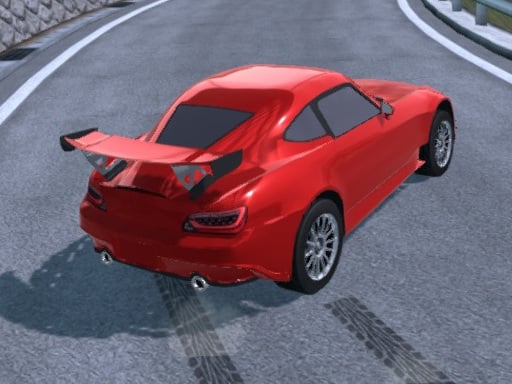
About Drift Hunt
Drift Hunt is a 3D driving and car racing title built around high-speed vehicle handling and controlled sliding. Players jump into fast-paced sessions where balance, throttle management, and timely handbrake input determine how cleanly the car navigates sharp curves and straightaways. With options for solo play or competing online against other racers, the title delivers immediate behind-the-wheel action straight from your desktop browser.
Set within open driving environments, Drift Hunt focuses on the craft of slide control and precision navigation. Drivers ignite the engine, accelerate down open asphalt, and initiate prolonged drifts around corners to maintain momentum. The physics-driven experience encourages experimenting with weight transfer, steering corrections, and handbrake timing to find the ideal line through tricky sections.
The game provides flexible presentation options to suit individual driving preferences. You can adjust the camera perspective on the fly to inspect track lines from third-person or alternate viewpoints, swap speedometer readouts between metric and imperial units, and quickly reset vehicle placement whenever a run veers off course. Whether testing lines in solo practice or matching skills against online competitors, every session rewards steady steering discipline.
Your goal
Your core objective is to execute controlled, high-speed drifts while keeping the vehicle stable across varying turns. Players aim to balance throttle and counter-steering so the car slides fluidly without spinning out or losing forward drive. As you refine line selection and braking points, the focus shifts toward sustaining longer angles, cleanly recovering vehicle balance, and setting consistent runs whether practicing alone or competing in online matchups.
How to play Drift Hunt
1. Ignite the car engine to prepare your vehicle for the track session.
2. Accelerate down the straightaway using forward navigation controls to build adequate speed for corner entry.
3. Initiate your slide by steering into the corner and engaging the handbrake to break rear traction.
4. Counter-steer against the direction of the skid to balance the drift angle and maintain a smooth trajectory.
5. Switch camera perspectives to find your optimal viewing angle for apex tracking.
6. Trigger a position reset whenever the car stalls, collides, or leaves the active drivable area.
Controls and device support
Navigate the vehicle using the WASD keys or the Arrow keys. Apply the handbrake with Space, switch camera views using C, reset vehicle position with R, toggle between KM/H and MPH using U, and start or stop the engine with I.
- Controls: WASD + arrow keys
- Device support: Browser
- Game frame: 960 x 600
What makes the challenge interesting
The central mechanical appeal of Drift Hunt lies in throttle moderation and counter-steering equilibrium. Unlike grip-focused racing where braking early guarantees smooth exits, drifting requires breaking traction deliberately while sustaining lateral control. Players must read the curve radius, apply handbrake friction at the entry point, and feather directional keys to avoid both understeering into outer barriers and over-rotating into a complete spin.
Managing vehicle momentum involves a constant tradeoff between drift angle and forward speed. Aggressive sideways angles produce spectacular slides but bleed velocity rapidly, demanding immediate steering correction upon corner exit. Finding the rhythm between sudden deceleration into a turn and steady throttle application out of it forms the foundation of mastering each route.
Tips for Drift Hunt
- Tap the handbrake briefly rather than holding it down continuously. Prolonged handbrake input locks the wheels and causes the car to spin out rather than sustaining a smooth drift.
- Cycle through available camera perspectives using the camera key to find an angle that clearly displays corner apexes and outer boundaries.
- Begin counter-steering the moment the rear end steps out to maintain a stable slide line, avoiding late steering inputs that result in violent snap oversteer.
- Use the quick vehicle reset key immediately after spinouts or barrier contact to resume your practice rhythm without wasting track time.
Playing on different devices
Drift Hunt is configured for desktop keyboard play with dedicated bindings for directional navigation, handbraking, camera toggling, engine ignition, unit switching, and vehicle resets. Playing on a full keyboard gives quick access to the Space bar for drifting alongside arrow or letter keys for steering adjustments.
The skills behind the game
Within the online sports and driving category, drift-focused car games offer a distinct rhythm compared to standard circuit racers. Rather than strictly rewarding minimal tire scrub and tight racing lines, these titles celebrate intentional oversteer, throttle feathering, and continuous slides through intricate turns.
Drift Hunt emphasizes car control mechanics within accessible 3D track spaces. By pairing traditional racing velocity with accessible handbrake sliding, it gives enthusiasts a direct playground to practice line control, recovery angles, and high-speed cornering without complicated installation requirements.
Who will enjoy this game
Players looking for a dedicated drifting game often want immediate driving physics that let them test car balance without long tutorial barriers. A drift hunt game session serves as an engaging way to build hand-eye coordination around rapid steering adjustments, braking timing, and vehicle momentum management.
Whether jumping in for a quick five-minute sliding drill or practicing multi-corner transitions, browser-based driving games fit seamlessly into casual gaming routines. The option to test routes solo or jump into competitive online racing provides variety for players seeking straightforward automotive thrills.
Games with a similar feel
Asphalt: Both titles center around fast-paced car racing and high-speed sliding. While Asphalt emphasizes arcade boost mechanics and cinematic track routes, Drift Hunt delivers a direct browser-based driving sandbox focused closely on car handling and responsive handbrake drift practice.
Need for Speed: Like the Need for Speed series, Drift Hunt celebrates the thrill of street-style car handling and controlled drifting. Need for Speed features extensive progression and sprawling city narratives, whereas Drift Hunt offers an instantly accessible browser format focused on immediate sliding runs.
Frequently asked questions
How do I start the car engine in Drift Hunt? You can start or stop the vehicle engine by pressing the I key on your keyboard before setting off down the road.
Which controls initiate a drift? Turn into a bend using the WASD or Arrow keys and tap the Space bar to apply the handbrake, which breaks rear tire grip and begins the slide.
Can I play solo or with other racers? The game offers both solo driving sessions for individual track practice and the option to compete online against other players.
How can I change the speedometer units? Press the U key during gameplay to switch your on-screen speed readout between kilometers per hour (KM/H) and miles per hour (MPH).
Something not right?
Tell us if the game does not load, the information is wrong or the content needs review.
Report a problem ›