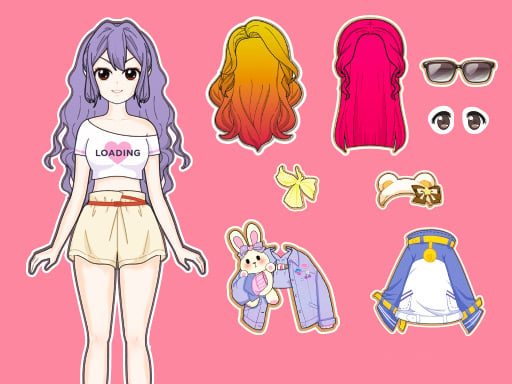
About Dress Up Babi Doll
Dress Up Babi Doll is an engaging online dress-up title that lets you customize and decorate a charming doll character. Players can freely experiment with diverse fashion options, swapping out dresses, hairstyles, facial expressions, skin colors, hats, and purses to create adorable and expressive personal styles.
Capturing the nostalgic delight of styling toy figures, this title lets fashion enthusiasts design custom outfits without limitations. The experience revolves around personal creative expression, offering an assortment of carefully selected cute dresses alongside customizable physical features such as skin tones and expressions. Once the main wardrobe is coordinated, players can complete the doll's ensemble with matching accessories like hats and purses. It delivers a relaxing and colorful styling session tailored for casual browser play.
Your goal
The main goal is to assemble a complete, harmonious outfit for your doll. Tailor her appearance by matching her hairstyle, expression, and skin tone with selected dresses, then finish the look using complementary purses and headwear to suit your artistic taste.
How to play Dress Up Babi Doll
1. Browse through the available base styling options to select a skin color and facial expression for the doll.
2. Explore the hair collection and apply your preferred hairstyle to establish the doll's character.
3. Pick from the assortment of cute dresses to assemble the core wardrobe pieces.
4. Complete the final look by adding coordinating accessories, including cute hats and purses.
Controls and device support
Mouse: Click to select and change clothes, hairstyles, skin colors, and accessories
Tap: Touch onscreen items to equip garments, switch expressions, and add accessories
- Controls: Mouse or touch
- Device support: Desktop + mobile
- Game frame: 504 x 800
What makes the challenge interesting
Gameplay focuses on open-ended aesthetic exploration rather than competitive pressure or timed milestones. Players move through customization categories to inspect different combinations of garments and accessories on the doll model. Because you can alter facial expressions, skin tones, and hairstyles alongside dresses and purses, the experience encourages creative experimentation to discover harmonious color palettes and expressive themes at your own pace.
Tips for Dress Up Babi Doll
- Decide on a hairstyle and facial expression first so your chosen dress complements the doll's overall character mood.
- Coordinate accent colors between your doll's hat and purse to create a well-balanced and unified fashion ensemble.
- Try contrasting dress colors against your selected skin tone to make detailed wardrobe pieces stand out prominently.
The skills behind the game
Classified under girls and dress-up genres, Dress Up Babi Doll emphasizes intuitive cosmetic personalization and artistic selection. HTML5 dress-up games offer accessible entry points for kids and casual players seeking stress-free creative spaces where they can test different outfit combinations quickly across modern web browsers.
Who will enjoy this game
If you are looking for an accessible dress up game, Dress Up Babi Doll delivers classic doll-decorating mechanics directly in your browser. The dress up babi doll game format appeals to fans of cute character customization who enjoy mixing and matching clothing, expressions, and accessories without complicated setup.
Games with a similar feel
Love Nikki-Dress UP Queen: Like Love Nikki-Dress UP Queen, this game focuses on coordinating garment pieces, but Dress Up Babi Doll offers an immediate, casual sandbox experience without intricate scoring campaigns.
Project Makeover: Sharing a thematic focus on character styling with Project Makeover, Dress Up Babi Doll lets you modify hair and accessories directly without solving puzzle stages first.
Frequently asked questions
What parts of the doll can you customize? You can customize the doll's skin color, facial expression, hairstyle, dresses, and accompanying accessories like hats and purses.
How do you interact with items in the game? You can play directly by using mouse clicks on desktop or tapping items on mobile touchscreens.
Something not right?
Tell us if the game does not load, the information is wrong or the content needs review.
Report a problem ›