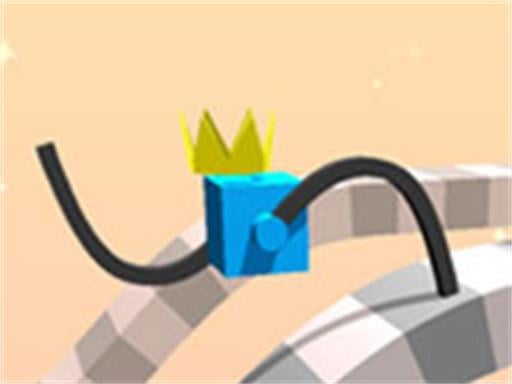
About Draw Climber 2 Game
Draw Climber 2 Game is a browser-based physics racing puzzle where you sketch custom appendages to propel a moving block. Competing head-to-head against another block, your challenge is to design functional leg shapes that carry you over terrain and through varied obstacles. Because you can alter the shape at any point during a race, success depends on quickly adapting your drawings to whatever physical barriers appear ahead.
In Draw Climber 2 Game, your racing block cannot move forward on its own until you give it limbs. Using a dedicated drawing space, you sketch lines or curves that immediately attach to the main body and rotate to provide momentum. As your block rolls and strides across the course, you face another racing competitor striving to reach the end of the track first.
The course features various terrain features and obstacles designed to halt standard movement. Long, spindly legs might help you step over steep barriers or high ledges, while compact, hook-like limbs may provide better speed on flatter stretches. When an obstacle halts your forward progress, you can instantly draw a fresh design to help your block climb, push through, or maneuver around the hazard without restarting.
Your goal
Your primary goal is to outrace the opposing block and cross the course finish line ahead of your rival. To achieve this, you need to navigate every track obstacle efficiently by constantly evaluating your block's movement, modifying leg shapes as soon as terrain demands change, and maintaining forward momentum throughout the sprint.
How to play Draw Climber 2 Game
1. Start the match by clicking or tapping into the drawing panel on the screen.
2. Draw an initial leg shape to give your block physical limbs and begin moving forward.
3. Watch the course ahead for sudden elevation changes, gaps, and stationary obstacles.
4. Redraw your leg design whenever your current limbs struggle to climb or move past a barrier.
5. Maintain high momentum to stay ahead of the competing block until you reach the finish line.
Controls and device support
Mouse click and drag on desktop or touch and drag on mobile devices to draw leg shapes and interact with the game interface.
- Controls: Mouse or touch
- Device support: Desktop + mobile
- Game frame: 750 x 1334
Rules to keep in mind
- The block requires drawn limbs to generate propulsion and move across the track.
- Matches are direct races against an opposing block attempting to complete the course.
- Obstacles and varied terrain must be cleared to keep your racer moving forward.
- Leg shapes can be altered and redrawn at any time during an active race.
What makes the challenge interesting
The core mechanical appeal of Draw Climber 2 Game lies in real-time creative problem solving under racing pressure. Rather than using conventional steering buttons, your locomotion is entirely determined by geometry and physics. Every stroke you draw translates directly into rotating leverage against the track floor.
This creates an engaging tactical trade-off between stride length and rotation speed. Long, straight limbs provide wide reach that can vault over high obstacles or wide steps, but they may cause chaotic bouncing or get caught under low barriers. Shorter or curved strokes provide steady, rapid traction on smooth surfaces but struggle against taller walls. Knowing when to switch between expansive reach and compact speed is the key skill to master.
Tips for Draw Climber 2 Game
- Draw longer limbs when approaching tall steps or steep walls. The extended reach lets the rotating appendage catch the top edge and hoist the block upward instead of colliding head-on.
- Switch to shorter, compact shapes on flat stretches. Oversized legs can cause violent bouncing and reduce speed, whereas smaller strokes provide fast, continuous forward rotation.
- Do not hesitate to redraw if your block gets stuck. Since shapes can be modified at any moment, quickly sketching a curved or angled limb can free you from tight gaps before your rival pulls ahead.
- Keep your drawings relatively simple. Intricate doodles take longer to input and can create awkward rotational hitboxes, while single clean strokes translate into predictable physics movement.
Stages and progression
As you move through different race courses, the arrangements of obstacles and elevation changes require faster reaction times and more varied drawing strategies. To improve consistently across runs, focus on recognizing terrain types earlier and reducing the delay between spotting an obstacle and sketching the appropriate leg geometry.
Playing on different devices
With native 750 x 1334 vertical dimensions, Draw Climber 2 Game is well-suited for touchscreen play on mobile devices as well as standard browser windows. Touch controls offer quick, natural drawing gestures directly on the glass, while a desktop mouse allows for steady precision when outlining specific limb angles.
The skills behind the game
Draw Climber 2 Game fits squarely into the physics puzzle and hypercasual arcade traditions. Rather than testing complex multi-button inputs, physics-based runners focus on a single accessible mechanism—in this case, freeform drawing—that produces dynamic, emergent interactions with the game environment.
By combining obstacle avoidance with competitive racing dynamics, the title offers quick, bite-sized sessions where trial, error, and physical experimentation drive the enjoyment. Players of all ages can easily grasp the concept while finding endless variation in how different line shapes interact with track slopes.
Who will enjoy this game
Players looking for an engaging arcade game online often seek titles that combine fast-paced competition with clever mechanical puzzles. Draw Climber 2 Game delivers on that intent by offering spontaneous drawing gameplay that keeps matches fresh and responsive.
Because each track demands on-the-fly shape adjustments, the game serves as an enjoyable casual warm-up for reflexes, spatial awareness, and quick decision-making in a desktop or mobile browser.
Frequently asked questions
How do you make your block move in Draw Climber 2 Game? Your block moves when you sketch a shape in the drawing area. The lines you draw become rotating limbs that push off the ground and propel the block forward through physical contact with the track.
Can you change your leg shape while the race is ongoing? Yes. You can draw a new limb shape at any time during a race. The new design takes effect immediately, allowing you to adapt your movement whenever you encounter a difficult obstacle or steep incline.
What is the best shape to draw for climbing high obstacles? Longer lines or hook-shaped curves generally work best for climbing. Extended reach allows the rotating leg to grab onto high ledges and pull your block up and over barriers that stop shorter legs.
Something not right?
Tell us if the game does not load, the information is wrong or the content needs review.
Report a problem ›