Official listing
Game description
Here is a drawing puzzle and a car-racing arcade game. It is managed for you to draw a body on the wheels and defeat your AI enemy at each level. When you colleect enough coins, you can buy more skins in the shop.
Arcade game
Draw Car 3D is a hybrid drawing puzzle and car-racing arcade game where your sketched lines directly determine the physical structure of your vehicle. In every stage, you draw a custom frame over wheels to compete against an AI opponent on the track. Because you can modify the chassis instantly, finding effective contours helps you navigate obstacles, maintain forward speed, and race toward victory across each unique level challenge.
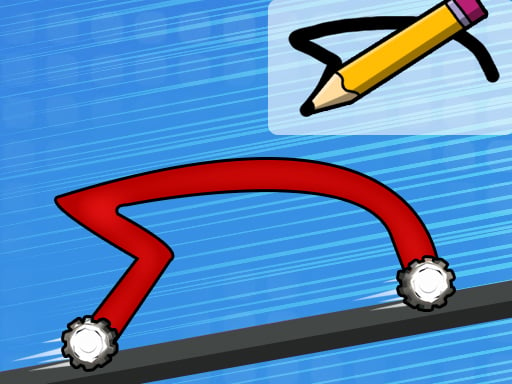
Choose Play now to load the game.
Official listing
Here is a drawing puzzle and a car-racing arcade game. It is managed for you to draw a body on the wheels and defeat your AI enemy at each level. When you colleect enough coins, you can buy more skins in the shop.
From the game listing
Drag and swipe to draw your cars body You can change it instantly at each level
Open this card to load the gameplay video.
Draw Car 3D is a hybrid drawing puzzle and car-racing arcade game where your sketched lines directly determine the physical structure of your vehicle. In every stage, you draw a custom frame over wheels to compete against an AI opponent on the track. Because you can modify the chassis instantly, finding effective contours helps you navigate obstacles, maintain forward speed, and race toward victory across each unique level challenge.
Draw Car 3D combines creative freehand sketching with three-dimensional track racing. Rather than choosing from pre-assembled vehicles, you actively engineer your own machine by drawing a car body connected to the base wheels. As the race begins, your freshly drawn vehicle speeds forward to challenge an AI rival along the course. The track layout demands adaptability, as different shapes interact differently with the ground, inclines, and racing surfaces.
What distinguishes the experience is real-time flexibility: you can redraw and update your chassis instantly whenever needed during a stage. As you complete races and outmaneuver your computer opponent, you gather coins scattered across your runs. These collected coins serve as currency in the in-game shop, allowing you to unlock alternative cosmetic skins. The resulting gameplay loop blends rapid problem-solving with arcade thrills, encouraging you to rethink vehicle architecture on the fly.
Your main goal in Draw Car 3D is to defeat the AI enemy in each level by engineering a car body that finishes ahead of the rival racer. Beyond crossing the finish line first, you want to gather as many coins as possible along your journey to purchase new vehicle skins from the shop. Striving for smoother transitions between drawings, adapting quickly to terrain shifts, and optimizing your vehicle's silhouette for speed and balance will help you reliably outpace the competition on every course.
1. Study the starting line and initial terrain ahead to envision an effective vehicle silhouette before the race begins.
2. Drag and swipe across the designated drawing area to sketch a sturdy body onto the wheels.
3. Monitor your vehicle's movement against the AI opponent as both cars accelerate down the track.
4. Swipe a new shape immediately whenever you encounter rough inclines or need to adapt your car's physical profile.
5. Gather coins along the racepath whenever they appear within reach of your vehicle's frame.
6. Cross the finish line ahead of the rival car to clear the level and earn your stage rewards.
7. Visit the shop when you have accumulated enough coins to browse and unlock new car skins.
Draw Car 3D is played by dragging and swiping on the screen or game canvas to sketch your car's body, which can be modified instantly at any time during a level.
Draw Car 3D centers on dynamic geometry and kinetic puzzle-solving under racing pressure. Unlike standard arcade racers where success relies solely on steering timing and acceleration buttons, this title challenges your spatial reasoning. The core rhythm involves reading the upcoming terrain, anticipating friction or clearance needs, and drawing a line that balances center of mass with forward drive. A low, sleek chassis might provide streamlined speed on flat sections, but a taller or arched shape might be needed to clear awkward bumps or maintain clearance. Because the opponent is an active AI racer progressing simultaneously, hesitation can cost you the lead. The primary tradeoff lies between taking time to sketch a carefully measured profile versus reacting quickly with a hasty stroke to maintain momentum. Mastering this quick-thinking loop makes every stage an engaging test of practical physics and rapid improvisation.
Progression in Draw Car 3D unfolds stage by stage as you confront new track configurations and compete against the AI enemy at each level. While individual stage layouts evolve, the overarching progression invites players to refine their drawing speed, spatial intuition, and reaction times under pressure. Along the way, collecting coins from your runs unlocks tangible cosmetic milestones in the shop, where accumulated savings can be spent on diverse skins. For long-term improvement, treat each new level as a test of adaptability: practice executing smooth, single-stroke chassis designs that match the contour of the course, and strive to beat your rival with fewer corrective redraws on subsequent attempts.
Rendered in a vertical 750 x 1334 resolution, Draw Car 3D is well-suited for portrait orientations on mobile touchscreens and desktop browsers alike. On mobile devices, intuitive dragging and swiping with your thumb or finger provides direct tactile control over the sketch pad, making on-the-fly chassis adjustments swift and natural. On desktop systems, holding the left mouse button to drag and swipe across the canvas delivers dependable precision when drafting complex shapes. Closing background tabs can help maintain fluid frame rates during rapid 3D motion.
As an arcade racing title that incorporates drawing and puzzle elements, Draw Car 3D bridges the gap between creative problem-solving and competitive momentum. Traditional arcade racing games emphasize rapid reflexes, tight track navigation, and high-speed rivalries. By weaving in freeform sketching mechanics, this title introduces a cognitive layer where vehicle performance is tied directly to player creativity rather than fixed vehicle attributes. The 3D platform environments challenge players to think about slope, balance, and clearance, elevating the experience into an accessible brain-teaser that appeals to casual puzzle enthusiasts and racing fans seeking an inventive mechanical twist.
Players searching for Draw Car 3D or looking to play a draw car 3d game typically seek an approachable, browser-based challenge that combines active vehicle construction with brisk competition. As an arcade game online, it serves as an entertaining mental warm-up between tasks, offering quick rounds where immediate visual feedback keeps the stakes light and engaging. Casual players who enjoy physics puzzles and racing games can use each level to test different structural hypotheses, seeing how subtle variations in car shape overcome track obstacles. The straightforward controls and instant redraw mechanics make it welcoming for both short breaks and relaxed iterative play.
Asphalt: Asphalt is a premier arcade racing franchise known for high-velocity racing and dramatic handling across stylized courses. Draw Car 3D shares the core thrill of racing against rivals to reach the finish line first, but replaces fixed supercar cockpits with a freehand drawing interface where you sketch your own chassis. Players wanting licensed vehicles and deep driving simulation prefer Asphalt, while those seeking a playful, improvisational puzzle racer will enjoy Draw Car 3D.
How do you control your vehicle in Draw Car 3D? You control your vehicle by dragging and swiping on the screen or canvas to sketch a car body over the wheels. The car accelerates forward automatically along the 3D track, allowing you to focus on redrawing shapes to handle terrain.
Can you modify your car while a race is already underway? Yes, you can change your car's body instantly at any point during each level. Swiping a new line on the canvas replaces your existing chassis on the fly, helping you clear steep hills or recover when stuck.
What can you spend collected coins on in Draw Car 3D? Coins gathered during races serve as currency in the in-game shop. Once you have accumulated enough coins, you can spend them to unlock a variety of cosmetic skins to customize the appearance of your vehicle.
What is the best way to defeat the AI opponent in each level? Focus on sketching balanced, aerodynamic shapes that keep both wheels firmly grounded for consistent speed. If the track features bumps or steep inclines, instantly redraw an arched or elevated frame so your car does not lose momentum.
Tell us if the game does not load, the information is wrong or the content needs review.
Report a problemExplore popular games by category, shared tags and site-wide activity.



















