Official listing
Game description
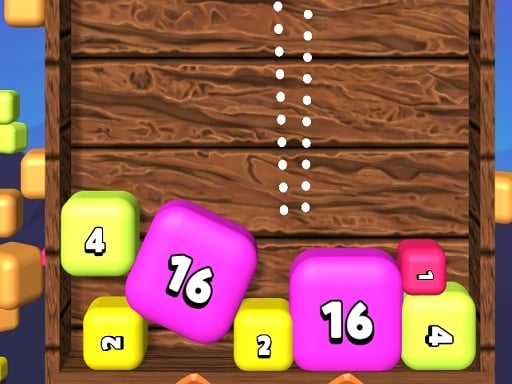
Drop the ball into similar balls below to merge them and turn them into a new balls. Play on mobile and PC. Good luck!
Puzzles game
Doroppuboru is a physics-based puzzle game where your goal is to drop balls into matching spheres waiting below. When identical pieces make contact, they merge into a single, newly transformed ball. Designed for both desktop and mobile web browsers, the title tests spatial awareness, horizontal positioning, and drop timing as you manage an evolving container of rolling shapes.

Choose Play now to load the game.
Official listing
Drop the ball into similar balls below to merge them and turn them into a new balls. Play on mobile and PC. Good luck!
From the game listing
Tap screen click mouse use keybord Controls left arrow A move left right arrow D move right bottom arrow S Space drop Enter start Esc back M music on off N sound on off
Open this card to load the gameplay video.
Doroppuboru is a physics-based puzzle game where your goal is to drop balls into matching spheres waiting below. When identical pieces make contact, they merge into a single, newly transformed ball. Designed for both desktop and mobile web browsers, the title tests spatial awareness, horizontal positioning, and drop timing as you manage an evolving container of rolling shapes.
In Doroppuboru, gameplay revolves around releasing spherical pieces from the top of the play area into the space beneath. The primary mechanic relies on matching: landing a ball onto an identical counterpart causes the pair to fuse together into a brand new ball type. Because physics govern how round objects settle, bounce, and roll, every release can shift neighboring pieces across the floor.
The title offers an accessible loop suited for quick sessions or extended puzzle solving. Whether using keyboard inputs on a computer or touch interactions on a mobile screen, players must read the current layout before committing to a drop. Balancing deliberate placement against shifting physical reactions creates an engaging challenge that encourages steady observation on every turn.
The main objective in Doroppuboru is to successfully align and drop falling spheres onto matching balls to trigger continuous merges and generate new ball varieties. Players strive to keep their board organized by identifying identical targets, managing space effectively, and anticipating how round pieces roll after impact so that matching pairs remain accessible throughout the run.
1. Observe the currently loaded ball at the top of the play area and examine the arrangement of resting balls below.
2. Shift your dropper horizontally across the screen using your keyboard, mouse, or touch controls to line up with a matching target.
3. Release the active sphere by pressing the drop key or tapping the screen so it falls under gravitational physics.
4. Watch the dropped item collide with identical balls to merge them into a single new sphere.
5. Repeat the process with each successive drop, adjusting your placement as the physical pile shifts and grows.
Desktop players can navigate using Left Arrow or A to move left, Right Arrow or D to move right, and Down Arrow, S, or Space to drop. Menu controls include Enter to start, Esc to go back, M to toggle music, and N to toggle sound effects. Mobile players can steer and release pieces by tapping and clicking directly on the screen.
Doroppuboru combines puzzle planning with the unpredictability of physics simulations. Because the objects are curved, a falling ball rarely stays perfectly centered if it catches the shoulder of another sphere. Players must weigh the benefit of an immediate direct hit against the risk of sending nearby matching targets rolling out of reach.
The core skill involves spatial foresight: anticipating where merged spheres will settle and keeping complementary shapes near one another. A patient rhythm tends to produce better outcomes than rapid dropping, as waiting a brief second for rolling items to come to rest reveals the true terrain of the board.
Doroppuboru is formatted in a vertical 720x1280 resolution, making it naturally suited for portrait viewing on mobile smartphones as well as centered window play on desktop browsers. Both mouse clicks and direct touchscreen taps are supported for navigating menus and positioning your drops.
Desktop users have the extra flexibility of full keyboard support, allowing precise incremental positioning with arrow keys or WASD inputs, alongside dedicated hotkeys for muting audio and returning to menus.
As a physics puzzle, Doroppuboru belongs to the hypercasual branch of browser games that emphasize straightforward rules and immediate playability. Rather than requiring complex menu management or long tutorial stages, the appeal comes from predicting momentum, collision angles, and gravity-driven reactions in real time.
The merge mechanics add a layer of organizational puzzle solving to the physical toybox feel. Players who enjoy spatial arrangement, falling-piece puzzles, and tactile chain reactions will find a clear, accessible pastime that rewards clean aim and patient board maintenance.
Players looking for a relaxing merge puzzle game online often seek titles that provide immediate tactile satisfaction without overwhelming complexity. Doroppuboru fits this niche by pairing intuitive drop controls with dynamic ball physics, creating an approachable web experience that is simple to learn in a single session.
Whether practicing precision drops on a phone during a quick break or settling in for a focused keyboard session on desktop, the game serves as an enjoyable mental workout centered on spatial planning and collision timing.
How do you combine balls in Doroppuboru? You combine balls by lining up your dropper and releasing an active ball so it lands directly onto an identical ball resting below. Upon contact, the matching pair merges into a new ball type.
Can I play Doroppuboru on mobile devices? Yes, Doroppuboru is built with HTML5 technology and runs on both Android and desktop web browsers. You can play using touchscreen taps, mouse clicks, or standard keyboard controls.
What keyboard keys control movement and dropping? You can steer left and right using the Left and Right Arrow keys or A and D. To drop a ball, press the Down Arrow, S, or Space. Start rounds with Enter and navigate menus using Esc.
How do I toggle the background music and sound effects? While playing on a desktop keyboard, press M to turn the background music on or off, and press N to toggle sound effects without needing to open a settings menu.
Tell us if the game does not load, the information is wrong or the content needs review.
Report a problemExplore popular games by category, shared tags and site-wide activity.