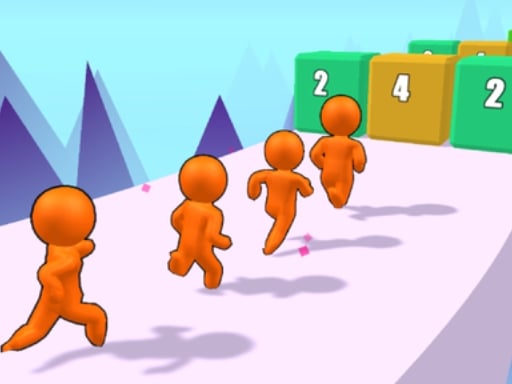
About Dodge Run 3D
Dodge Run 3D is a fast-paced hypercasual runner where quick reactions keep your character safe on the track. Players control a running person moving forward through 3D stages, sliding left and right to bypass incoming hazards. The straightforward layout keeps the challenge centered on reading the path ahead and steering smoothly around obstacles to complete stages and unlock fresh character skins.
In Dodge Run 3D, you guide a running character along vibrant 3D courses filled with hazardous barriers. Your primary responsibility is maintaining clean lateral movement by sliding or dragging across the screen to steer clear of anything blocking the running line.
Each level presents a continuous running sprint where dodging obstacles is essential to reaching the end. As you clear runs and advance through groups of levels, the game rewards steady performance with unlockable character skins, giving players visual variety to look forward to during subsequent runs.
Your goal
The primary goal is to safely maneuver your runner past every obstacle in each level. By sustaining continuous movement and avoiding collisions from start to finish, you work toward clearing consecutive stages and unlocking new runner skins as you progress.
How to play Dodge Run 3D
1. Start the level and watch the path ahead as your character begins running forward.
2. Click and drag your mouse on desktop or swipe across your touch screen on mobile to initiate steering.
3. Move your runner left and right across the lane to dodge obstacles placed along the route.
4. Maintain your lateral positioning until you successfully navigate through the entire level course.
5. Complete sets of levels to unlock new cosmetic skins for your runner.
Controls and device support
To steer your character, click and drag the mouse on desktop or swipe across the screen on mobile devices to move left and right around obstacles.
- Controls: Mouse or touch
- Device support: Browser
- Game frame: 1920 x 1080
Rules to keep in mind
- Your runner travels along the course, requiring you to steer left and right to navigate open space.
- You must avoid all obstacles encountered during each level run.
- Advancing through a series of levels unlocks new skins for your character.
What makes the challenge interesting
The core appeal of Dodge Run 3D lies in swift visual tracking and responsive spatial steering. Because your runner is constantly moving forward, success depends on spotting clear lanes early rather than reacting at the very last moment. Smooth, measured dragging inputs help prevent oversteering into neighboring hazards.
Finding the right rhythm between wide lane switches and subtle course corrections creates a satisfying loop. Players must balance the urge to make sweeping evasive moves with the discipline of staying centered when narrow openings appear.
Tips for Dodge Run 3D
- Look ahead at the upcoming section of the track rather than staring directly at your character. This gives you extra time to plan lane shifts before obstacles get too close.
- Make moderate steering inputs instead of dragging all the way across the screen instantly. Overcorrecting often pushes your runner directly into adjacent obstacles.
- Return toward the middle of the track after clearing an obstacle when possible. Holding a central position leaves open escape routes to both the left and right sides.
- Keep your dragging motion steady and continuous rather than using erratic, jerky swipes that can cause unpredictable runner positioning.
Stages and progression
Progression in Dodge Run 3D is structured across distinct levels. As you guide your runner safely through the courses and complete batches of stages, you unlock new character skins to personalize your appearance during future attempts.
To build consistency across sessions, focus on maintaining clean runs level by level. Developing a composed steering style helps you adapt to different obstacle placements while working toward every available skin unlock.
Playing on different devices
Dodge Run 3D supports both desktop and mobile control schemes. Desktop players use mouse clicking and dragging to guide the runner, while mobile players can swipe directly across the touchscreen to shift left and right.
The full-screen 1920x1080 canvas provides a clear view of approaching obstacles across both desktop monitors and mobile displays, ensuring steering lanes remain easily visible.
The skills behind the game
As a 3D hypercasual arcade runner built with Unity3D technology, Dodge Run 3D emphasizes immediate, pick-up-and-play accessibility. Hypercasual games strip away complex rule sets in favor of an intuitive core mechanic where anyone can grasp the controls within seconds.
The genre's appeal comes from short, engaging level segments paired with clear visual milestones like cosmetic unlocks. This makes the experience suitable for brief casual breaks or quick reaction warm-ups.
Who will enjoy this game
Players searching for dodge run 3d or a quick dodge run 3d game typically want lightweight browser entertainment that tests agility and reflexes. The game meets this expectation by offering uncomplicated steering controls and fast obstacle avoidance.
Whether playing on a computer mouse or a mobile touchscreen, the straightforward dodging mechanics deliver an accessible way to practice hand-eye coordination and spatial timing in quick gameplay bursts.
Frequently asked questions
How do you control your runner in Dodge Run 3D? You guide your runner by sliding across the screen on touch devices or by clicking and dragging your mouse left and right on desktop computers.
How do you unlock new character skins in the game? New skins are unlocked as you progress and complete multiple levels while successfully avoiding course obstacles.
What is the best approach for dodging tight obstacles? Focus your eyes on the track ahead and make subtle, controlled steering adjustments rather than rapid, broad swipes that might cause you to overshoot the safe gap.
Something not right?
Tell us if the game does not load, the information is wrong or the content needs review.
Report a problem ›