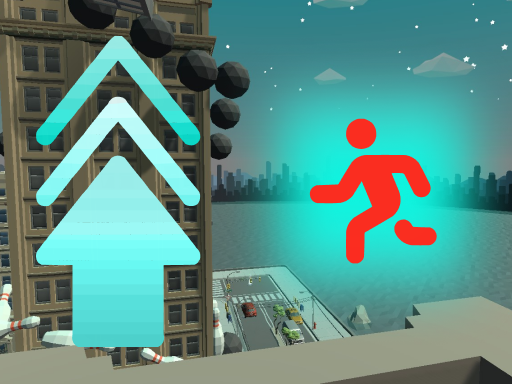
About Do it up!
Do it up! is a 3D vertical platformer set within a compact town where your main goal is simple: keep moving upward. By combining standard runs and walks with single and double jumps, players navigate urban terrain, test their spatial judgment, and focus purely on gaining height.
Set against the backdrop of a small urban settlement, Do it up! gives players full freedom to explore structures, streets, and elevated perches. The central premise revolves entirely around ascending through the environment without distracting complexities or convoluted objectives.
Movement is direct and physics-driven, allowing you to walk, sprint, and leap across various obstacles. As you seek paths leading higher into the skyline, every ledge and rooftop serves as a stepping stone. The experience emphasizes continuous upward motion, challenging you to find reliable routes and execute cleanly timed jumps throughout the town.
Your goal
The primary objective in Do it up! is to climb continuously upward through the town environment. Players strive to maintain elevation, navigate tricky urban geometry, and scale structures without tumbling back down to street level.
How to play Do it up!
1. Orient yourself in the town and scan the surrounding rooftops, stairs, and structures for clear paths that lead upward.
2. Use the W, A, S, and D keys or the keyboard arrow keys to guide your character across the ground and onto nearby surfaces.
3. Press the Space bar to execute standard single jumps across short gaps or up onto low barriers.
4. Tap the Space bar twice in quick succession to perform a higher double jump when trying to reach elevated ledges.
5. Carefully align your landings on narrow perches and continue seeking higher footholds as you scale the town.
Controls and device support
According to the official instructions, you steer your character using either WASD (W forward, A left, S back, D right) or the keyboard arrow keys. Press Space to jump, and press Space twice to execute a higher jump.
- Controls: Keyboard
- Device support: Browser
- Game frame: 800 x 600
Rules to keep in mind
- Directional movement allows forward, backward, and lateral traversal using either WASD or directional arrow keys.
- Single jumping provides standard vertical lift for clearing modest obstacles.
- Double tapping the jump key delivers extended vertical reach to scale higher ledges.
- The core progression principle requires players to maintain an upward trajectory through the town environment.
What makes the challenge interesting
The central appeal of Do it up! lies in vertical pathfinding and spatial timing. Navigating a 3D cityscape requires players to judge distances accurately, especially when transitioning between standard running and precision jumps. Because the focus is strictly on climbing upward, route selection becomes your most important decision at every step.
A key mechanical dynamic comes from managing jump heights. A standard single jump is ideal for horizontal preservation and small hurdles, whereas the double jump offers crucial vertical height at the cost of requiring precise second-tap timing. Learning when to conserve momentum versus when to stop and prepare a measured leap creates an engaging rhythm throughout your climb.
Tips for Do it up!
- Survey overhead ledges before leaping. Rushing into an unplanned jump can cause you to miss narrow platforms and lose hard-earned elevation.
- Time your second jump input near the peak of your initial leap to maximize the total vertical distance gained on steep walls.
- Switch between WASD and arrow keys depending on which hand setup feels more comfortable for steady directional adjustments in mid-air.
- Avoid sprinting blindly around blind building corners, as sudden gaps can lead to accidental drops back down to street level.
Playing on different devices
Do it up! is designed for desktop keyboard play with an 800 x 600 display viewport. Players can utilize standard WASD keys or keyboard arrow keys for character navigation, paired with the Space bar for single and double jumping maneuvers.
The skills behind the game
As a 3D action platformer, Do it up! belongs to the vertical exploration genre where spatial awareness and momentum control take center stage. Rather than relying on combat or complex inventory systems, action here is defined by movement precision and navigation across an urban playground.
Who will enjoy this game
Players looking for an action game online that tests jumping skills and climbing patience will find a focused experience in Do it up! The game offers a casual platforming challenge suitable for short practice sessions or relaxed climbing runs across a 3D town.
Frequently asked questions
How do I jump higher in Do it up!? You can jump higher by pressing the Space bar twice in succession. This double jump maneuver provides additional vertical lift to reach elevated platforms that a single leap cannot reach.
Can I use arrow keys instead of WASD? Yes. The game supports character steering and directional control using either the standard WASD layout or the keyboard arrow keys, allowing you to choose your preferred hand position.
What is the main goal during a run? The main goal is to explore the 3D town environment and climb as high as possible by finding suitable ledges, roofs, and vertical pathways while avoiding drops back to the ground.
Something not right?
Tell us if the game does not load, the information is wrong or the content needs review.
Report a problem ›