About DIY Locker
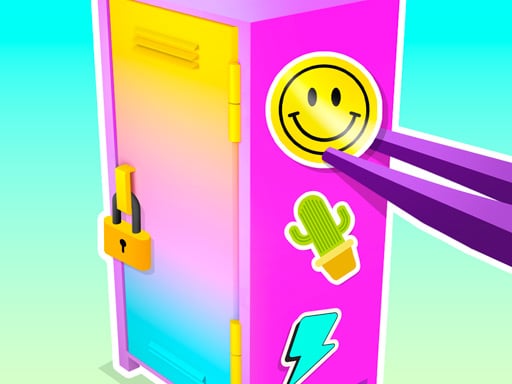
DIY Locker is a creative browser decoration game where players personalize a school locker with customized visuals. You can choose distinct background patterns, place colorful stickers, and arrange stylish accessories to express your personal taste. Whether you want to assemble a bright aesthetic filled with cute accents or a sporty layout highlighting your favorite athletic team, the experience focuses entirely on visual creativity and hands-on styling.
In DIY Locker, the primary focus is giving a plain locker a complete visual makeover. Players explore an assortment of customization items, mixing and matching aesthetic elements to suit any desired theme. You can swap out the backdrop, place decorative stickers across the inner walls, and stage various accessories to build an inviting personalized space.
The game provides an open-ended crafting atmosphere designed for relaxing experimentation. Players interact using straightforward point-and-click or tap controls, making it simple to test out different color palettes and accessory arrangements. From sweet pastel designs to high-energy sports motifs, you can freely rearrange components until your locker reflects your ideal visual concept.
Your goal
Your objective in DIY Locker is to craft a fully decorated and visually cohesive locker display. By combining background themes, thematic stickers, and matching accessories, you aim to build expressive designs ranging from cute fashion spaces to sporty athletic showcases. The core goal is exploring aesthetic options and refining your personal decorating style.
How to play DIY Locker
1. Open the game and view the initial blank locker ready for your creative makeover.
2. Browse the available background options to set the primary wall color or pattern for your locker interior.
3. Select and place decorative stickers across the interior surfaces to add playful accents.
4. Add accessories such as sporty or cute items to complete your themed locker arrangement.
5. Review your finished design, swapping any components until you achieve your dream locker layout.
Controls and device support
Use the mouse or finger to decorate the lockers by selecting and placing items.
- Controls: Mouse or touch
- Device support: Browser
- Game frame: 504 x 800
What makes the challenge interesting
The central appeal of DIY Locker lies in aesthetic curation and personal expression. Unlike skill-based or reaction-driven games, the satisfaction comes from visual harmony, color matching, and thematic styling. Players consider how backgrounds interact with sticker placements, balancing cute decor with sporty accessories to create an appealing overall composition.
The pacing is deliberate and self-directed. Because you can experiment with varied customization options without time pressure, you are free to try bold color contrasts, minimalist arrangements, or densely packed decorative layouts at your own rhythm.
Tips for DIY Locker
- Pick a clear theme, such as cute pastel or athletic sports, before placing items. Having a central motif helps all stickers and accessories look cohesive rather than cluttered.
- Select your background pattern first to establish your lighting and base palette. This ensures subsequent stickers and small accents stand out clearly against the locker walls.
- Distribute accessories and stickers evenly across shelves and open surfaces. Avoid clustering everything into one corner so your overall composition feels balanced.
- Experiment with contrasting styles across different sessions. Switching between a sporty layout and a vibrant fashion showcase helps you explore the full catalog of options.
Playing on different devices
DIY Locker supports both desktop mouse input and touchscreen tapping or swiping. Its portrait canvas orientation (504 by 800) fits naturally on mobile devices and vertical browser windows, allowing smooth item placement whether you are using a finger or a desktop cursor.
The skills behind the game
DIY Locker fits into the casual decoration and creative makeover genre, often enjoyed alongside dress-up and lifestyle styling games. These titles emphasize creative freedom, lighthearted customization, and relaxing design choices rather than fast reflexes or strict time limits.
With themes spanning cute accessories to athletic football elements, it appeals to kids and casual players seeking an imaginative digital space where they can quickly personalize an environment and experiment with interior styling.
Who will enjoy this game
Players looking for a relaxing DIY locker game or casual decoration experience will appreciate the quick pick-up-and-play format of this title. Because no elaborate setup is required, it serves as an accessible creative outlet for anyone interested in room makeover, fashion styling, or sports-themed locker design.
The simple tap-to-decorate flow makes it an easy choice for casual desktop breaks or mobile touchscreen play, providing a lighthearted sandbox where design enthusiasts can test different color pairings and sticker layouts.
Games with a similar feel
Love Nikki-Dress UP Queen: Love Nikki-Dress UP Queen focuses on choosing garments and styling elaborate character outfits, emphasizing wardrobe coordination. DIY Locker shares the creative thrill of mixing visual accents and color themes, but shifts the canvas from character fashion to interior locker decoration for a lighter, bite-sized styling session.
EA SPORTS FC: EA SPORTS FC centers on active football gameplay, tactical ball control, passing, and scoring goals on the pitch. In contrast, DIY Locker only incorporates football as a decorative theme, letting sports fans showcase their favorite team aesthetic through locker stickers and athletic accessories rather than real-time soccer matches.
Frequently asked questions
What can you customize in DIY Locker? Players can customize backgrounds, attach different decorative stickers, and place various accessories throughout the locker interior to create themed looks.
How do you control and place items in DIY Locker? You can interact directly with the game using a mouse on desktop or a finger tap on touchscreen mobile devices to select and arrange decorations.
Can I create different decoration styles in the game? Yes. The customization options allow for multiple aesthetic directions, including cute, feminine decor styles as well as team-focused sporty locker themes.
Something not right?
Tell us if the game does not load, the information is wrong or the content needs review.
Report a problem ›