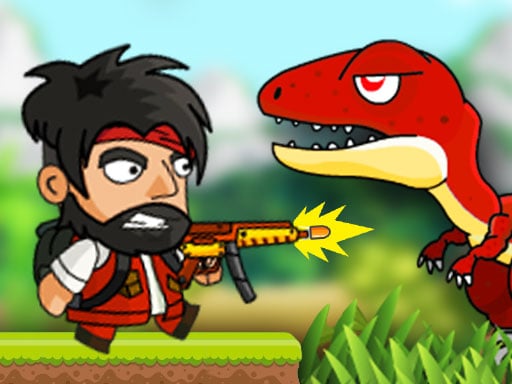
About DinoZ
DinoZ is an action-packed platform adventure where intelligent dinosaurs have broken out of a research laboratory and captured scientists as hostages. Fleeing into the dense forest, these prehistoric foes have laid dangerous traps along the way. Jump into the mission solo or team up with a partner in two-player mode to navigate treacherous terrain, defeat threats, and rescue captives.
In DinoZ, an unexpected laboratory accident allows genetically studied dinosaurs to escape into the wild, taking vital research personnel with them as hostages. Players venture deep into a hazardous forest environment riddled with traps and hostile prehistoric creatures to execute a daring rescue mission.
The game features both single-player and cooperative two-player modes on a shared keyboard. Each player wields an arsenal that includes primary strikes, explosive bombs, and swappable firearms to tackle dynamic combat encounters. Combined with athletic wall-jumping traversal, the gameplay demands careful coordination, agile movement, and quick offensive decisions to overcome hostile dinosaurs and guide trapped scientists to safety.
Your goal
The primary goal in DinoZ is to locate and safely rescue the captured scientists while surviving hostile encounters across trap-laden forest zones. Whether venturing alone or working cooperatively with a teammate, you must eliminate aggressive dinosaurs using your weapons and explosives, bypass environmental hazards, and reach the captive researchers before your team gets overwhelmed.
How to play DinoZ
1. Select your preferred playstyle by choosing either single-player exploration or cooperative two-player mode on the same system.
2. Traverse forest platforms by running and pressing your designated jump key against vertical surfaces to execute wall jumps.
3. Engage threatening dinosaurs by executing close-range hits or cycling to alternate firearms with your weapon switch command.
4. Deploy explosive bombs to clear out dense clusters of enemies or neutralize tough prehistoric obstacles safely.
5. Evade hidden forest traps while tracking down and freeing the captive scientists held across each area.
Controls and device support
Both players can execute wall jumps by pressing their respective jump key (W for Player 1, Up Arrow for Player 2) against vertical surfaces.
W, A, S, D: Player 1 Move
W: Player 1 Jump and Wall Jump
F: Player 1 Hit
H: Player 1 Bomb
Q: Player 1 Switch Weapon
Arrow Keys: Player 2 Move
- Controls: Keyboard
- Device support: Browser
- Game frame: 800 x 600
Rules to keep in mind
- Hostage Rescue: The primary mission requires locating and freeing captured scientists held captive throughout the forest by escaped dinosaurs.
- Cooperative and Solo Modes: Players can undertake rescue operations individually in single-player or together in local two-player mode.
- Environmental Hazards: Escaped dinosaurs have set traps across the forest terrain that must be avoided during navigation.
- Wall-Jump Navigation: Players can scale vertical surfaces by activating their jump control while touching walls.
What makes the challenge interesting
Gameplay in DinoZ centers on high-tempo platform combat and mutual support in two-player cooperative setups. Players navigate multi-tiered environments where agile movement, particularly the wall-jump technique, is vital for dodging dinosaur charges and bypassing ground traps. Combat balances regular attacks, switchable ranged firearms, and heavy explosive bombs. In cooperative mode, teammates must coordinate space on the screen, dividing targets so one player handles immediate melee threats while the other manages distant dinosaur ambushes or secures the trapped scientists. Efficient weapon selection and sharp spatial awareness ensure survival in volatile prehistoric territory.
Tips for DinoZ
- Use wall jumps repeatedly against vertical surfaces to gain high ground quickly, letting you bypass low-lying dinosaur traps and ground patrols safely.
- Save heavy bombs for dense dinosaur packs or dangerous bottlenecks where standard attacks might leave your character exposed to counterattacks.
- Switch weapons proactively to engage distant targets with ranged firepower before closing in for direct melee strikes.
- In two-player mode, communicate weapon usage so both players do not expend explosives simultaneously on a single target.
The skills behind the game
As an entry in the platform adventure genre, DinoZ blends side-scrolling traversal with responsive combat and mission-focused rescue objectives. Classic adventure titles emphasize exploring hostile wilderness, mastering movement mechanics like wall jumps, and overcoming obstacles to protect allies. DinoZ enhances this traditional framework by incorporating shooter elements and a two-player cooperative mode, requiring tactical teamwork alongside quick reflexes to overcome prehistoric predators and intricate forest hazards.
Who will enjoy this game
Players seeking an engaging adventure game online or looking up the dinoz game will discover a fast-paced blend of platforming and action shooting in DinoZ. The title accommodates both solo adventurers and local pairs looking for shared keyboard play. By uniting hostage rescue objectives, weapon swapping, and vertical platform mobility, dinoz delivers an accessible cooperative challenge centered on outsmarting prehistoric beasts and overcoming dangerous wilderness environments.
Games with a similar feel
DOOM: Like DOOM, DinoZ centers on rapid combat encounters against aggressive monsters while managing switchable armaments. However, while DOOM is a classic first-person shooter set in dark sci-fi corridors, DinoZ is a side-scrolling 2D platformer supporting cooperative shared-keyboard rescue missions in a trap-filled forest.
Frequently asked questions
Can DinoZ be played with two players on one keyboard? Yes, DinoZ supports a local two-player mode where Player 1 uses the W, A, S, D layout with nearby combat keys, while Player 2 controls movement with the Arrow Keys and adjacent action keys.
How do you perform a wall jump in DinoZ? To wall jump, press your jump input while touching a vertical wall surface. Player 1 uses the W key, whereas Player 2 presses the Up Arrow key to scale upward.
What weapons do players have available to fight dinosaurs? Players are equipped with standard hit attacks, throwable bombs, and switchable firearms, allowing versatile engagement options against hostile dinosaurs at both close and distant ranges.
Something not right?
Tell us if the game does not load, the information is wrong or the content needs review.
Report a problem ›