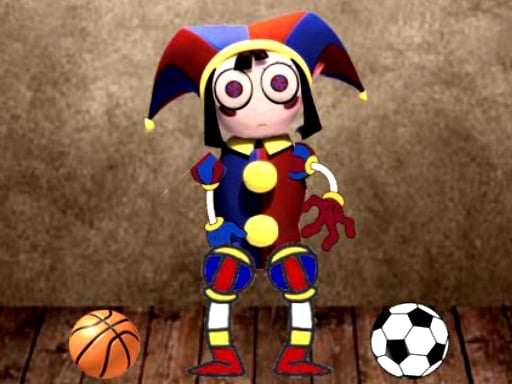
About Digital Circus Relaxing Time
Digital Circus Relaxing Time is a casual browser game featuring Pomni in a variety of playful, low-stress minigames. Players can explore creative coloring, stack boxes, distort character expressions, and interact with physics-based character movement without complex requirements. It offers a lighthearted sandbox experience designed for quick, entertaining sessions directly in your web browser.
Digital Circus Relaxing Time provides a collection of playful activities centered around the cartoon character Pomni. Rather than imposing rigid high-pressure objectives, the experience invites players to experiment across several distinct toy-like modes. These activities include filling in coloring templates, stacking boxes, distorting facial features for comedic effect, and dragging the character around the screen.
The game operates directly in standard web browsers using lightweight HTML5 technology, requiring no installation or setup. Each minigame offers immediate feedback, allowing players to jump between creative drawing, basic physics manipulation, and casual toy interactions whenever they want a quick, relaxing diversion.
Your goal
The main goal in Digital Circus Relaxing Time is to freely explore and enjoy each interactive activity. Whether you are neatly completing a coloring sheet, building a steady tower during box stacking, or creating funny expressions through face distortion, success comes from creative experimentation and casual play rather than racing against an aggressive timer.
How to play Digital Circus Relaxing Time
1. Launch the game in your web browser and select an activity such as coloring, box stacking, or character interaction.
2. Use your mouse cursor to point at interactive objects, colors, or character parts on the screen.
3. Click and drag to move Pomni, manipulate face features, or position boxes neatly into place.
4. Apply different color palettes to line art in the coloring mode to complete your chosen illustration.
5. Switch between available minigames at your own pace whenever you want to try a different casual challenge.
Controls and device support
The game uses simple mouse controls to click, drag, and interact with objects, tools, and characters on screen.
- Controls: Mouse or touch
- Device support: Browser
- Game frame: 480 x 854
What makes the challenge interesting
The primary appeal of Digital Circus Relaxing Time lies in its approachable, open-ended structure. Because activities span creative coloring, light physics manipulation, and silly face distortion, players can engage without worrying about strict penalty systems or precise speed demands. Balancing steady hand coordination during box placement against quick, playful dragging lets players set their own pace throughout every session.
Tips for Digital Circus Relaxing Time
- Align each box carefully over the center of the base before releasing your mouse click to avoid wobbly, unstable towers during stacking.
- Work systematically across one section of the coloring canvas at a time so you do not leave uncolored patches behind.
- Experiment with gradual mouse drags when pulling on facial features to see subtle expression changes before making drastic distortions.
- Switch activities if a particular minigame feels repetitive, using the variety of modes to keep your casual play session fresh.
Stages and progression
Because Digital Circus Relaxing Time functions as a casual sandbox, progression is largely self-directed rather than tied to locked gating or rigid level tiers. Players can measure their progress by exploring each included minigame, completing clean coloring designs, and refining their control when stacking boxes or experimenting with character physics across multiple sessions.
Playing on different devices
The game runs in a portrait-oriented window frame of 480 by 854 pixels, making its layout compact and easy to view on desktop monitors. Mouse inputs provide precise drag-and-drop pointing, which helps when selecting small coloring areas or placing stacked items steadily.
The skills behind the game
Classified under hypercasual and arcade styles, this title emphasizes immediate accessibility and uncomplicated mechanics. Hypercasual browser games often strip away convoluted onboarding in favor of straightforward, direct interaction, making them ideal for brief breaks. By combining familiar cartoon themes with tactile physics toys and drawing tools, it provides an easy entry point for players seeking low-pressure entertainment.
Who will enjoy this game
Players looking for a relaxing digital circus experience or a casual coloring game online often seek accessible web activities that do not demand long tutorials or intense competition. This title meets that intent by grouping light sandbox interactions, drawing pages, and simple stacking mechanics into a single browser window for quick, lighthearted amusement.
Games with a similar feel
Happy Color: Like Happy Color, Digital Circus Relaxing Time includes visual coloring activities where players apply colors to unfilled line art. However, while Happy Color centers strictly on structured color-by-number illustrations, this game functions as a variety toybox that also includes box stacking, face distorting, and character dragging for players who want interactive minigames alongside coloring.
Frequently asked questions
What activities are available in Digital Circus Relaxing Time? The game includes a variety of casual minigames featuring Pomni, such as digital coloring, box stacking, character face distortion, and freeform dragging interactions.
Do I need to download files to play? No download is needed. Digital Circus Relaxing Time runs directly inside modern web browsers as an instant HTML5 game.
How do the controls work? You interact with all minigames using standard mouse clicks and dragging motions to move pieces, select colors, and manipulate character features.
Something not right?
Tell us if the game does not load, the information is wrong or the content needs review.
Report a problem ›