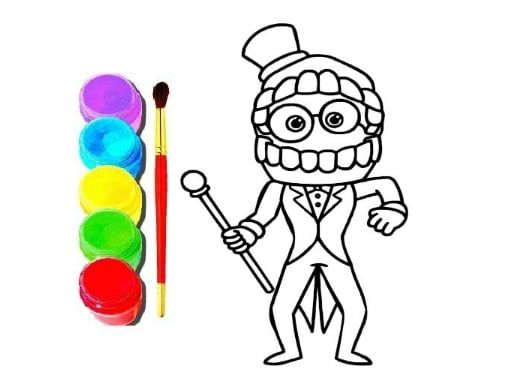
About Digital Circus Click and Paint
Digital Circus Click and Paint is a relaxed browser coloring game tailored for both children and adult players. Inspired by a playful circus theme, the game turns standard mouse clicks into brushstrokes to fill unpainted illustrations with color. With direct, approachable controls, it offers an accessible creative outlet for anyone looking to unwind through digital art.
The core experience of Digital Circus Click and Paint centers on bringing outline illustrations to life using point-and-click coloring mechanics. Drawing upon circus aesthetics, the game presents clean canvases waiting to be decorated with vibrant tones. Players choose shades and place them directly onto distinct sections of each picture, transforming line art into finished visual pieces at their own pace.
Because the title emphasizes casual entertainment over high-stakes competition, the atmosphere remains steady and pressure-free. There are no frantic action sequences or rapid-fire reflexes required. Instead, each click functions as a brushstroke, allowing players to focus entirely on visual balance, color experimentation, and completing each circus illustration systematically.
Your goal
The primary objective is to complete unpainted circus scenes by filling each section of the image with chosen colors. Players strive to craft harmonious illustrations, test diverse color palettes, and neatly finish each available canvas from start to end without rushing through the creative process.
How to play Digital Circus Click and Paint
1. Launch the game in your desktop browser and select a canvas featuring circus line art to begin painting.
2. Use your mouse cursor to browse the available color palette options displayed alongside the canvas.
3. Click on your desired paint color to load it onto your virtual brush.
4. Move your cursor over an uncolored segment of the illustration and click to apply the selected pigment.
5. Repeat this coloring process across all character outlines and background areas until the entire image is fully filled.
Controls and device support
Use the mouse to navigate menus, select colors from the palette, and click individual canvas areas to paint them.
- Controls: Mouse or touch
- Device support: Desktop + mobile
- Game frame: 1280 x 720
What makes the challenge interesting
The defining appeal of Digital Circus Click and Paint lies in its deliberate, stress-free rhythm and open-ended creative freedom. While conventional arcade titles prioritize fast reaction times and punitive win-or-lose states, this title strips away timers and fail conditions to highlight personal artistic choices. Players engage in a calming loop where every mouse click alters the visual composition instantly.
The main creative tradeoff involves balancing complementary shades against contrasting highlights. Deciding whether to follow traditional character colors or invent completely unexpected palettes gives each session an individualized touch. Because input execution is as simple as pointing and clicking, the challenge is purely aesthetic: building a cohesive, pleasing image out of separate segmented regions.
Tips for Digital Circus Click and Paint
- Paint the largest background segments before detailing central characters. Filling wide empty spaces first establishes a cohesive background mood and prevents small foreground elements from blending into blank canvas zones.
- Limit your primary color scheme to three or four key tones per illustration. Relying on too many clashing hues can make detailed character art feel disorganized rather than intentional.
- Work across the illustration methodically by coloring all matching components with one active shade before picking another. This saves cursor travel time and ensures consistent color distribution across the scene.
- Inspect small segmented areas along borders and clothing trims before finishing. Skipping narrow outline gaps leaves unfinished white flecks that disrupt the polished look of your completed artwork.
Stages and progression
Progression in Digital Circus Click and Paint is driven by personal creative goals rather than rigid level ladders or forced gating. Rather than tracking score thresholds or strict performance stars, the game presents a collection of circus canvases ready for paint. A player's growth is reflected in their developing sense of color coordination, neat segment completion, and creative confidence across consecutive artwork sessions.
To structure your own ongoing practice, consider alternating between complex multi-character scenes and simpler compositions. You can set personal challenges such as finishing an entire canvas using a warm-toned palette, or aiming to complete intricate designs with methodical precision before moving on to another piece.
Playing on different devices
Digital Circus Click and Paint runs in a standard 1280 x 720 widescreen aspect ratio, providing sufficient screen area to view illustrations alongside color selection tools. Operating via a standard computer mouse allows for pinpoint cursor accuracy, making it effortless to target compact line segments without accidental misclicks on adjacent borders.
The skills behind the game
Digital Circus Click and Paint sits comfortably in the casual coloring genre, combining arcade accessibility with puzzle-like spatial mindfulness. While classified broadly under hypercasual games, its focus diverges from reflex-heavy obstacle courses to offer peaceful, task-oriented recreation. Players who enjoy coloring games appreciate the straightforward satisfaction of filling blank outlines, where every input yields clear visual progress.
The title appeals strongly to family audiences, young learners, and casual gamers seeking a gentle creative break. Its circus theme introduces cheerful figures and dynamic shapes that encourage playful exploration without imposing restrictive performance benchmarks.
Who will enjoy this game
Players searching for a digital circus click and paint game or looking for a coloring game online typically desire quick, browser-friendly art activities that require zero setup or intricate tutorial stages. Digital Circus Click and Paint satisfies this intent by presenting an instant canvas where anyone can practice basic color harmony or simply relax between busy tasks.
Whether used by children practicing mouse coordination or adults seeking a calm visual diversion, the game provides an immediate, low-stress venue for casual digital coloring on desktop setups.
Games with a similar feel
Happy Color: Happy Color is widely known for guiding players through intricate pictures using strictly numbered color regions. In contrast, Digital Circus Click and Paint offers an unnumbered click-and-fill format centered on playful circus art. Players who prefer following a structured numerical key will lean toward Happy Color, whereas those wanting freeform color selection and quick browser access will enjoy the circus-themed simplicity here.
Frequently asked questions
How do I paint sections in Digital Circus Click and Paint? Click on any color from the on-screen palette with your mouse to select it, then click directly inside any segmented region of the line art to fill that area with the chosen shade.
Is Digital Circus Click and Paint suitable for younger players? Yes. The title is designed for both kids and adults, featuring intuitive mouse-based controls, clear circus art designs, and a relaxed environment free from stressful timers or sudden fail states.
Can I play this coloring game directly online without downloads? Yes, Digital Circus Click and Paint is a browser-based coloring game that runs within your web browser window at standard 1280 x 720 resolution using standard mouse input.
Something not right?
Tell us if the game does not load, the information is wrong or the content needs review.
Report a problem ›