Official listing
Game description
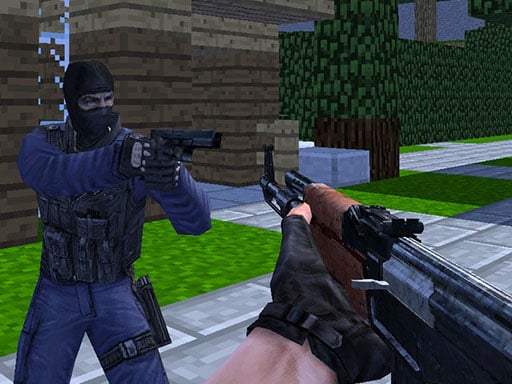
Counter Craft features multiplayer battle on different minecraft themed maps and lots of various types of weapons to buy and shoot all rival players in order to win.
Multiplayer game
Counter Craft is a 3D multiplayer first-person shooter where combatants clash across block-themed battlegrounds. Players purchase varied weapons, navigate voxel-styled environments, and eliminate rival opponents to secure victory in fast-paced arena warfare. With classic keyboard and mouse shooter mechanics, each round demands quick reflexes, steady aim, and sharp tactical awareness.
Choose Play now to load the game.
Official listing
Counter Craft features multiplayer battle on different minecraft themed maps and lots of various types of weapons to buy and shoot all rival players in order to win.
From the game listing
WASD - Move Space - Jump C - Crouch LMB - Shoot RMB - Aim R - Reload TAB - Pause menu 1 2 3 - Select weapon
Open this card to load the gameplay video.
Counter Craft is a 3D multiplayer first-person shooter where combatants clash across block-themed battlegrounds. Players purchase varied weapons, navigate voxel-styled environments, and eliminate rival opponents to secure victory in fast-paced arena warfare. With classic keyboard and mouse shooter mechanics, each round demands quick reflexes, steady aim, and sharp tactical awareness.
Counter Craft drops players into vibrant, block-styled environments inspired by voxel sandbox worlds, blending accessible aesthetics with competitive gunplay. Each match challenges you to take down opposing combatants across distinct maps, using earnings or match resources to purchase different firearms and gear.
The core loop revolves around fluid movement, precise targeting, and weapon management. Players can run, jump, crouch behind obstacles, and aim down weapon sights before engaging enemies. Surviving encounters and scoring eliminations against rivals leads to match supremacy across diverse arenas.
The primary objective in Counter Craft is to defeat all rival players across the arena. By purchasing effective weapons, maintaining tactical positioning, and landing accurate shots while dodging incoming gunfire, your goal is to eliminate opponents and achieve victory for your side in every combat round.
1. Spawn into the selected arena and explore the block-themed layout using WASD for movement.
2. Acquire or switch between available weapons using the number keys 1, 2, and 3.
3. Aim down sights with the Right Mouse Button and fire at opposing players with the Left Mouse Button.
4. Use Space to jump over obstacles and C to crouch behind cover to avoid incoming enemy bullets.
5. Press R to reload your weapon during pauses in combat so you are always prepared for firefights.
WASD: Move
Space: Jump
C: Crouch
LMB: Shoot
RMB: Aim
R: Reload
Counter Craft combines fast positioning with reactive shooting mechanics. Success depends on anticipating enemy movement corridors, utilizing terrain structures for cover, and choosing the right weapon for each encounter. Crouching with C lowers your target profile, while aiming down sights with RMB tightens weapon accuracy during mid-to-long-range duels.
Weapon selection via keys 1, 2, and 3 allows players to swap tools quickly when primary magazines run dry. Staying mobile with WASD and jumping across barriers keeps opponents from locking onto your position during heated arena firefights.
As a multiplayer 3D shooter, Counter Craft belongs to a genre centered on arena combat, quick tactical decisions, and competitive peer matches. These games emphasize player reflexes, spatial navigation, and weapon versatility within shared online battlegrounds.
Players looking for a counter craft game can enjoy action-oriented shooting matches across block-inspired maps. Counter Craft offers direct browser-based first-person shooter action without requiring complicated setups.
Minecraft: Counter Craft shares the blocky voxel aesthetic popularized by Minecraft, but focuses entirely on multiplayer first-person shooting combat rather than open-world building and survival.
DOOM: Like DOOM, Counter Craft emphasizes first-person shooting, continuous movement, and direct weapon aiming, though Counter Craft sets its battles within block-themed competitive multiplayer arenas.
How do you aim and shoot in Counter Craft? Use the Right Mouse Button (RMB) to aim down sights for improved precision, and click the Left Mouse Button (LMB) to fire your active weapon.
How do you switch between weapons during a match? Press the 1, 2, or 3 number keys on your keyboard to instantly select and switch between your equipped firearms.
What is the pause menu key in Counter Craft? Press the TAB key on your desktop keyboard to open the in-game pause menu at any time during gameplay.
Tell us if the game does not load, the information is wrong or the content needs review.
Report a problemExplore popular games by category, shared tags and site-wide activity.