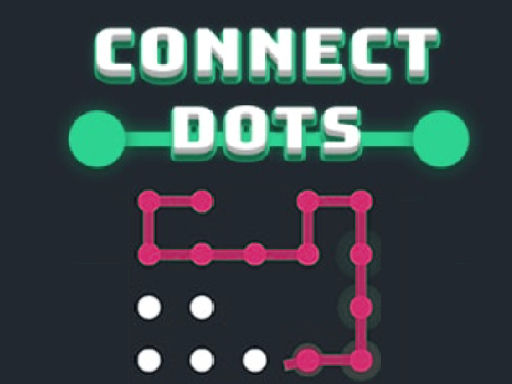
About Connect Dots
Connect Dots is a classic 2D puzzle game where your objective is to link every point across the board. By drawing horizontal and vertical connections between adjacent dots without overlapping lines, players must find a workable path that covers the entire layout. As each stage advances, the puzzles grow progressively more demanding for casual problem solvers.
Connect Dots presents an engaging brain-teaser built around clean grid-based navigation. In this casual puzzle title, the primary task is to connect all the dots presented on screen using straightforward horizontal and vertical paths. Unlike puzzles that force an exact pre-determined sequence or rigid route, this game gives you the freedom to link nodes in any workable order, provided that every single point is joined and lines do not overlap. The board layouts start out simple, allowing players of all ages to learn the spatial flow quickly. However, the difficulty steadily climbs with each level, introducing denser point configurations that require forward planning. Whether you play solo to test your logical thinking or compare milestones with friends to see who can advance the furthest, Connect Dots delivers an accessible and satisfying puzzle-solving loop.
Your goal
Your core objective in Connect Dots is to establish valid connections between all available dots on the board. Every point must become part of the network, and your connecting lines can only run horizontally or vertically between points that are close together. Success requires creating a complete network without overlapping any lines or leaving isolated dots behind before moving to the next level.
How to play Connect Dots
1. Examine the board layout to identify all open dots and potential horizontal or vertical paths.
2. Use a mouse click or touch the screen to begin linking adjacent dots together.
3. Extend connections across neighboring points while ensuring no lines cross or overlap.
4. Continue drawing paths until every single dot on the screen is fully connected to solve the level.
5. Advance to subsequent stages where the configuration of points increases in difficulty.
Controls and device support
Mouse click: Connect dots on the board
Touch screen: Connect dots on the board
- Controls: Mouse or touch
- Device support: Desktop + mobile
- Game frame: 720 x 1280
Rules to keep in mind
- Connections must only run horizontally or vertically between dots that are close together.
- Drawn paths must never overlap or cross over each other on the board.
- Every dot on the screen must be connected to successfully complete a stage.
- You do not need to follow one fixed order or specific path, as long as all points are properly linked.
What makes the challenge interesting
Gameplay in Connect Dots centers on spatial awareness and logical pathfinding. Because lines can only travel horizontally and vertically without intersecting, each decision directly impacts the remaining open routes on the board. Players must visualize how adjacent nodes interact, determining which connections leave enough clearance for the rest of the network. Since the game does not penalize you with a single mandatory starting dot or predetermined sequence, you can freely experiment with different routing strategies. Success depends on maintaining open pathways so that distant or corner dots do not end up trapped or cut off as the board fills up.
Tips for Connect Dots
- Inspect corner and edge dots first, as perimeter points typically offer fewer horizontal and vertical routing options than central nodes.
- Avoid walling off empty dots by planning your line trajectory a couple of moves ahead, ensuring your active path leaves room for remaining points.
- Remember that order does not matter, so if a particular path feels crowded, try initiating links from a different cluster of dots.
Stages and progression
As you complete each puzzle, the game advances to subsequent levels where the layout difficulty progressively increases. Stages introduce denser collections of points and tighter spacing, requiring more thoughtful line placement to avoid dead ends. Players can push their solving skills across harder stages and compare their level milestones with friends.
The skills behind the game
As a member of the puzzle genre, Connect Dots emphasizes deliberate spatial logic and geometric planning over fast-paced action. Classic line-drawing and dot-connecting games challenge players to resolve constraints on a 2D plane by visualizing routes before committing moves. This casual format makes the game easily approachable for kids and puzzle enthusiasts alike, offering calm mental exercise that rewards structured problem-solving.
Who will enjoy this game
Players searching for a relaxing connect dots game or an engaging puzzle game online will find a focused, accessible challenge in this title. The classic connect dots mechanic strips away unnecessary distractions, concentrating entirely on linking nodes across the board using clean orthogonal lines. Its simple rules and escalating puzzle difficulty cater to casual sessions across both desktop and touchscreen web browsers.
Frequently asked questions
Do I have to connect the dots in a specific order? No, Connect Dots does not require a specific order or single fixed path. You can link the dots in any sequence you choose, provided every point is connected without overlapping lines.
Can connecting lines cross over each other? No, lines cannot overlap. Every path must connect adjacent dots horizontally or vertically without crossing any previously drawn connection, ensuring a clean and uninterrupted network across the board.
What controls are used to play Connect Dots? You can play using a mouse click on desktop or by touching the screen on mobile devices to draw horizontal and vertical connections between the dots.
Something not right?
Tell us if the game does not load, the information is wrong or the content needs review.
Report a problem ›