Official listing
Game description
Play Connect Colors game online and for free. This is a game where you have to connect the dots without crossing the lines, solve line puzzles by connecting all the dots in the board to complete the puzzle.
Puzzles game
Connect Colors is a browser-based puzzle game where players link matching colored dots across a board grid. The core challenge requires forming complete connections between every paired dot without letting any drawn lines intersect. Designed around visual logic and clean spatial planning, the game tasks you with analyzing the entire layout so that every pair connects successfully while keeping paths entirely unblocked.
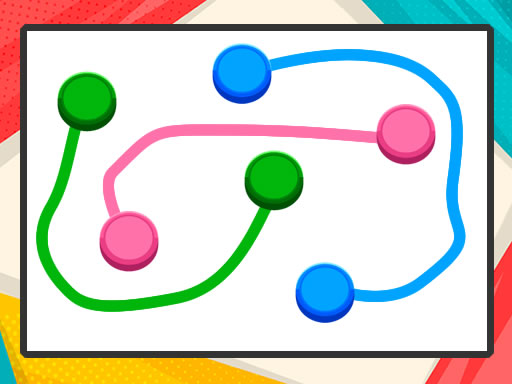
Choose Play now to load the game.
Official listing
Play Connect Colors game online and for free. This is a game where you have to connect the dots without crossing the lines, solve line puzzles by connecting all the dots in the board to complete the puzzle.
From the game listing
Mouse click or tap to play
Open this card to load the gameplay video.
Connect Colors is a browser-based puzzle game where players link matching colored dots across a board grid. The core challenge requires forming complete connections between every paired dot without letting any drawn lines intersect. Designed around visual logic and clean spatial planning, the game tasks you with analyzing the entire layout so that every pair connects successfully while keeping paths entirely unblocked.
In Connect Colors, players encounter grid boards populated by pairs of colored dots. The primary objective is to draw clean lines connecting corresponding colors without allowing lines to overlap or cross over one another. Each puzzle presents a self-contained spatial riddle where every colored pair must find an unobstructed pathway across the board.
The loop revolves around careful observation and path tracing. Before committing to a move, players evaluate which routes hug the outer borders and which lines need central passage. Because crossing paths is prohibited, a single misplaced line can trap another color. Solving each puzzle means adjusting routes until all dots are joined cleanly across the playing surface.
The main goal in Connect Colors is to solve each line puzzle by connecting every dot on the board to its matching counterpart without crossing any paths. Success requires creating continuous, independent routes for all pairs so that no two lines overlap, ensuring the entire puzzle board reaches a fully resolved state.
1. Examine the board to identify all matching colored dot pairs and their relative positions.
2. Select a starting dot by clicking with a mouse or tapping on a touchscreen.
3. Draw a path toward the matching colored dot while avoiding paths created for other colors.
4. Route outer or corner dots along board edges first to leave open space through the center.
5. Connect all remaining dots on the board without crossing lines to complete the puzzle.
Interact with the board by using mouse clicks on desktop or screen taps on mobile devices to select dots and draw connecting lines.
Connect Colors focuses on spatial reasoning and route management. The central tension comes from space allocation: drawing a direct route between two adjacent dots might seem efficient, but it can cut off access for other colors located across the board. Players must weigh the tradeoff between taking short paths through the middle versus routing lines around the perimeter.
This creates a satisfying rhythm of visual planning and trial-and-error deduction. Because every color requires an uninterrupted lane, thinking two or three connections ahead helps maintain open corridors. Success depends on recognizing board geometry and respecting the non-crossing restriction.
Players progress by solving each presented line puzzle to complete the board. To build consistency, focus on establishing a steady analytical routine with each new layout rather than rushing to draw the first obvious connection. Approaching puzzles methodically by securing edge paths first creates a reliable problem-solving habit across diverse board configurations.
Connect Colors supports both desktop and mobile play with direct mouse clicking and touchscreen tap controls. On desktop monitors, mouse cursor precision makes it easy to guide lines through narrow grid channels. On mobile phones and tablets, tap inputs provide an intuitive, hands-on feel suitable for casual puzzle sessions.
Logic puzzles centered around grid navigation and color matching provide an engaging mental workout. By challenging players to visualize multiple paths simultaneously, these brain games emphasize foresight, spatial deduction, and clean problem solving without demanding fast reflexes.
Because the rules remain clear and approachable, color-connecting puzzle games appeal to players of all ages, from kids practicing basic visual logic to adults seeking a relaxing, bite-sized brain teaser in their web browser.
Players looking for a fun connect colors game online can jump directly into quick puzzle-solving sessions without complicated setups. The straightforward concept of linking matching dots across an open board makes it an accessible choice for casual browser gaming.
Whether you want a short mental break or a structured way to practice spatial deduction, solving line puzzles provides a satisfying flow. Navigating paths and clearing boards offers an enjoyable puzzle game online experience for anyone who appreciates tidy logic challenges.
What is the main goal in Connect Colors? The main objective is to connect all matching colored dots on the board using continuous lines without allowing any paths to cross over each other.
Can connecting lines cross each other in Connect Colors? No. A core rule of the game is that lines cannot intersect. Every color pair must have its own dedicated, unblocked route across the board.
How do you control the game on different devices? You can play using mouse clicks on a computer or by tapping on touch-enabled screens, making it simple to draw paths on both desktop and mobile browsers.
Tell us if the game does not load, the information is wrong or the content needs review.
Report a problemExplore popular games by category, shared tags and site-wide activity.



















